Solo streamer managing gameplay and donation messages
If you switch between gameplay and pre-prepared message scenes while playing, clearly assigned shortcuts can help. Elgato documents actions for scenes and sources in its OBS integration.


For a handful of OBS actions, hotkeys or a small keypad may be all you need to start with. If you want to access several scenes and donation messages without switching pages, more buttons that are always in view can be useful. For frequent audio adjustments, faders or audio routing matter more, while you only need a capture solution if the game feed comes from an external source. Check the software requirements and the actual donation process separately from your choice of controller.
If you switch between gameplay and pre-prepared message scenes while playing, clearly assigned shortcuts can help. Elgato documents actions for scenes and sources in its OBS integration.
If you want to keep track of or adjust game audio, your voice and other sources separately during a session, check which faders and signal paths you need. OBS Project explains volume controls and muting in the Audio Mixer; BEACN describes separate mixes and routing for Mix Create.
If you want to try out just a few commands to begin with, hotkeys or a small control pad may be enough. Elgato says the Stream Deck Mini has six LCD keys; according to the manufacturer, you can assign further actions to pages or folders.
First, work out whether you need to trigger software actions, adjust audio on the fly or transfer an external game feed. Only then can you decide how much hardware you need.
| Priority | What to check before buying | Who it matters to |
|---|---|---|
| Scenes and donation messages | Count the actions you need to access at the same time without switching pages; check that your OBS version and integration are compatible. | If I’m managing gameplay, pause and message scenes on my own, I want to be able to distinguish the key commands at a glance. Around 36% of consumers put scene control first. |
| Audio during the stream | Check which sources OBS receives and whether you need muting, level adjustments or a supported fader action. | If I need to adjust my voice and game audio repeatedly during a session, the right faders and signal paths matter to me. Audio control is a priority for around 29% of consumers. |
| A compact setup to get started | Allow for the space taken up by the device, stand and cables, the number of buttons you can see at a glance, and the software requirements. | If desk space is limited and I only have a few commands to start with, I want to begin with something small. Around 21% of consumers prioritise a low-cost entry point and a small footprint. |
| External game feed | Work out whether the game is running on your streaming PC or sending an external HDMI signal, then check the connections and signal path if it’s external. | If my console needs to send its picture to my streaming PC, I need a suitable way to transfer video as well as button controls. An external game source is the main priority for around 14% of consumers. |
The Elgato Stream Deck Mini has six physical buttons visible at the same time. Pages and folders can hold more actions, but you may need to switch between them.
Before you buy, list all the commands you want to access while playing without switching pages.
Elgato says its current Stream Deck software requires Windows 11 or macOS 13 or later. These requirements may differ from the minimum requirements for older hardware.
Check your device, the software you need to use now and the OBS integration separately against your computer.
A control pad triggers software actions, but it can’t transfer an external console video signal to your streaming PC on its own.
First decide whether the game is running on your streaming PC or on an external source. If you’re using HDMI, check the entire signal path.
A button can display a pre-prepared message, but that doesn’t confirm who receives the money or how a payment is classified.
Check the recipient, payment process and wording of the message separately from your choice of controller.
The Stream Deck range includes compact keypads, models with more actions at your fingertips and a model with additional faders.
The Stream Controller X is an option with 15 buttons for commands you want to access directly.
Mix Create is designed for setups where audio sources and separate mixes are the main focus.
According to the manufacturer, the Streamer X combines an audio interface with video capture and a control surface.
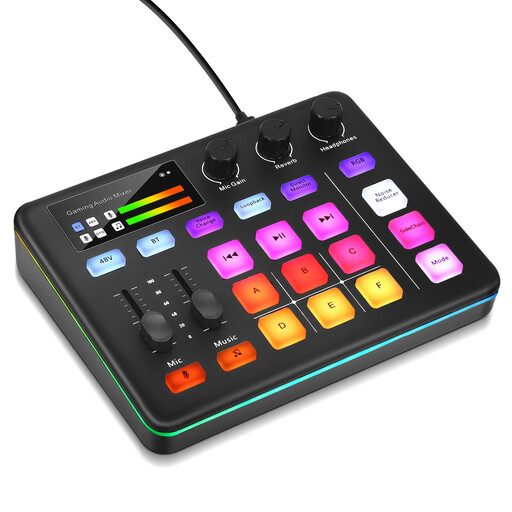
This selection is for streamers who want to control audio sources during a session.
 No image available
For controlling audio sources during a live stream, the product description lists muting, loopback and direct monitoring.
The description also mentions six customisable sound pads, an XLR preamp, 48 V phantom power and a built-in voice changer.
Set up the scenes and audio actions you need in OBS first, then test them before going live. Elgato documents scene and audio actions for its OBS integration; according to the manufacturer, this requires Stream Deck 5.3 or later and OBS Studio 27.0 or later. Also check the requirements for the controller software you’re currently using.
No. A control pad for software actions won’t automatically transfer an external game feed. If you need to capture HDMI from a console, check for a suitable capture solution and the signal path; RØDE describes the Streamer X as a device with video capture.
No. Twitch distinguishes payments made through a charity tool or donation platform from payments to streamers through tips, subscriptions or Bits. This does not automatically confirm that a payment is tax-deductible in Germany. According to Twitch, the charity tool is only available to Affiliates and Partners.
There’s no blanket answer; it depends on the characteristics of the specific service. The German media authorities recommend assessing each service individually. Their checklist dated 30 April 2021 applies explicitly to services aimed at a nationwide audience.