For checkout testing, referencing and debugging on one computer, a 3,440 × 1,440-pixel ultrawide monitor could be a good fit, provided your windows reach the viewport widths you need at your chosen scaling. However, it is still a single screen: you’ll need a different setup for two independent displays. Chrome for Developers describes mobile browser emulation as an approximation of a real device, not a replacement for one.
Which setup is right for you?
Checkout testers who need multiple views
If you want to see checkout, a reference page and debugging tools on one computer at the same time, check that the windows will remain wide enough on the available screen space. Microsoft Learn describes arranging windows side by side as one way to organise multiple apps on larger screens.
Testers with a laptop workstation
If you switch between using your laptop on the go and at a dedicated test station, check that its video support and power requirements match the monitor you’re considering. Dell UK states that the P3425WE offers up to 90 W of USB-C power delivery and RJ45. Whether the connection will work for you also depends on your laptop.
Testers using two computers
If you want to see two computers at the same time, check the inputs and the specific PbP and KVM features listed for the model. Samsung UK lists these features for the ViewFinity S65UC; that doesn’t mean the monitor replaces two physical displays.
What to consider when buying
One ultrawide, one computer, multiple windows
A good fit if: You want checkout and comparison or debugging windows visible together on one continuous desktop.
Bear in mind: The windows share the screen space; they aren’t two independent displays.
Two separate monitors
A good fit if: Your testing workflow requires two independent display outputs or a permanently separate arrangement.
Bear in mind: You’ll need enough space and suitable outputs or a compatible docking solution.
An ultrawide with two video sources
A good fit if: You want to display two computers at once or share input devices between them, and the specific model has the features you need.
Bear in mind: PbP splits one display between two sources; KVM switches input devices. Neither replaces testing on real mobile hardware.
| What you need |
What to look for |
Who is this especially important for? |
| Space for two checkout views |
Check the resolution, operating system scaling and browser viewport widths you need with your test layout. |
If I need checkout and a reference page side by side, I want to see whether both windows will remain wide enough. Around 36% of consumers prioritise parallel views. |
| Readable text and a comfortable setup |
Compare the resolution and stand adjustments; try out the text size and seating position where you plan to use the monitor. |
If I need to read checkout details and debugging text for extended periods, the right text size and setup matter more to me than having as many windows visible as possible. Around 29% of consumers prioritise readability and setup. |
| Connecting a laptop with minimal cable swapping |
Check your laptop’s USB-C video support and power requirements, as well as the specific monitor’s charging output. |
If I regularly bring my laptop to the test station, I mainly want to know whether video and charging will work together. Around 21% of consumers prioritise laptop connectivity. |
| Two computers rather than two windows |
Work out whether you need to see two sources at once, share input devices or connect to two independent displays. Then check the inputs, PbP and KVM. |
If I need signals from two computers at the same time, the right inputs and features are essential. Around 14% of consumers prioritise two video sources. |
Common misconceptions
-
Assuming “two windows” means “two screens”
Arranging windows and using Picture-by-Picture are not the same as having two physical displays. If your workflow requires separate display outputs, a single ultrawide won’t automatically meet that requirement.
Before you buy, work out whether you need two windows, two computer sources or two independent displays.
-
Assuming a mobile browser view is a full device test
Chrome for Developers describes device mode as an approximation. It doesn’t reproduce every feature of a real mobile device.
Use emulation for quick layout checks, and real mobile hardware for test steps that can’t be replicated that way.
-
Assuming USB-C always provides the right level of charging power
The models considered list different maximum charging outputs, including up to 65 W and up to 90 W. Your laptop must also support video over the port you plan to use.
Check your laptop’s video support and power requirements against the specifications for the exact monitor model.
Relevant brands to consider
Dell
According to Dell UK, the Dell P3425WE is a 34-inch model with a 3,440 × 1,440-pixel resolution, up to 90 W of USB-C power delivery and RJ45.
- USB-C and RJ45 may be useful for a laptop test station.
- Whether video and charging work at the same time also depends on the connected laptop.
LG
LG lists an IPS display with a 3,440 × 1,440-pixel resolution, along with USB-C, PbP and KVM, for the 34BQ77QB-B.
- The listed PbP and KVM features may be useful for a workstation with two computers.
- These specifications don’t automatically apply to other LG monitors, nor do they mean you have two physical displays.
AOC
AOC describes the CU34P3CV as a 34-inch model with a VA panel, a 3,440 × 1,440-pixel resolution and up to 65 W of USB-C power delivery.
- The resolution, USB-C and RJ45 specifications are useful when planning a laptop test station.
- The maximum USB-C charging output listed is lower than the 90 W specified for the Dell P3425WE and LG 34BQ77QB-B; check your laptop’s requirements.
Samsung
Samsung lists KVM and Picture-by-Picture for connecting devices to the ViewFinity S65UC.
- These features may be useful if you want to display two computers or share input devices.
- The specifications apply to this specific model, not the entire ViewFinity range.
Philips
Philips lists a 3,440 × 1,440-pixel resolution and a stand that tilts, swivels and adjusts in height for the B-Line 346B1C/01.
- The adjustment options can help you set up your workstation.
- Manufacturer claims about visual comfort aren’t independent evidence of a health benefit.
Ultrawide monitors at Joybuy
This selection includes ultrawide monitors for using multiple windows on one computer; some models also list PIP or PBP features for multiple video sources. An ultrawide is still a single physical screen.
 No image available
CRUA CR340QA-H 34-inch ultrawide monitor
The wide display may be useful for checkout and reference windows on one computer; check that both windows reach the width you need at your chosen scaling.
34 inches; 3,440 × 1,440 pixels; 21:9; 1500R; 165 Hz; 1 ms MPRT; VESA-compatible with 75 × 75 mm mounting.
View at Joybuy
 No image available
CRUA 49-inch DQHD ultrawide monitor
The stated wide workspace may be useful for running multiple windows on one computer; it doesn’t replace two independent displays.
49 inches; 5,120 × 1,440 pixels; 32:9; 1500R; 165 Hz; height-adjustable stand; HDMI 2.1 and DisplayPort 1.4.
View at Joybuy
 No image available
INNOCN E34A1R 34-inch ultrawide monitor
This model lists PIP and PBP for displaying multiple video sources; check that the available inputs suit your devices.
34 inches; 3,440 × 1,440 pixels; VA; 21:9; 1500R; 200 Hz; PIP and PBP; height-adjustable stand.
View at Joybuy
 No image available
INNOCN 40C1U 40-inch ultrawide monitor
The stated resolution is useful for a wide workspace with multiple windows; if you’re using two sources, check the PIP or PBP requirements.
40 inches; 5,120 × 2,160 pixels; IPS; 21:9; 100 Hz; PIP and PBP; USB-C with 65 W Power Delivery; height-adjustable stand.
View at Joybuy
 No image available
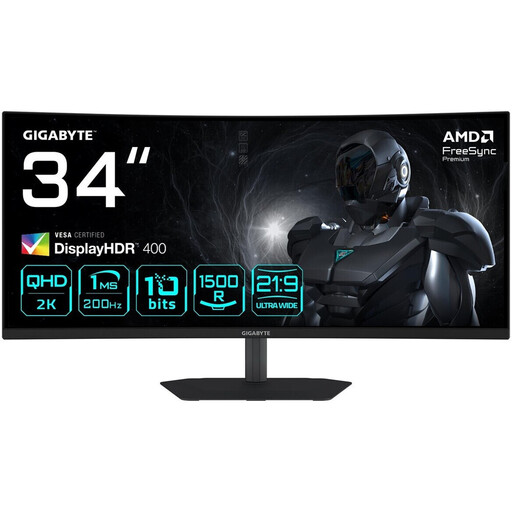
Gigabyte G34WQC2 34-inch ultrawide monitor
The ultrawide resolution may be useful for checkout and reference windows side by side; check the usable window width at your chosen scaling.
34 inches; 3,440 × 1,440 pixels; VA; 1500R; 200 Hz; HDMI 2.0 and DisplayPort 1.4.
View at Joybuy
Frequently asked questions
Can I test two checkout views side by side on an ultrawide?
Yes, as two windows on one desktop, provided they fit within the available space at the viewport widths you need. Check how the windows are arranged and the actual browser viewport size in your operating system.
Can a mobile browser view replace testing on a real smartphone?
No. Chrome for Developers describes device mode as an approximation; for features the emulation can’t reproduce, you’ll need to test on real mobile hardware.
How should I set up my monitor for longer testing sessions?
Arrange your windows, text scaling and seating position to suit your work, and check whether an adjustable stand will work with your desk. Germany’s ASR A6 specifies requirements for screen-based and teleworking workstations within its scope; it doesn’t apply generally to private screen use.
What should I compare when it comes to energy costs and the energy label?
Compare the information for the specific model in its product information sheet or in the EU product database, EPREL. To calculate an individual cost in euros, you’ll also need to factor in how long you use it and your electricity tariff.
What rights do I have when buying online as a private consumer in Germany?
Online consumer purchases generally come with a 14-day right to cancel; exceptions and the start of the cancellation period should be noted. The Verbraucherzentrale also points out that the seller is responsible for faulty goods. Your statutory rights for faulty goods are separate from any voluntary guarantee.


