
Lieferung heute & morgen

Qualitätsgarantie

Willkommens-Angebote freischalten: KOSTENLOSE Lieferung | Bis zu 80 % RABATT | Kostenlose 30-Tage-JoyPlus-Testphase
App herunterladen
If you're looking to buy a CHERRY keyboard and mouse, you'll find models for gaming, home office, study and flexible multi-device workstations. The range stretches from a mechanical gaming keyboard with RGB lighting to a quiet wireless desktop set. What matters isn't just the brand name, but the combination of layout, switch technology, connectivity and ergonomics.
Many offers use QWERTY or international layouts. For users in the UK, a UK English QWERTY keyboard with ISO layout is usually the more straightforward choice. So check the product description before you buy: terms like "US Layout", "UK English" or "Belgian AZERTY" indicate a different key arrangement.
A wireless keyboard can communicate via Bluetooth, 2.4 GHz wireless or both standards. Bluetooth is often suitable for laptops and tablets, while a 2.4 GHz receiver provides a direct connection for gaming applications. With a wireless mouse, you should also pay attention to the battery or rechargeable battery type, charging port and stated battery life.
A compact TKL keyboard does away with the number pad. This frees up space for your mouse, but isn't always practical for spreadsheets, accounting or frequent number entry. 65% or 75% models save even more space, but often require the use of Fn combinations for navigation keys and special functions.
A mechanical keyboard works with individual mechanical switches. Linear variants like CHERRY MX2A Red offer a smooth key travel with no tactile bump. Tactile variants like CHERRY MX2A Brown provide noticeable feedback when actuated, without using the typical clicky switch.
For quiet working, CHERRY SX Scissor keyboards are a practical alternative. The low-profile design and short key travel make them suitable for the office, home office and shared spaces. Lifespan figures should be understood as technical manufacturer specifications and not as a guarantee for every individual use case.
Look out for:
With lithium-ion batteries, the manufacturer's safety instructions should be followed. Devices must not be opened, exposed to high heat or charged with unsuitable power adapters.
An ergonomic mouse must fit your hand size, grip style and preferred hand. Right-handed users can benefit from a contoured shape; symmetrical models are more flexible but don't always offer the same thumb rest. For fast mouse movements, an ultra-light gaming mouse weighing 53 grams could be of interest. For office work, however, quiet buttons, DPI switching and a comfortable palm rest often matter more than weight.
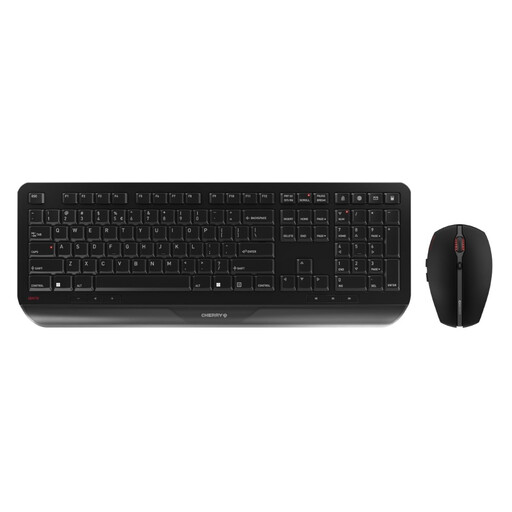
Why this product fits the profile: The set connects keyboard and mouse via a single 2.4 GHz receiver, so it only needs one USB port. The symmetrical mouse with 1,000 or 2,000 DPI is designed for different hand positions.
The EU QWERTY layout, integrated palm rest and clearly visible key legends make it easy to check before purchase.
Wireless combination, ten special keys and, according to product specifications, up to three years of battery life.
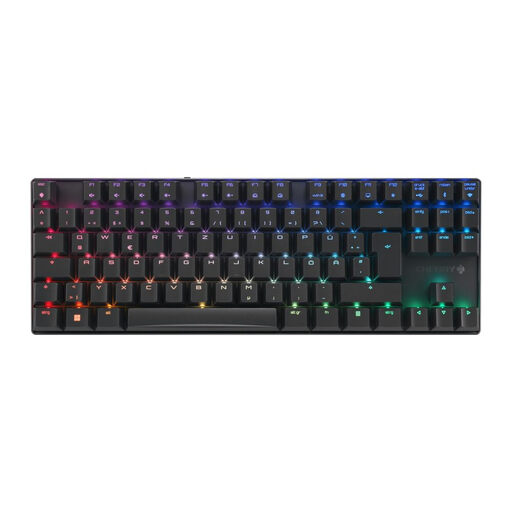
Why this product fits the profile: This mechanical gaming keyboard offers a UK QWERTY layout, an aluminium housing and three connection options for both gaming and work.
The TKL design is clearly stated; at the same time, 2.4 GHz wireless, Bluetooth and USB-C remain available as options.
CHERRY MX2A Brown switches, per-key RGB, full N-key rollover and a stated gaming mode with under 1 ms latency.
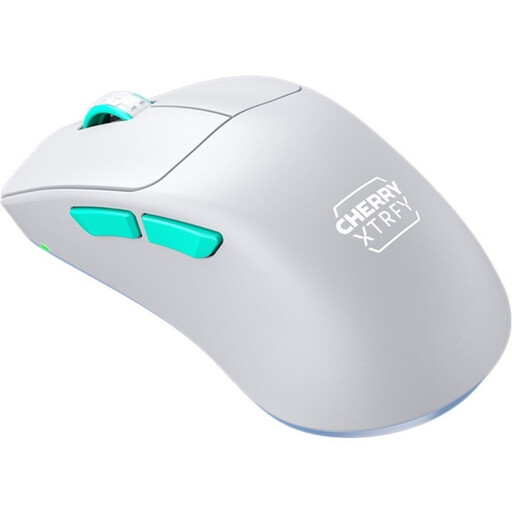
Why this product fits the profile: Designed for right-handed users and fast gaming inputs, this mouse combines an ergonomic design with a low front section, 2.4 GHz wireless and a weight of 53 grams.
The hand shape is explicitly stated as right-handed, making it easier to assess the fit before purchase.
Pixart 3395 sensor, adjustable polling rate up to 1,000 Hz and, according to product specifications, up to 75 hours of battery life.
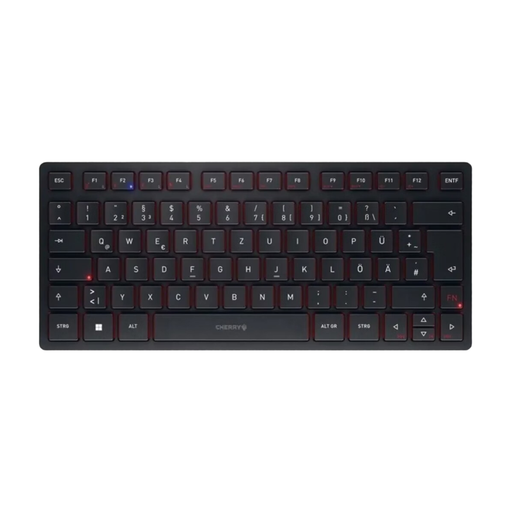
Why this product fits the profile: This compact keyboard is aimed at users who switch between a laptop, tablet and other devices, and who need to save space.
The product data explicitly mentions four channels and the 75% format. However, the layout is QWERTY (UK English) and should be checked before purchase.
CHERRY SX Scissor switches, Bluetooth 5.0, 2.4 GHz wireless, USB-C and a carrying case.
We've put together a complete, regularly updated list of products that fully meet these strict selection criteria and the safety regulations in force in the EU.
For gaming, look at mechanical models with CHERRY MX2A Red or Brown switches, full N-key rollover and anti-ghosting. A TKL or 65% keyboard can free up more space for mouse movements. If you prefer an RGB keyboard, check whether the lighting is configured directly on the device or via CHERRY software.
Battery life depends on usage, lighting, wireless standard and battery or rechargeable battery capacity. Selected mice claim up to 75 or 90 hours, while desktop sets with disposable batteries can achieve much longer intervals between changes. These figures are guidelines from the respective product data and may vary in everyday use.
Yes, provided the layout, range and connection suit your workspace. For a fixed PC workstation, a 2.4 GHz receiver is often sufficient. If you switch between several devices, choose a model with Bluetooth and multi-device functionality. For daily use, quiet CHERRY SX Scissor switches, a suitable palm rest and an adjustable mouse resolution are also relevant criteria.