
Lieferung heute & morgen

Qualitätsgarantie

Willkommens-Angebote freischalten: KOSTENLOSE Lieferung | Bis zu 80 % RABATT | Kostenlose 30-Tage-JoyPlus-Testphase
App herunterladen
Authored by: Joybuy Product Recommendation OfficerDate: July 17, 2026
For PC gamers and esports enthusiasts, choosing the right equipment is a critical factor for precision and reaction speed. A high-quality mechanical keyboard forms the foundation of any high-performance setup. In particular, a CHERRY mechanical gaming keyboard is synonymous with durability and reliable performance for many users.
This article serves as a guide. We will introduce various models and explain key features like switch types and form factors to help you make an informed decision about your next PC Gaming Accessories.
With so many options available, the selection can seem overwhelming. The following three points will help you find the right keyboard for your individual needs.
The size of the keyboard directly impacts ergonomics and the available space on your desk.
CHERRY MX switches are the industry standard for mechanical keyboards. For gamers, linear switches like the CHERRY MX2A Red are particularly relevant.
These switches offer a smooth, resistance-free keystroke from top to bottom, without a tactile bump or audible click. This allows for the rapid, repeated inputs required in action-packed games. According to the manufacturer, the MX2A generation has been optimised for a lifespan of over 100 million actuations and features improved lubrication for an even smoother feel.
Modern gaming keyboards often offer more than just basic input functionality.
Based on the criteria mentioned, we have compiled a selection of models that cater to different needs and preferences.
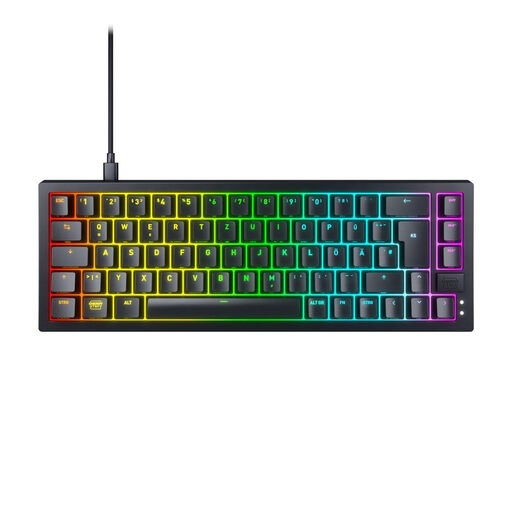
Why It Stands Out: The K5V2 Compact is an ultra-compact 65% keyboard designed for maximum efficiency and customisation. Its hot-swap capability makes it a favourite among enthusiasts. The Super-Scan technology, which the manufacturer claims scans every key every 0.5 milliseconds, ensures an extremely fast response time.
Pros:
Who It's For: This model is aimed at competitive gamers and keyboard enthusiasts who prefer a minimalist setup and value individual customisation options.
View Details for the CHERRY XTRFY K5V2 Compact
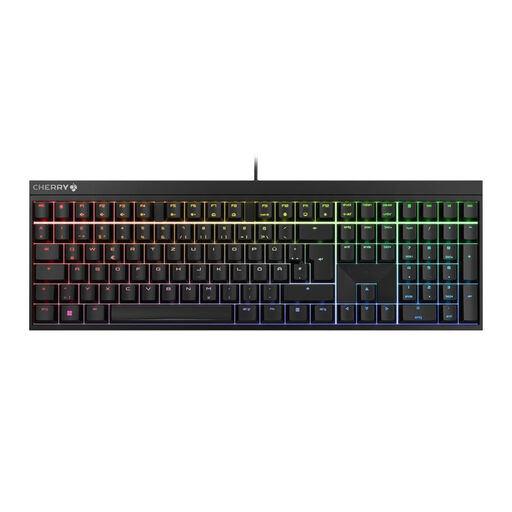
Why It Stands Out: The CHERRY MX 2.0S is a classic full-size keyboard that focuses on the essentials: functionality and durability. Its timeless design and high-quality CHERRY MX2A Red switches make it a reliable tool for gaming and daily use. This full QWERTY gaming keyboard also offers extensive RGB customisation via the CHERRY UTILITY software.
Pros:
Who It's For: Ideal for users looking for an all-round keyboard for gaming, home office, and daily tasks who don't want to give up a full key layout and proven gaming features.
View Details for the CHERRY MX 2.0S
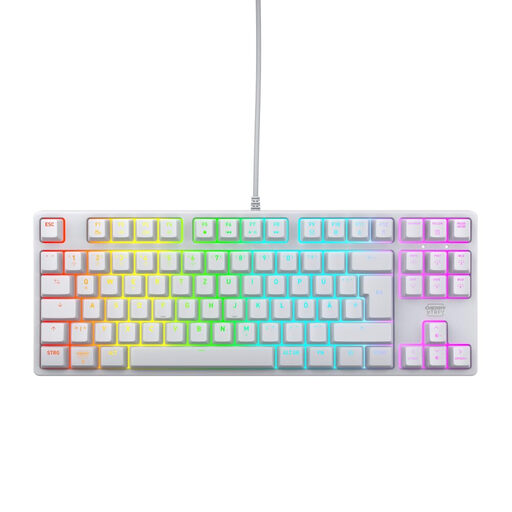
Why It Stands Out: The K4V2 TKL offers the perfect compromise between compactness and functionality. As a TKL keyboard, it creates more room for the mouse while retaining the important function and arrow keys. Its robust construction with a metal plate ensures high stability, while the CHERRY MX2A RED switches deliver their signature precise performance.
Pros:
Who It's For: This model is an excellent choice for gamers who appreciate a clean setup and need the extra space for their mouse, but don't want to sacrifice the convenience of dedicated arrow and function keys.
View Details for the CHERRY XTRFY K4V2 TKL
Haven't found the right model in our selection? For a broader overview of high-performance PC gaming accessories, take a look at our Cool Gaming Computers category. There you will find other peripherals to complete your setup.
CHERRY MX2A Red are linear switches. This means they have a smooth, consistent key travel without a tactile "bump" or loud clicking sound. This allows for very fast and repeated keystrokes, making them particularly suitable for fast-paced games like shooters or MOBAs. Additionally, they are relatively quiet compared to tactile or clicky switches.
For competitive gaming, a wired keyboard is generally the safer choice. It eliminates any potential latency, signal interference, or dead batteries that can occur with wireless connections. A direct cable connection ensures that every input is transmitted to the PC instantly and reliably.
These terms describe the form factor, i.e., the size and layout of the keyboard.