
Lieferung heute & morgen

Qualitätsgarantie

Willkommens-Angebote freischalten: KOSTENLOSE Lieferung | Bis zu 80 % RABATT | Kostenlose 30-Tage-JoyPlus-Testphase
App herunterladen
As a Joybuy Product Recommendation Officer, I see gamers fighting their way through a jungle of marketing promises every day. The confusion is especially high when choosing a new gaming keyboard. Many products advertise impressive features, but not all deliver on their promises. This guide is designed to help you separate the wheat from the chaff and make an informed decision based on facts, not hype.
Before we dive into the technical details, let's look at the typical problems that can lead to a bad purchase. Knowing these will help you search for quality more effectively.
To avoid the pitfalls mentioned above, focus on the following three technical features. They are the key to a high-performance and durable keyboard.
The choice of connection depends on your usage profile. A modern wireless mechanical keyboard ideally offers multiple options:
The switches are the heart of any mechanical keyboard. Cherry MX Red Switches are very popular among gamers because they are linear—meaning they have a smooth keystroke without a tactile bump or audible click. This allows for rapid, repeated key presses. According to the manufacturer, Cherry, the new MX2A switches are rated for over 100 million actuations.
The chassis is just as important. An aluminum keyboard offers significantly more stability and torsional rigidity than a plastic model. The result is a more solid, precise typing feel and a considerably longer product lifespan.
For users in any region, having the correct keyboard layout (e.g., QWERTY) is essential to have all the familiar keys and special characters available. Beyond that, the following gaming-specific features are relevant:
Based on the criteria above, we have identified a few models that are well-suited for specific user profiles.
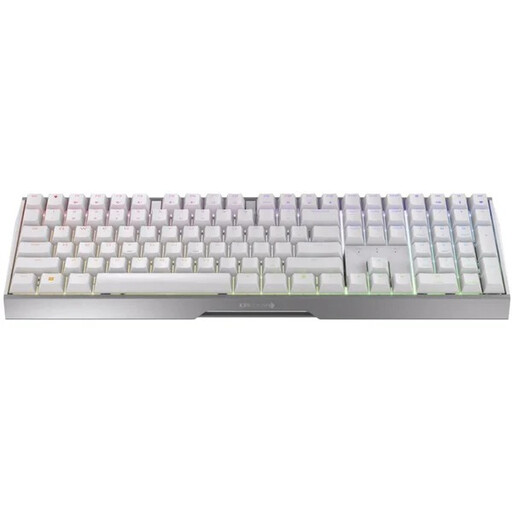
Why This Fits Their Persona: This user wants maximum flexibility without compromising on performance. The triple-mode connectivity allows for quick switching between a gaming PC (2.4 GHz), a work laptop (Bluetooth), and wired operation.
It bypasses the latency trap with its dedicated gaming mode offering under 1 ms response time. The die-cast aluminum frame and MX2A switches directly address concerns about durability.
Versatile connectivity (2.4 GHz, Bluetooth 5.2, USB-C) combined with genuine, durable CHERRY MX2A Red Switches and a sturdy aluminum frame.
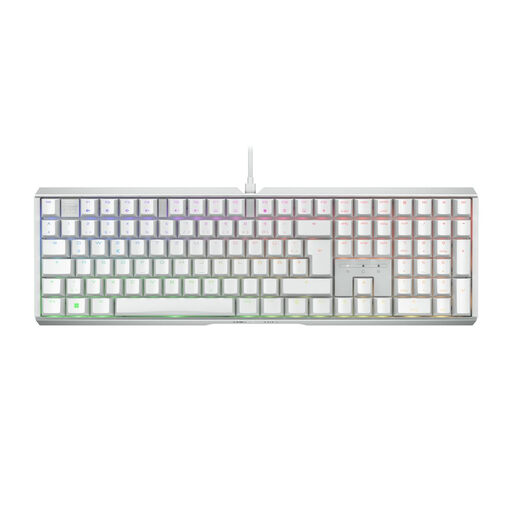
Why This Fits Their Persona: For this gamer, absolute reliability is the top priority. A wired connection isn't a limitation but a guarantee of interference-free performance in any situation.
Eliminates all latency concerns with its purely wired connection. The solid full-aluminum frame and the MX2A Brown switches, rated for 100 million keystrokes, are a clear statement against the myth of short-lived mechanicals.
Exceptional stability and longevity thanks to the full-aluminum frame. The tactile CHERRY MX2A Brown Switches provide precise, noticeable feedback for users who want more than just linear switches.
Customisable lighting is a central feature of modern gaming setups. We've curated a selection of products that stand out for their high-quality RGB features and meet strict quality criteria.
Yes, as long as it uses the right technology. Models like the Cherry MX 3.0S Wireless, which offer a 2.4 GHz connection with a latency of under 1 millisecond, are practically indistinguishable from a wired connection and are perfectly suited for esports and competitive play.
The main difference is the typing feel. MX Red are linear switches, which press down smoothly without any resistance or bump, making them ideal for rapid inputs. MX Brown are tactile switches. They provide a noticeable but quiet feedback bump halfway through the keypress, which signals the actuation point. The choice is a matter of personal preference.
Battery life depends heavily on usage, especially the brightness of the RGB lighting. With active lighting, you can expect several days of intensive use. With the lighting turned off, the battery life extends to several weeks. The keyboard can be used without any limitations via the USB-C cable while it is charging.