
Lieferung heute & morgen

Qualitätsgarantie

Willkommens-Angebote freischalten: KOSTENLOSE Lieferung | Bis zu 80 % RABATT | Kostenlose 30-Tage-JoyPlus-Testphase
App herunterladen
The search for a new gaming keyboard can quickly become overwhelming. Especially in the premium segment, manufacturers promote their products with numerous technical terms and features. Anyone looking for a compact, high-performance, and wireless mechanical keyboard will inevitably come across models like the CHERRY MX 8.2 TKL Wireless Gaming Keyboard. But what really matters when making an informed decision and avoiding common purchasing pitfalls?
As a Joybuy Product Recommendation Officer, I will filter the relevant information for you, show you what features define a high-quality keyboard, and help you distinguish marketing hype from genuine benefits.
Before we dive into the details, let's address two common issues that often lead to disappointment:
To make a sound purchasing decision, you should focus on three objective criteria that directly impact performance and user comfort.
A TKL keyboard with a German layout omits the number pad on the right side. This 80% format offers a crucial advantage for gamers: it creates significantly more desk space for sweeping mouse movements. This is particularly relevant in fast-paced FPS games. Additionally, the more compact design allows for a more ergonomic posture, as the arms can be positioned closer together.
The heart of any mechanical keyboard is its switches. The CHERRY MX Brown switches belong to the category of tactile switches. This means:
These characteristics make them a versatile switch for both gaming and productive typing.
Modern premium keyboards often offer three connection modes to cover different use cases:
Such a wireless TKL mechanical keyboard with triple-mode functionality offers maximum flexibility for any use case.
Based on these criteria, we have identified a few models suitable for different user profiles.
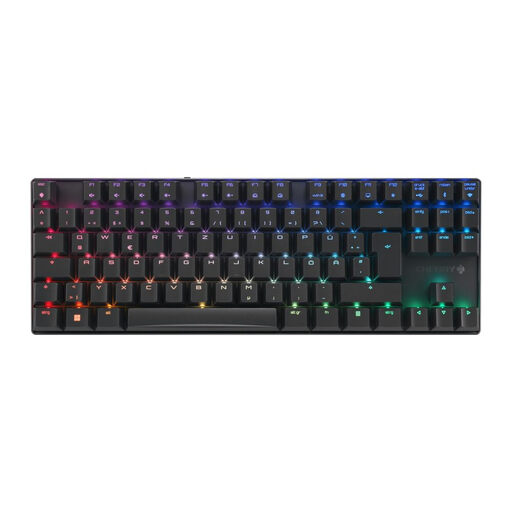
Why This Fits Their Persona: Ideal for gamers who want maximum mouse freedom, a low-latency wireless connection, and an extremely robust build in a compact format. Perfect for demanding setups where precision and space are paramount.
The solid aluminium gaming keyboard chassis prevents any flex. The gaming mode with sub-1 ms latency over 2.4 GHz provides a demonstrably stable and fast connection.
Triple-mode connectivity for maximum flexibility; high-quality CHERRY MX2A Brown switches for tactile feedback; compact TKL format with German layout.
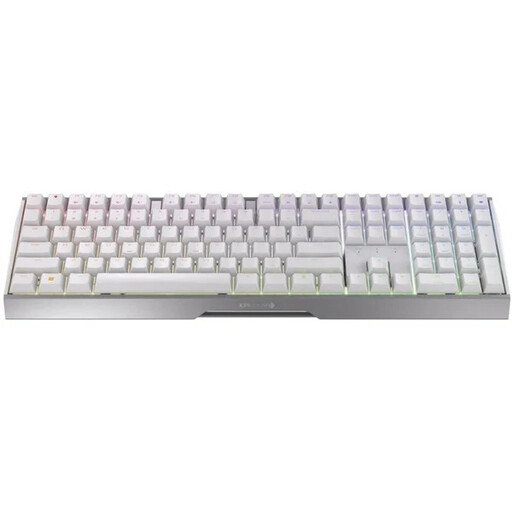
Why This Fits Their Persona: Suitable for users who both game and type extensively and therefore don't want to give up a number pad, yet still appreciate the freedom of a wireless connection.
The aluminium chassis ensures stability, while the proven CHERRY wireless technology guarantees a reliable connection. The linear MX2A Red switches are optimised for fast, smooth inputs.
Full layout with number pad; triple-mode connectivity; smooth, linear MX2A Red switches for fast responses without tactile resistance.

Why This Fits Their Persona: For users seeking an uncompromisingly stable, wired keyboard with maximum durability and a substantial typing feel. Ideal for a fixed desk setup where wireless flexibility is not needed.
This model completely bypasses the latency trap by being purely wired. The focus is clearly on material quality, with a solid aluminium frame that provides significant weight and absolute stability.
Massive full-aluminium frame for maximum stability; integrated damping for a quieter and softer typing feel; reliable wired connection.
We have compiled a complete, up-to-date list of products that fully meet these strict selection criteria and German regulations.
What is the advantage of CHERRY MX Brown switches over other types? CHERRY MX Brown switches offer a tactile actuation point without a loud clicking noise. This gives the user clear feedback on when a key has been triggered, which increases precision in both typing and gaming. Compared to linear switches (e.g., MX Red), they help prevent accidental keystrokes because a slight resistance must be overcome.
What is the battery life of the CHERRY MX 8.2 TKL Wireless? The battery life depends heavily on usage, especially the brightness of the RGB lighting. According to the manufacturer, the keyboard is equipped with a 2800 mAh battery that allows for extended wireless use. With the lighting disabled or dimmed, the battery can last for several days or weeks, whereas it will be shorter at full brightness. The keyboard can be used normally via USB-C cable while charging.
Do I need software for the RGB lighting? For basic functions and preset lighting effects, software is generally not required. However, to get full control over the RGB gaming keyboard, such as customising per-key lighting, creating your own profiles, or assigning macros, the manufacturer's software (e.g., CHERRY Utility Software) is needed. This allows for detailed personalisation of the keyboard's functions.