
Lieferung heute & morgen

Qualitätsgarantie

Willkommens-Angebote freischalten: KOSTENLOSE Lieferung | Bis zu 80 % RABATT | Kostenlose 30-Tage-JoyPlus-Testphase
App herunterladen
A wireless keyboard and mouse combination clears clutter from your desk and makes it easier to switch between the office, your home office and personal use. However, CHERRY wireless keyboard and mouse sets differ significantly in layout, power supply, connectivity and ergonomics. If you only focus on a slim design or a high DPI number, you could end up buying a set that doesn't suit your actual workspace.
For users in Germany, a German QWERTZ layout is usually essential. Some models are offered with an EU or US layout. The positions of Y and Z, as well as special characters and umlauts, can differ. A US layout with a EURO symbol is not automatically a German keyboard.
So before you buy, check the following:
A 2.4 GHz wireless set usually requires a USB receiver. Bluetooth models, on the other hand, can be paired directly with compatible laptops, tablets or PCs. With a wireless desktop set, it's also important to know whether the keyboard and mouse share a single receiver.
The power supply also deserves attention. Conventional batteries incur ongoing costs and need to be replaced regularly. A rechargeable keyboard and mouse with a USB charging cable reduces this hassle. With NiMH rechargeable batteries, it's also handy if you can continue working while they charge.
An ergonomic mouse for office work has different goals to a lightweight gaming mouse. For typing, what matters is a comfortable shape, a pleasant click sound and a stable palm rest. For gaming, however, weight, sensor, polling rate, grip style and the ability to charge wirelessly are more important.
An "ultra-lightweight wireless gaming mouse" weighing 53 grams can make fast movements easier, but it won't automatically suit every hand shape. Right-handed users should look for a mouse shaped accordingly. Symmetrical models, on the other hand, offer more flexibility in hand position.
A 2.4 GHz wireless keyboard typically uses a USB nano receiver. This is straightforward for desktop PCs and many office workstations. The range can be up to 10 metres according to product specifications, but in everyday use it shouldn't be unnecessarily obstructed by metal surfaces or other wireless sources.
Bluetooth is a good option if you want to connect several devices without a free USB-A port. Dual-mode models with both 2.4 GHz wireless and Bluetooth offer more choice, but they do require careful setup.
CHERRY SX scissor switches are low-profile and designed for a quiet keystroke. A quiet keyboard is therefore particularly suitable for shared spaces, video conferences or late-night working. You should also look for abrasion-resistant key labelling and a sturdy keyboard plate.
For long typing sessions, an integrated palm rest, adjustable feet and a suitable tilt angle can make your workspace more comfortable. These features don't replace an ergonomic sitting position and regular breaks, though.
The DPI rating describes the adjustable sensitivity, not necessarily the actual precision. For office use, moderate values are often sufficient. For gaming mice, the sensor, polling rate and weight are also relevant.
The CHERRY XTRFY M64 and M68 models are offered with 2.4 GHz wireless, a rechargeable battery and a weight of 53 grams. The M64 is shaped for right-handed users, while the M68 uses a symmetrical design. The battery life stated by the manufacturer is up to 75 or 90 hours, depending on the model.
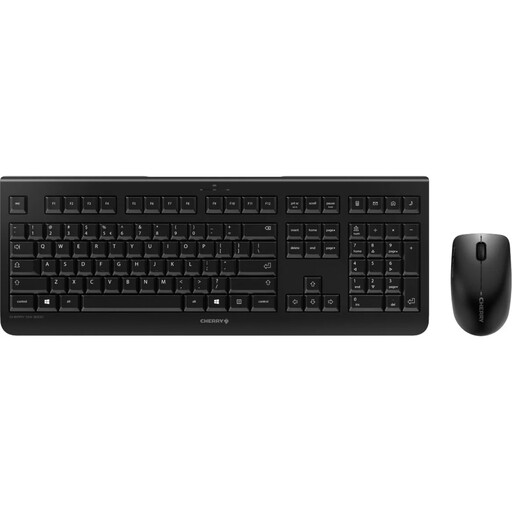
Why this product fits the profile: This set offers a complete keyboard and mouse combo for the office with a numeric keypad, 2.4 GHz wireless and a symmetrical mouse.
The EU-QWERTY layout, status indicators and single USB nano receiver should be clearly checked before purchase; the keyboard requires separate batteries.
Full-size keyboard, quiet keys, 1200 DPI mouse and a stated range of up to 10 metres.

Why this product fits the profile: For regular office and home office use, this set combines quiet SX scissor switches with rechargeable NiMH batteries and a USB-C charging port.
Charging while in use reduces interruptions. Before buying, please note the stated EU-QWERTY layout.
USB-C charging, AES-128 encryption, metal plate, eight non-slip feet and a mouse with 1000/1600/2400 DPI.
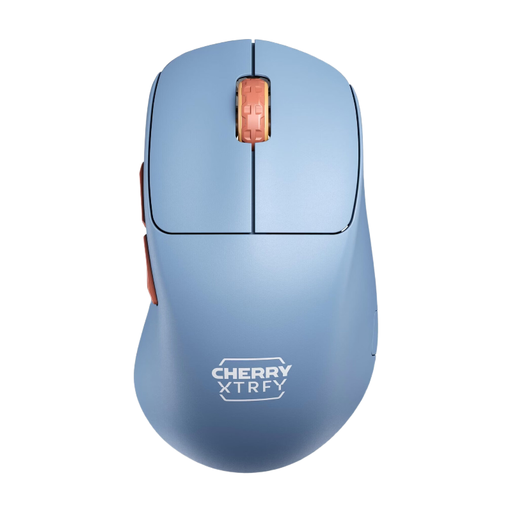
Why this product fits the profile: This right-handed gaming mouse is aimed at players who prioritise low weight, a Pixart 3395 sensor and a flat front design.
The shape is explicitly designed for right-handed users. This avoids a common mistake: choosing a symmetrical mouse despite a clear ergonomic preference.
53 grams weight, 2.4 GHz wireless, up to 90 hours stated battery life and adjustable polling rate up to 1000 Hz.
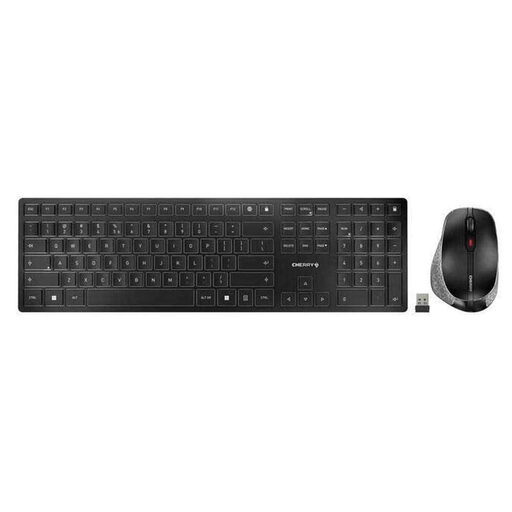
Why this product fits the profile: If you switch between your PC, laptop and other compatible devices, you get Bluetooth and 2.4 GHz wireless in one rechargeable set.
The dual connectivity prevents Bluetooth or USB compatibility alone from being a deal-breaker. The EU-QWERTY layout should be checked beforehand.
USB charging while in use, SX scissor switches, six hotkeys, six mouse buttons and DPI levels from 600 to 3000.
We've put together a full, regularly updated list of products that fully meet these strict selection criteria and the safety regulations in force in the EU.
Many 2.4 GHz sets connect automatically once you plug in the USB receiver. With Bluetooth models, pairing is usually required via the system settings. Check beforehand whether your device has a free USB-A port or Bluetooth.
The battery life depends on usage, lighting and battery type. Rechargeable NiMH or lithium batteries can be charged via USB. For models with disposable batteries, you should factor in the cost of replacements and switch the devices off when not in use for longer periods.
For office use and casual gaming, a wireless keyboard and mouse is often sufficient. For competitive gaming, a separate CHERRY gaming mouse such as the XTRFY M64 or M68 is a better choice, because the weight, sensor, polling rate and grip design are more focused on fast mouse movements.