
Lieferung heute & morgen

Qualitätsgarantie

Willkommens-Angebote freischalten: KOSTENLOSE Lieferung | Bis zu 80 % RABATT | Kostenlose 30-Tage-JoyPlus-Testphase
App herunterladen
Anyone looking to buy a CHERRY keyboard and mouse will find models for gaming, home working, programming and mobile workstations. However, product names often differ only slightly, while layout, connectivity and feel can vary considerably. Focusing solely on RGB lighting, high DPI values or long battery life can therefore result in buying something that does not really meet your needs.
The following selection by the Joybuy Product Recommendation Officer provides an objective overview of the most important features and shows which CHERRY configuration is best suited to each user profile.
For users in Germany, a German QWERTZ keyboard is usually the obvious choice. However, some CHERRY models from the international range have a US layout or another regional variant. This affects more than just the key labels: the position of individual special characters, the Enter key and punctuation marks may also differ.
Before buying, check the following:
A wireless keyboard can connect via Bluetooth or through a 2.4 GHz USB receiver. Bluetooth is particularly suitable for laptops, tablets and smartphones. For gaming, a 2.4 GHz connection is often preferred because the receiver communicates directly with the PC.
A wireless keyboard and mouse set with a shared USB receiver reduces cable clutter. With Bluetooth models, however, you should check how many devices can be stored and how switching between them works. For several work devices, a Bluetooth keyboard with multiple channels is more practical than a model with just one connection.
An RGB keyboard changes the appearance, but says little about typing feel or durability. With a mechanical keyboard, the switch type, actuation force, key travel and layout are much more relevant. Linear CHERRY MX2A Red switches feel different from tactile Brown or low-profile switches.
A high DPI value on a CHERRY gaming mouse is not a standalone indicator of quality either. Important factors include:
A mechanical gaming keyboard uses individual switches beneath the keys. This provides a clearly defined keystroke and, on many models, allows multiple keys to be registered simultaneously. For example, the CHERRY MX 2.0S features linear MX2A Red switches, full N-key rollover and anti-ghosting.
A keyboard with CHERRY SX scissor technology is generally flatter and quieter. It is suitable for the office, home working and shared spaces. If you do a lot of typing, do not base your decision solely on the word “mechanical”. Consider the feedback you want and the level of noise it produces.
A compact keyboard in a 65% or TKL format takes up less space and leaves more room for moving the mouse. Depending on the model, however, it may not have a number pad, function keys or separate navigation keys. Programmers and office users should check whether they regularly need these keys.
An ergonomic keyboard does not necessarily have to be split or unusually shaped. Adjustable feet, a suitable tilt, an integrated wrist rest and sufficient space between the keyboard and mouse can make it easier to arrange your workstation. No conclusions about health effects can be drawn from these features alone.
With a rechargeable keyboard and mouse, you no longer need to regularly buy disposable batteries. Nevertheless, check whether the keyboard and mouse are charged separately, whether they can be used while charging and whether a USB-C cable is included.
The specification “up to 75 hours” or “up to three years” is a guide stated by the manufacturer. Lighting, connection type and intensity of use can affect the actual runtime. A wired model, on the other hand, does not require a battery and is straightforward to use at a fixed PC workstation.
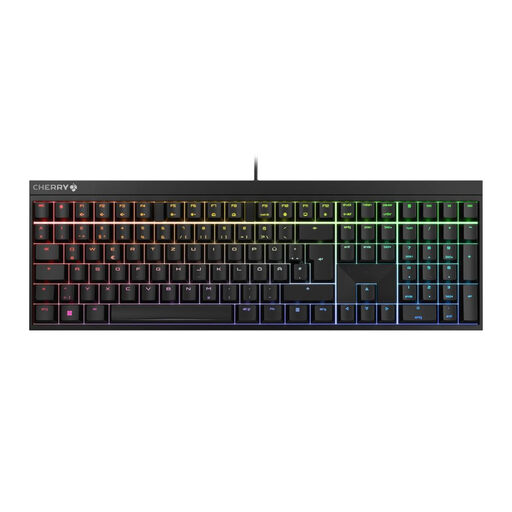
Why this product suits the profile: This wired full-size keyboard has a German QWERTZ layout and is suitable for gaming as well as everyday typing at a fixed PC workstation.
The clearly stated German layout helps prevent mistakes caused by an unsuitable US key arrangement. The USB connection eliminates battery and pairing concerns.
CHERRY MX2A Red, RGB lighting, full N-key rollover and anti-ghosting; 110 keys including a number pad.
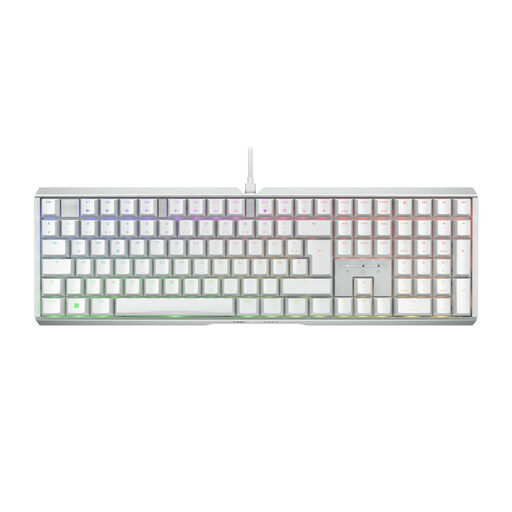
Why this product suits the profile: An aluminium frame, tactile MX2A Brown switches and a full-size QWERTZ layout combine gaming features with a stable typing platform.
The specification goes beyond lighting: the frame material, tactile switches, dampening and adjustable metal feet are all clearly stated.
Per-key and side RGB, full N-key rollover, anti-ghosting and programmable media keys.
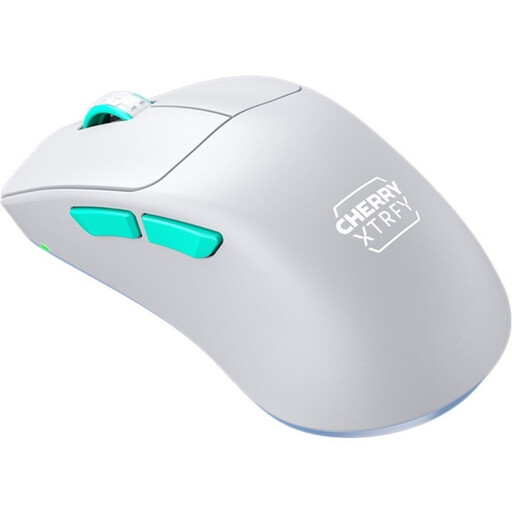
Why this product suits the profile: The right-handed CHERRY XTRFY gaming mouse is designed for players who want to combine low weight, 2.4 GHz wireless connectivity and a Pixart 3395 sensor.
The shape is specifically designed for the right hand. Weight, polling rate and battery life are given as concrete specifications rather than just marketing claims.
53 grams in weight, Pixart 3395, up to 75 hours according to the product specification and USB-C charging while in use.

Why this product suits the profile: The set combines a quiet keyboard with a wireless mouse and rechargeable NiMH batteries for a dedicated work or family workstation.
The product data specifies the connection, encryption, charging port, layout and mouse resolution. This allows security and compatibility questions to be checked before purchase.
2.4 GHz connection with AES-128, USB-C charging, SX scissor keys and mouse DPI levels of 1000, 1600 and 2400.
We have put together a complete, regularly updated list of products that fully meet these strict selection criteria and the safety regulations applicable in the EU.
For a traditional German workstation, a QWERTZ keyboard with a DE or German layout is a sensible choice. Check the product description before buying, as some CHERRY models are listed as US International or QWERTY.
That depends on the switch type and noise level. Linear or tactile switches may be suitable for long typing and gaming sessions, while CHERRY SX scissor keys often provide a flatter and quieter alternative. In shared spaces, particular attention should be paid to the volume.
The runtime per charge depends on the model, lighting and usage. For the products mentioned, manufacturer specifications range from several weeks to specific hour figures. Overall service life is also affected by the switch design, battery ageing, charging habits and careful cleaning. If there is visible damage, unusual heat or a damaged cable, stop using the device.