
Lieferung heute & morgen

Qualitätsgarantie

Willkommens-Angebote freischalten: KOSTENLOSE Lieferung | Bis zu 80 % RABATT | Kostenlose 30-Tage-JoyPlus-Testphase
App herunterladen
A children’s tablet for ages 3 to 8 can serve very different purposes, depending on the model: digital learning, audio activities, drawing or free play. But the word ‘tablet’ alone tells you little about how a product is actually used. Some models run Android and connect to Wi-Fi, while others are designed as screen-free educational toys or reusable LCD writing tablets.
That’s why parents, grandparents and other family members should take a closer look at the recommended age, how the device works and where it will be used. This can help you avoid choosing a product that advertises plenty of features but proves too complicated, fragile or unsuitable for your child in everyday family life.
An Android tablet can run videos, apps and games. But that doesn’t automatically make it a learning tablet for children. What matters is the parental controls available, how easy it is to use and the content on offer. For younger children, a simpler design with cards, audio feedback or a drawing surface may be better suited to the intended use than a tablet with unrestricted access.
A larger screen gives children more room to draw and trace. But it may take up more space in your bag when you’re out and about. When choosing an LCD writing tablet for children, consider its overall dimensions and weight as well as the screen size. Depending on the model, the products in this selection weigh around 170 to 215 grams, making them suitable for travelling, waiting times or use on a lap.
Descriptions such as ‘child-friendly’ or ‘safe’ are no substitute for checking the details of a specific product. Important points include rounded edges, the casing material, warnings about small parts and the recommended age. Pay particular attention to choking warnings for products with small cards or accessories. According to the relevant product information, these items are not suitable for children under three.
A tablet for toddlers should be easy to understand and use. An audio pen with picture cards can be a good option for children aged three to five, while pre-school and primary-school-aged children may benefit more from writing, drawing or tracing activities.
Look for:
A traditional children’s tablet with learning games also calls for a check of the pre-installed content, storage capacity and connectivity options. If it has Wi-Fi, a camera or the ability to install apps, parents should check the settings before first use.
An LCD drawing tablet for children provides a writing surface that can be cleared at the press of a button or switch. It doesn’t usually need an app or an internet connection. This makes it suitable as an electronic learning toy for short creative activities, but it won’t replace a tablet with interactive learning programmes.
A screen-free learning system with cards and audio output, on the other hand, is designed for language and logic activities. It doesn’t offer unrestricted internet access, so it may appeal to families looking for structured learning without a conventional screen.
For use on the go, weight, charging method and battery life are all worth considering. According to the product description, the Alilo learning system charges via USB-C and offers up to six hours of playtime. LCD writing tablets, by contrast, are designed for straightforward use without frequent recharging. Before you buy, check how each model is powered and how its erase function works.
For Android tablets, you should also check the storage, Wi-Fi standard, battery capacity and what’s included in the box. According to the product name, the Alldocube Kido has an 8-inch display, 3 GB of RAM, 32 GB of storage, Android and a protective case. A power adapter is not necessarily included with the listed variants.
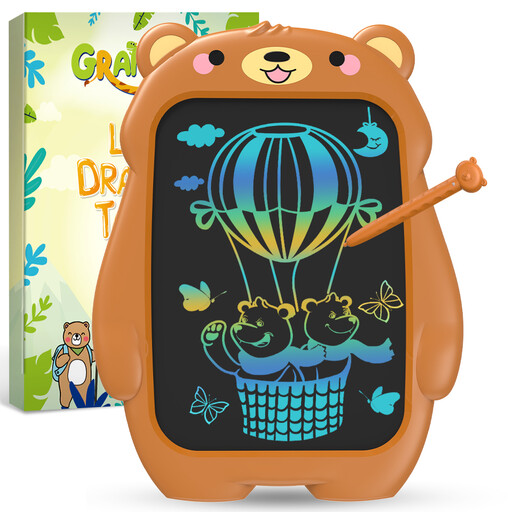
Why it suits this profile: The 8.5-inch surface is designed for drawing, taking notes and practising simple writing. At around 0.21 kg, its light weight makes it easy to use at home or on the go.
It doesn’t need apps or an internet connection, and focuses on a reusable writing surface.
8.5-inch LCD surface, ABS casing, rounded edges and one-button erase function.
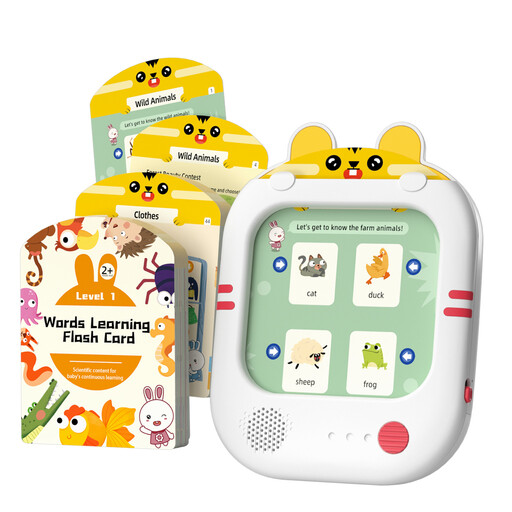
Why it suits this profile: According to the product information, it’s designed for children aged three to five and combines 47 double-sided cards with audio feedback.
The content is clearly defined and doesn’t rely on freely installable apps, videos or internet access.
47 double-sided cards, over 180 words and more than 180 logic games, according to the product description; USB-C charging port.
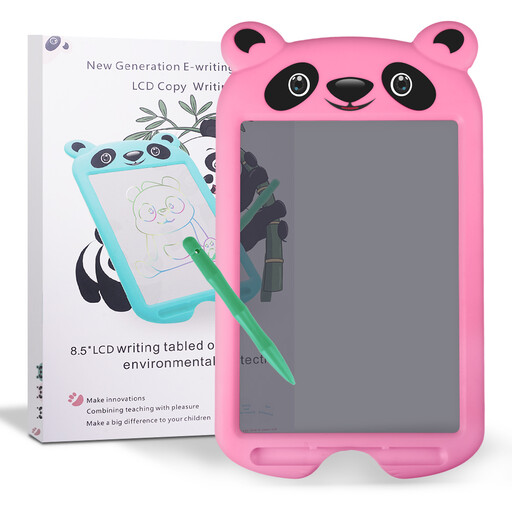
Why it suits this profile: The 10-inch surface gives children more room for tracing, letters, shapes and larger drawings. According to the product information, the model weighs around 0.2 kg.
It combines a larger drawing surface with a simple erase function, avoiding paper waste and liquid paints.
10-inch LCD surface, tracing design, light weight and ABS plastic casing, according to the product description.
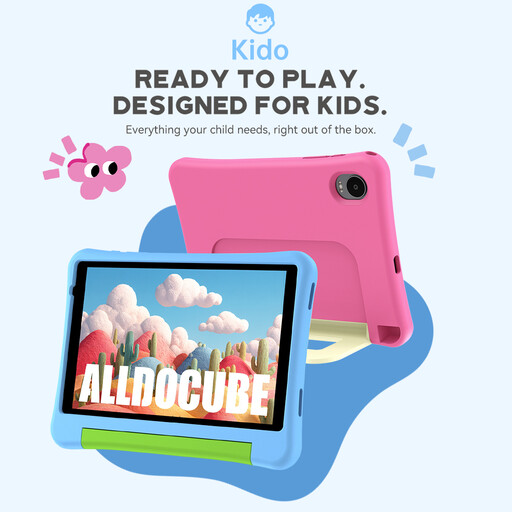
Why it suits this profile: According to the product name, this 8-inch Android tablet has 3 GB of RAM, 32 GB of storage, 5G Wi-Fi, cameras and a child lock.
The child lock mentioned can help you set up the tablet with appropriate controls. Parents should still configure apps, accounts, screen time and Wi-Fi access themselves.
Android operating system, 8-inch display, 32 GB of storage and protective case, according to the product name; check whether an adapter is included.
We’ve put together a complete, regularly updated list of products that meet these strict selection criteria and fully comply with the safety regulations in force in the EU.
It depends on how you plan to use it. Screen-free audio cards can be a good choice for short, structured learning sessions. An LCD drawing tablet is suitable for drawing and writing. An Android tablet offers more content, but needs to be carefully set up by an adult and used with their supervision.
Its lifespan depends on the casing, screen surface, erase mechanism and how it’s handled. Before buying, parents should check whether the manufacturer provides information about the materials, moisture resistance and impact resistance. Liquids, excessive heat and sharp objects should generally be avoided.
An LCD writing tablet or card-based learning system normally has no app or subscription costs. Android tablets, on the other hand, may involve extra spending on apps, content, accessories or additional storage. Also check whether a power adapter is included and what type of charging connection the tablet needs.