What should you consider before buying?
First, work out whether you already have speakers and who will control the songs. Then compare the available content, how much setup is involved, and any implications for privacy and ongoing costs.
Wi-Fi speaker with a built-in player
A good fit if: you want to play children’s songs on one device without an existing audio system.
Bear in mind: the Sonos Era 100 needs to be set up over Wi-Fi using the app. Bluetooth does not replace this setup.
Separate network streamer
A good fit if: you already have active speakers or an audio system with suitable connections.
Bear in mind: the WiiM Mini sends audio to your existing equipment and is not a speaker itself. Passive speakers need an amplifier.
Children’s music box with buttons or figures
A good fit if: you want your child to start pre-selected songs or other content as independently as possible.
Bear in mind: with the wobie box, Spotify content is assigned to buttons; the Toniebox 2 requires compatible content from the Tonies system.
Smart speaker with voice control
A good fit if: you or your child want to choose songs using voice commands.
Bear in mind: Germany’s Federal Office for Information Security points out that voice assistants can involve personal information, which may often be stored by the provider.
| Priority |
What to look for when buying |
Who it matters most to |
| Playback without an additional audio system |
Check for a built-in speaker, supported music services, Wi-Fi setup and controls on the device. |
If I don’t have an audio system in my small living room, I want to get started without extra speakers. Around 29% of consumers put an all-in-one solution first. |
| Independent use by children |
Check the controls, whether an account is required, which content can be assigned and whether the specific product version is suitable. |
I want my child to start selected songs independently, without a screen. Around 23% of consumers prioritise this kind of independent use. |
| Continuing to use existing speakers |
Check whether your speakers are active or passive, whether the input is compatible and whether you may need an amplifier. |
If I already have speakers, I want to keep using them and check the connections beforehand. Around 18% of consumers put connecting to an existing audio system first. |
| Privacy with voice control |
Check whether the device has a microphone, how to switch it off, and what privacy and account settings are available. |
I only want to use voice features if I can control the microphone and how my data is handled. Around 18% of consumers prioritise privacy when using voice features. |
| Costs and content |
Check whether the songs you want are available, whether you need an account, and whether there may be costs beyond the services included. |
I want to know in advance whether the songs I want require an account, a subscription or extra content. Around 12% of consumers focus first on ongoing content costs. |
Wi-Fi speakers at Joybuy
The Joybuy products below are Wi-Fi speakers with built-in players, designed to play music through a single device. Both offer Siri and touch controls on the device.
 No image available
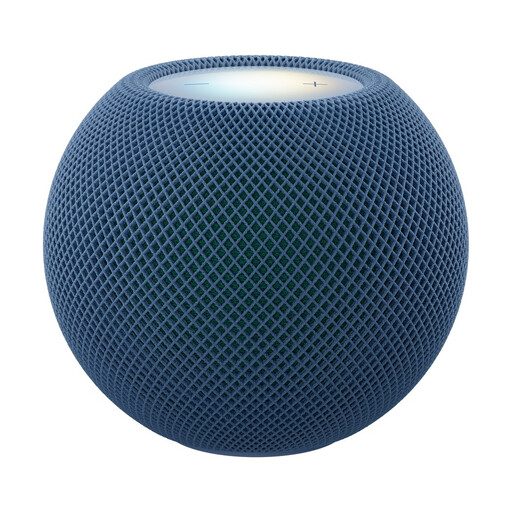
Apple HomePod Mini 2, Blue
An option for playing music through a Wi-Fi speaker with Siri and touch controls. Touch controls also let you operate it without a voice command.
Features listed include Wi-Fi 6E, Siri, touch controls and AirPlay. If you use Siri, check the privacy settings: according to Germany’s Federal Office for Information Security, voice assistants can involve personal information, which may often be stored in the provider’s cloud.
View at Joybuy
 No image available
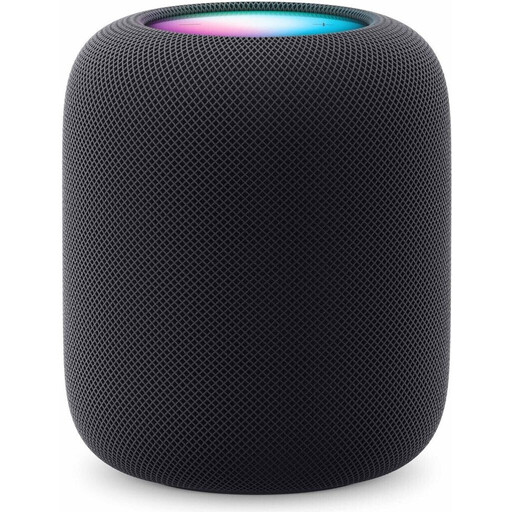
Apple HomePod (2nd Generation), Midnight
An option for playing music through a Wi-Fi speaker with Siri and touch controls.
Features listed include AirPlay, Siri and touch controls. Setup requires a compatible iPhone or iPad and Wi-Fi; some services and content may require subscriptions or other compatible Apple devices. If you use Siri, you should also check the privacy settings.
View at Joybuy
Frequently asked questions about audio players for children’s songs
Can I connect a separate network player directly to passive speakers?
Not with the WiiM Mini on its own: WiiM says passive speakers need an additional amplifier. Also check that the amplifier has a compatible input.
Can my child press a button straight away on a Spotify music box without any setup?
The wobie box needs to be set up with Wi-Fi and Spotify, and its buttons need to be assigned first. After that, according to wobie, your child can start pre-selected content with a button press.
Does the Sonos Era 100 work over Bluetooth straight out of the box?
No. According to Sonos, you first need to set up the Era 100 over Wi-Fi using the Sonos app. After that, you can switch it to Bluetooth mode.
What should I set up on a voice assistant in the family living room?
Germany’s Federal Office for Information Security recommends checking your privacy settings and stored data, and switching off voice assistants if necessary. Also decide when you want voice control to be used.
Which markings are relevant for a Wi-Fi audio device in Germany?
Germany’s Federal Network Agency says that requirements for supplying electrical or electronic devices include correct CE marking, clear product identification and instructions in German containing the necessary information. These obligations apply to the businesses involved in supplying the product; they do not, on their own, confirm that a specific listing complies.


