
Lieferung heute & morgen

Qualitätsgarantie

Willkommens-Angebote freischalten: KOSTENLOSE Lieferung | Bis zu 80 % RABATT | Kostenlose 30-Tage-JoyPlus-Testphase
App herunterladen
The search for the right mechanical gaming keyboard can quickly become overwhelming. The market is flooded with technical jargon, aggressive advertising, and features whose benefits aren't always clear. Many users invest in a model that fails to meet their expectations after just a few months or was the wrong choice from the start. As your Joybuy Product Recommendation Officer, I'll help you identify the crucial features and avoid common purchasing pitfalls.
Before we dive into the important specifications, let's look at the three most common mistakes that lead to dissatisfaction. Recognizing these traps is the first step toward making an informed decision.
To make an informed decision, focus on three core technical aspects. These determine the performance, comfort, and longevity of your future keyboard.
The switch is the most important component. It determines the sound, feel, and response speed of every keystroke. The three main categories are:
For those who are undecided, a hot-swap keyboard offers a flexible solution. On these models, the switches can be replaced without soldering, allowing you to try out different types.
The size of the keyboard has a direct impact on ergonomics and the available space on your desk.
When making your choice, be sure to select the correct regional layout (e.g., QWERTY) to avoid compatibility issues.
The choice of connection method depends on your priorities: maximum performance or maximum flexibility.
Here are some recommendations tailored to different needs and budgets.

Why This Fits Their Persona: This set is ideal for getting started. It offers a full mechanical experience with wireless freedom and a compact 60% layout that saves desk space. The included mouse completes the package for a value-oriented setup.
It focuses on tangible features (tri-mode connectivity, mechanical Blue switches) instead of empty marketing promises. The user gets a functional set without paying a premium for a brand name.
A combination of wireless flexibility (2.4G/Bluetooth/Wired) and a space-saving 60% form factor. The clicky feedback of the Blue switches is often very satisfying for beginners.
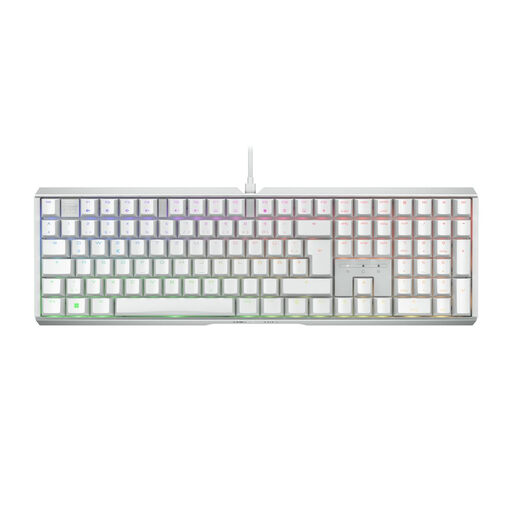
Why This Fits Their Persona: For users who value top-tier build quality, durability, and a precise typing feel for both gaming and work. The solid aluminum frame and proven Cherry MX switches are a clear mark of quality.
This model focuses on core quality instead of gimmicks. The tactile yet quiet MX2A Brown switches are a versatile choice and avoid the "too-loud keyboard" trap. The correct regional QWERTY layout comes standard.
The full aluminum frame provides exceptional stability. The CHERRY MX2A Brown switches offer a manufacturer-rated lifespan of over 100 million actuations and a balanced tactile feel.
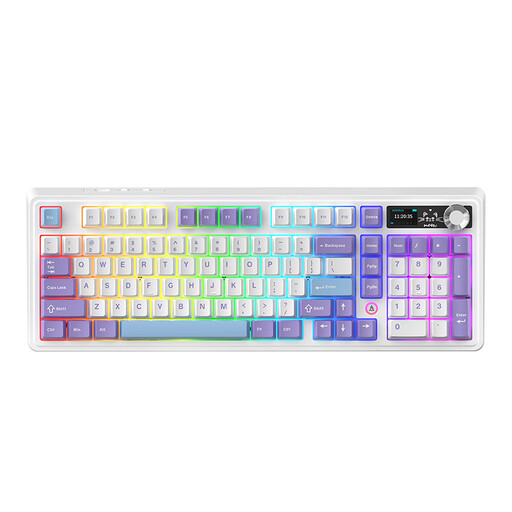
Why This Fits Their Persona: For users seeking advanced features, flexibility, and customization options. The hot-swap capability is a key advantage for experimenting with different switches to perfect the typing feel.
It directly solves the "wrong switch choice" dilemma with its hot-swap keyboard feature. Additional features like the TFT display and rotary knob offer practical utility over pure aesthetics.
Maximum customizability thanks to hot-swap sockets (compatible with 3-pin and 5-pin switches). The tri-mode connectivity and large 10,000 mAh battery provide tremendous flexibility.
We have compiled a complete, up-to-date list of products that fully meet these strict selection criteria and safety regulations.
1. What is the difference between a TKL and a 60% keyboard?
A TKL keyboard (Tenkeyless) is essentially a full-size keyboard with the numpad on the right side removed. All other keys, including the F-key row, arrow keys, and navigation cluster (Insert, Delete, etc.), are retained. A 60% keyboard is even more compact. It also removes the F-key row and the entire navigation cluster. Arrow keys are often accessible via a function layer (e.g., by pressing FN + WASD). The choice depends on how much you need direct access to these keys.
2. How long does a mechanical gaming keyboard last?
The lifespan is primarily determined by the switches used. Most mechanical switches, such as those from Cherry MX, are rated for 50 to 100 million keystrokes per key. This is many times the lifespan of conventional rubber-dome keyboards. With proper care and high-quality construction of the case and keycaps, a mechanical keyboard can function reliably for many years.
3. Is a wireless gaming keyboard suitable for competitive play?
Yes, modern wireless models are absolutely competitive. A wireless gaming keyboard that uses a dedicated 2.4 GHz wireless connection achieves latencies of under one millisecond, which is indistinguishable from a wired connection to human perception. A Bluetooth connection has slightly higher latency and is better suited for everyday tasks or less demanding games.