Stereo system owners
If you want to keep using your existing system or active speakers for streaming and your own music files, focus on suitable outputs and supported sources.


Start by considering which speakers you have. A separate streamer needs an amplifier or active speakers, while passive speakers need suitable amplification. Then check music sources, connections and ease of use. High-resolution specifications alone don’t prove that you’ll hear a difference when listening to folk music in a small living room.
If you want to keep using your existing system or active speakers for streaming and your own music files, focus on suitable outputs and supported sources.
If you have passive speakers but no suitable amplifier, check whether a player only streams music or also works as a streaming amplifier.
If you want to listen to music in other rooms or play your TV’s audio through the system, check the support and connections of the specific model.
Best suited to: Set-ups that already have an amplifier with a suitable input or active speakers.
The trade-off: WiiM and Cambridge Audio describe their models as separate players. Passive speakers still need an amplifier.
Best suited to: Set-ups with passive speakers but no suitable amplifier.
The trade-off: Bluesound describes the POWERNODE as a streaming amplifier. Check that its speaker connections are compatible with your speakers.
Best suited to: If you’ll actually use a compatible multiroom system, a headphone socket or a TV connection.
The trade-off: Bluesound lists HDMI eARC on the NODE, while Sonos designed the Port to work with a Sonos system. Check compatibility for the specific model.
| What matters to you | What to check before buying | Who it matters most to |
|---|---|---|
| Connecting to speakers and an amplifier | Check whether your speakers are active or passive, and match the player’s outputs to your amplifier’s phono or digital inputs. | I want to keep using my existing speakers and need a suitable signal path. This is the top priority for around 31% of consumers. |
| Access to your preferred music source | Check that the specific streaming service is supported and how it’s controlled. If you have your own music collection, look for USB or network access. | If I want to listen to my own folk recordings or use my music service, that exact source must be supported. Around 25% of consumers prioritise access to their preferred source. |
| Ease of use | Check the app set-up, preset buttons and volume controls against how you plan to use the player. | I want to start and control music easily in everyday life, without paying extra for features I won’t use. Easy operation is the top priority for around 25% of consumers. |
| Extra features | For TV use, check whether the specific model has HDMI eARC. For multiroom, make sure your devices are compatible. | If I want to play TV audio, use headphones or listen to music in other rooms, the player needs to support those features. Around 19% of consumers put these extra uses first. |
A separate network player outputs the audio signal, but it doesn’t amplify passive speakers itself.
Before comparing models, check whether your speakers are active or passive and what kind of signal path they need.
Supported signals or file formats alone don’t prove you’ll hear a difference with your system in your room.
Check sources, connections and ease of use first. Don’t treat manufacturers’ sound claims as independent proof in a comparison.
The Bluesound NODE, Bluesound POWERNODE and Sonos Port differ in design and connections.
Make a note of the rooms and devices you want to connect, then check compatibility and the TV connections you need on the specific model.
The WiiM Pro and Pro Plus are separate streamers for existing amplifiers or active speakers.
The compact MXN10 is a separate network player for existing systems.
The NODE and POWERNODE are designed for different systems: the NODE is a separate streamer, while the POWERNODE is a streaming amplifier.
The Port adds streaming to an existing stereo system and is particularly relevant if you want a Sonos multiroom system.
The Joybuy products below are standalone internet radios with built-in audio playback. They’re a better fit if you want to listen without an existing stereo system than if you’re specifically looking for a separate network player for a system you already own.
 No image available
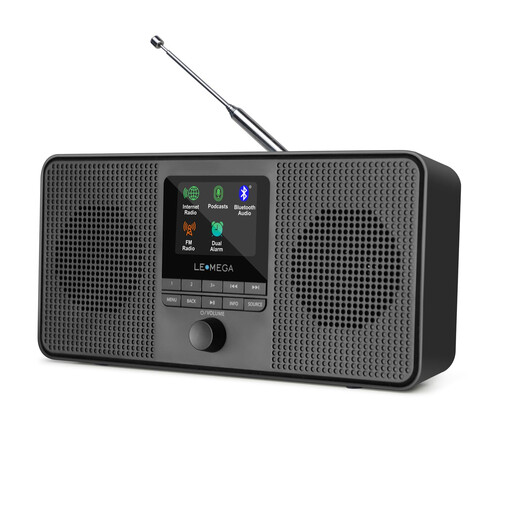
A standalone music solution with built-in stereo speakers and access to internet radio or Spotify Connect.
Wi-Fi, Bluetooth, DAB, FM, display and UNDOK app control. According to the product description, Spotify Connect requires a Spotify Premium account.
Before buying, check the CE marking and declaration of conformity required for the specific Wi-Fi or Bluetooth device; the Bundesnetzagentur lists these as points to check.
 No image available
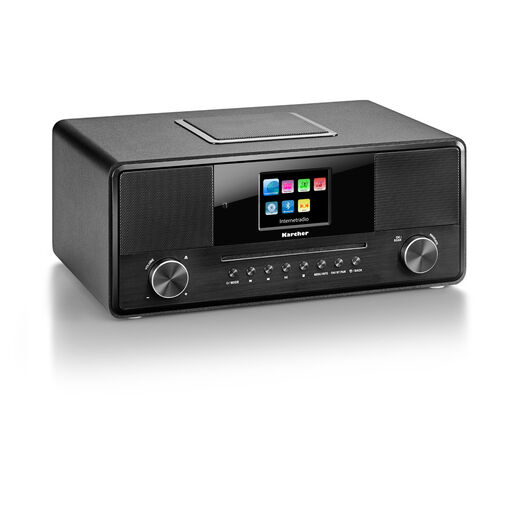
A complete radio and music playback system, so you don’t need to have a separate set of speakers.
Wi-Fi, internet radio, DAB+, FM, Bluetooth, CD, USB and AUX; built-in subwoofer, colour display, headphone socket and remote control. Stated power output: 36 W.
Before buying, check the CE marking and declaration of conformity required for the specific Wi-Fi or Bluetooth device; the Bundesnetzagentur lists these as points to check.
You’ll need a suitable amplifier for passive speakers, unless the player itself is a compatible streaming amplifier. WiiM describes the Pro as a separate streamer that connects to active speakers or to an amplifier or receiver.
First, connect the appropriate audio output to your amplifier or active speakers. For the Sonos Port, Sonos then recommends setting it up in the app and selecting the connected input on your amplifier. If you have Wi-Fi problems, Sonos suggests moving the device or using a wired network connection.
No, buying a player doesn’t automatically mean you’ll have subscription costs. Manufacturers list internet radio and playback from your own music library alongside music services for some models. Any charges depend on the service you choose.
GEMA says that a private gathering with personally invited guests doesn’t require a licence. Public use of music is treated differently; according to GEMA, public events generally need to be registered even if there’s no admission charge. The type of music alone doesn’t determine whether an event is private.
For Wi-Fi or Bluetooth devices, the applicable EU requirements for radio equipment apply. The Bundesnetzagentur lists CE marking and a declaration of conformity as points to check. CE marking is a manufacturer’s declaration, not an independent quality mark. According to EU guidance, CE marking is only required when the relevant harmonised legislation explicitly says so.