To create editable circuit diagrams, you need a computer with suitable circuit design software. A stylus can help you input information, but it won’t replace the editor used to add symbols and electrical connections. The KiCad documentation describes a desktop workflow for Windows, macOS and Linux. A standalone tablet may suit handwritten sketches, while a pen display connected to a computer lets you work directly on screen if you have the space and the right ports.
Which option suits you?
Students creating editable CAD circuit diagrams
If you need to edit component symbols and electrical connections in a circuit diagram file, first check which software workflow and file format your course requires. The KiCad documentation describes features for creating and editing circuit diagrams.
Students creating handwritten sketches
A visible drawing surface can be handy for sketches during practical sessions or for study notes. Check whether a hand-drawn sketch will do, or whether you need to submit an editable CAD file. Samsung Germany says the Galaxy Tab S10 FE comes with an S Pen.
Students with a small desk
If your laptop, paperwork and keyboard all compete for space, consider the drawing area, extra screen space and cables together. Manufacturers such as Wacom and Huion offer both graphics tablets and pen displays that connect to a computer.
What to consider when buying
Graphics tablet without a screen
A good fit if: you work on a computer and want to keep using its screen.
What to consider: You draw on a separate surface and look at your computer screen. Check that the operating system, drivers and usable area suit your setup.
Pen display connected to a computer
A good fit if: you want to write or sketch directly on the screen.
What to consider: The connected display needs a compatible computer, suitable ports and enough desk space.
Standalone tablet with a stylus
A good fit if: you mainly want to create handwritten sketches and study notes without connecting a computer.
What to consider: Check the required file format and stylus compatibility. The KiCad documentation describes a desktop workflow for Windows, macOS and Linux.
| What you need |
What to check before buying |
Who should pay particular attention |
| Editable CAD circuit diagrams |
Check the submission format and operating system first. The KiCad documentation lists Windows, macOS and Linux for its desktop workflow. |
If I need to submit an editable circuit, the right software matters more than stylus input. Around 36% of consumers put the CAD workflow first. |
| Working directly on the drawing |
Choose between a graphics tablet without a screen, a connected pen display and a standalone tablet. If you choose a tablet, check stylus compatibility. |
If I want to see the stylus tip directly on the drawing, I look at the type of display. Around 29% of consumers prioritise sketching directly on screen. |
| Space and ports |
Check the available desk space and the ports required by the specific model. XPPen lists an active area of 10 × 6.25 inches for the Deco 01 V3; Huion lists a 13.3-inch display for the Kamvas 13 (Gen 3). |
If my laptop, paperwork and keyboard already take up space, the drawing area needs to fit my setup. Around 21% of consumers focus mainly on having enough clear desk space. |
| Stylus and accessories |
Check the box contents, exact stylus version and any adapters needed for the specific device model. Apple Support Germany says that the first-generation Apple Pencil needs an adapter to pair and charge with the iPad (A16). |
If I’m choosing a device and accessories together, I want to know in advance which stylus will actually work. Around 14% of consumers prioritise the total cost of the device and accessories. |
Common buying mistakes
-
Confusing a freehand sketch with an editable circuit diagram
KiCad uses circuit symbols and electrical connections. A drawn sketch is not automatically an editable circuit diagram file.
Before buying, check whether your course requires a sketch or a CAD file. If CAD is required, first make sure you have the right computer and software workflow.
-
Assuming a pen display is a standalone computer
XPPen describes the Artist Pro 16 (Gen 2) as a device that needs to be connected.
Before ordering, check that your computer has the right ports and can meet the power requirements of the specific model, and check what’s included in the box.
-
Ordering just any Apple Pencil for your iPad
Apple lists Pencil compatibility by iPad model, so the brand name alone isn’t enough to check whether they’re compatible.
Compare the full model names against Apple’s compatibility information. For the first-generation Apple Pencil with the iPad (A16), Apple Support Germany lists an adapter for pairing and charging.
Brands to consider
Wacom
The Wacom One range includes both graphics tablets and pen displays, making it a useful starting point if you’re weighing up a computer screen against a separate drawing display.
- The product range includes both types and describes connections to compatible devices.
- Driver and connection requirements depend on the device; this doesn’t establish specific suitability for KiCad.
XPPen
The Deco 01 V3 is a graphics tablet without a screen, while the Artist Pro 16 (Gen 2) is a pen display that connects to a computer.
- XPPen lists an active area of 10 × 6.25 inches and eight programmable buttons for the Deco 01 V3.
- According to the product information, the Artist Pro 16 (Gen 2) needs to be connected to a device; this says nothing about its performance for circuit diagrams.
Huion
The Kamvas 13 (Gen 3) is a pen display for working on a visible drawing surface connected to a computer.
- Huion lists a 13.3-inch display with a resolution of 1920 × 1080 pixels.
- The display works with a compatible computer and needs desk space; specifications for colour or pressure don’t prove an advantage for circuit diagrams.
Samsung
The Galaxy Tab S10 FE is a standalone Android tablet for handwritten sketches and study notes.
- Samsung Germany lists the S Pen as included.
- An included stylus doesn’t mean that KiCad runs on the tablet as a desktop circuit diagram editor.
Apple
An iPad can be used with a compatible Apple Pencil for handwritten sketches.
- Apple lists Pencil compatibility by iPad model.
- For the iPad (A16), Apple Support Germany lists an adapter for pairing and charging with the first-generation Apple Pencil.
Joybuy products for sketches and notes
This selection focuses mainly on simple handwritten sketches and includes one standalone Android tablet. For editable KiCad circuit diagrams, you’ll still need the right computer and software workflow.
 No image available
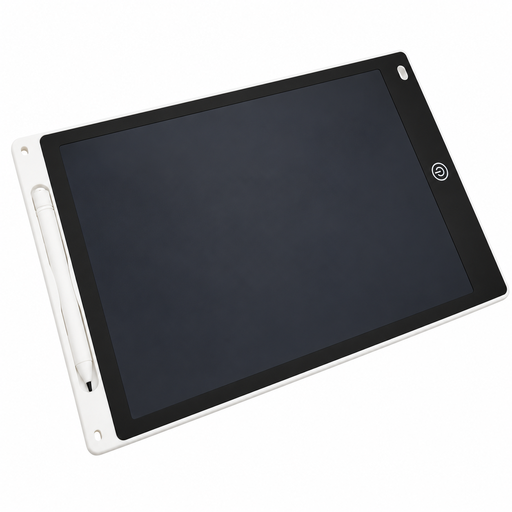
12-inch LCD drawing tablet with stylus and erase function
For reusable handwritten sketches; it’s not the same as an editable CAD circuit diagram file.
12-inch LCD drawing area and stylus. The erase button clears the whole drawing.
View at Joybuy
 No image available
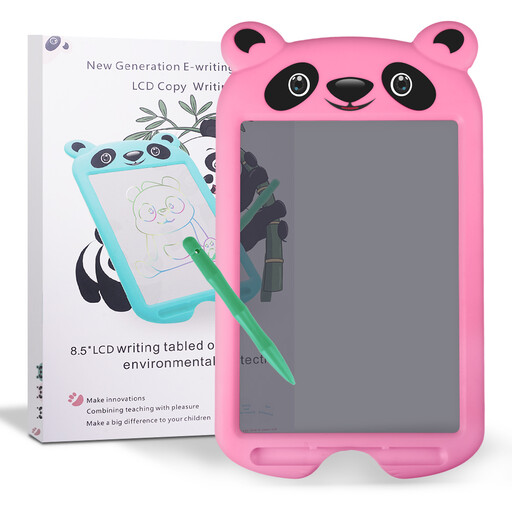
CHEERFUN 10-inch tracing tablet, Pink Panda, ages 3–8
For drawing and tracing on an LCD surface. The product description is aimed at children aged 3 to 8, so it’s not particularly suited to students working on circuit diagrams.
10-inch LCD drawing area with erase function. The erase button clears the whole drawing.
View at Joybuy
 No image available
Teclast ArtPad Pro 2025, 13.4-inch, 2K display
For handwritten sketches without a connected computer. The KiCad documentation lists Windows, macOS and Linux as desktop platforms; Android 15 isn’t part of the workflow described.
Android 15, T-Pen with 4096 pressure levels, 20 GB RAM (8+12 virtual), 256 GB storage, dual-SIM 4G LTE and 10,000 mAh battery.
View at Joybuy
Frequently asked questions
Can a drawing tablet replace circuit design software?
No. If you need to submit an editable KiCad circuit, you’ll need the right circuit diagram editor for your computer’s workflow. Before choosing a device, check whether you need to submit a hand-drawn sketch or a CAD file.
What’s the difference between a graphics tablet and a pen display?
With a graphics tablet without a screen, you draw on a separate surface and see the result on your computer screen. With a pen display, the drawing surface is on its own screen. A pen display connected to a computer still needs a compatible device and the right ports.
What should I check when setting up a graphics tablet?
Check the operating system and driver information for the specific model. Wacom says Wacom One requires driver downloads for Windows and macOS. Then test the stylus input and your preferred button settings in the application you’ll actually be using.
What are my rights if a device is faulty?
According to European Union consumer information, when you buy from a business seller, you’re generally entitled to a minimum two-year legal guarantee against faults from the date you receive the goods. Contact the seller; any additional manufacturer’s guarantee doesn’t replace these rights.
Can I cancel an online order in Germany?
According to the German consumer advice centre, online orders can generally be cancelled within 14 days of delivery. Exceptions and the terms of the specific contract apply. Cancelling an order is different from dealing with a faulty device.


