Which monitor is right for you?

For players who focus on maps and menus

If you spend a lot of time looking at maps, building options and text in city-building games, resolution and how easy the controls are to read matter more than the highest possible refresh rate. AOC lists the Q24G2A/BK as a QHD model; PC Monitors highlights its compact design, but doesn’t confirm that small menus will be easy to read in every game.

For players short on desk space

If you need to share your desk with a keyboard and mouse, check the monitor’s body and stand against the space available. ASUS lists the VG27AQ3A as 61.50 cm wide and 21.40 cm deep with its stand; BenQ lists the EX2710Q as 614 mm wide and 252.5 mm deep.

For considerate evening gamers

If someone else is in the room or asleep, headphones may be a better audio option than speakers. ASUS and BenQ list a headphone jack on their respective models; also compare screen brightness and the energy label.

What should you look for when buying?

What matters What to check when buying Who will find this especially important
Map details and clear menus Check the resolution, screen size and scaling in the game and operating system. If you want to see building options and maps clearly, readability from your usual seat is what matters. Around 34% of consumers in this scenario prioritise map details.
Desk space and positioning Compare the available desk width and depth with the monitor’s body and stand dimensions; check for height adjustment and, where relevant, the VESA size. If you need to leave room for your input devices, the full dimensions are essential. This applies to around 33% of consumers who prioritise available desk space.
Sound, lighting and power consumption Check for a headphone jack, adjustable brightness, screen finish and details on the EU energy label, including HDR. If you play in the evening while someone else is sharing the room, keeping the sound down and choosing suitable display settings may matter more than built-in speakers. Around 20% of consumers in this scenario prioritise being considerate of others.
Connections and refresh rate Check that your computer’s video output, cable and monitor connection support the resolution and refresh rate listed for that specific input. If you want to use a particular display mode with your existing hardware, your computer, cable and monitor all need to be compatible. Around 13% of consumers prioritise this compatibility.

Common buying mistakes

  • QHD on a small screen doesn’t automatically mean clear text

    Pixel count alone doesn’t determine how large menus appear in a particular game when scaling is turned off. On a compact QHD monitor, readability can depend on the game and its settings.

    Check the text size and scaling in the game you play before choosing a monitor based on resolution alone.

  • Comparing screen sizes alone isn’t enough

    Stands take up different amounts of desk depth. According to ASUS, the supplied stand for the ASUS TUF Gaming VG27AQ3A isn’t height-adjustable.

    Check the full dimensions against your desk, and make sure any VESA mount you choose will fit securely.

    A suitable monitor arm may mean an extra purchase and installation.

  • The highest refresh rate isn’t automatically available on every connection

    ASUS lists different refresh rate ranges for HDMI and DisplayPort on the VG27AQ3A: up to 144 Hz over HDMI and up to 180 Hz over DisplayPort.

    Check that the monitor input, PC output and cable support the display mode you want.

  • OLED protection features can’t completely rule out burn-in

    LG explains that burn-in can’t be completely ruled out, even with protection features. This is worth considering if you play games with menus that stay on screen for long periods.

    Check the warranty terms for the exact model and its settings for static content. Don’t assume that terms for a differently named variant will apply.

Brands to consider

AOC

The Q24G2A/BK is a compact QHD option for desks with limited width.

  • AOC lists the model as 23.8 inches, QHD, IPS and supplied with a height-adjustable stand.
  • PC Monitors highlights its compact QHD combination; how easy small game menus are to read depends on the game and its settings.

ASUS

The TUF Gaming VG27AQ3A is a 27-inch QHD IPS option with an anti-glare screen and a headphone jack.

  • ASUS lists refresh rates of up to 180 Hz over DisplayPort and a 100 × 100 mm VESA mount.
  • The supplied stand isn’t height-adjustable; ASUS lists a refresh rate of up to 144 Hz over HDMI.

BenQ

The MOBIUZ EX2710Q is a 27-inch QHD option with height adjustment and several audio output options.

  • BenQ lists 100 mm of height adjustment, a headphone input and an integrated 2.1 speaker system.
  • Speakers aren’t necessarily the right choice when sharing a bedroom during quiet hours.

LG

The UltraGear 27GS75QX-B is a 27-inch QHD IPS option for comparing features and connections.

  • LG lists this model as QHD with a refresh rate of 180 Hz.
  • LG says it has no built-in speakers. LG’s German product page marks this exact model as no longer available; this doesn’t say anything about other models or retailers.

MSI

The MPG 271QRXDE QD-OLED is an OLED option to consider in certain circumstances, not an essential feature for games focused on maps and menus.

  • COMPUTER BILD lists a very high refresh rate for this model.
  • COMPUTER BILD notes that text is slightly less sharp. An MSI statement on burn-in warranty terms refers to a similarly named model without the DE suffix; those terms can’t automatically be applied to the DE variant.

Joybuy products for 27-inch QHD

The Joybuy models below are 27-inch monitors with QHD resolution. They can be a starting point for comparing map readability, desk space and positioning.

Z-Edge AGEX 27-inch QHD gaming monitor

Z-Edge AGEX, 27-inch, QHD, 144 Hz

The listed QHD resolution and larger screen give you more room for maps and building menus; check text size in the game you play.

Listed features include 2560 × 1440 resolution, a Fast-IPS panel, 144 Hz and a height-adjustable stand, as well as HDMI and DisplayPort connections.

View at Joybuy

GIGABYTE GS27QCA, curved 27-inch QHD monitor

GIGABYTE GS27QCA, curved, 27-inch, QHD

If you’re considering a curved screen, check its listed depth against the space available on your desk.

Listed features include 2560 × 1440 resolution, 180 Hz and Adaptive Sync. The description also mentions an anti-glare screen, a headphone output, tilt adjustment and VESA 100 × 100 mm.

View at Joybuy

INNOCN 2751S PLUS, 27-inch QHD monitor

INNOCN 2751S PLUS, 27-inch, QHD, Mini LED

If you’re comparing monitors with height-adjustable positioning, also check the dimensions with the stand and the space available.

The description lists QHD at 2560 × 1440, a Fast-IPS panel, Mini LED with 1152 zones and 275 Hz. It also states that the stand has 120 mm of height adjustment.

View at Joybuy

KTC H27D9, 27-inch QHD monitor

KTC H27D9, 27-inch, QHD, 120 Hz

The listed resolution and screen size are useful when comparing larger QHD displays; also check that the monitor will fit where you plan to place it.

The description lists 2560 × 1440, an IPS panel, Adaptive Sync, and HDMI and DisplayPort connections. VESA mount compatibility is also specified.

View at Joybuy
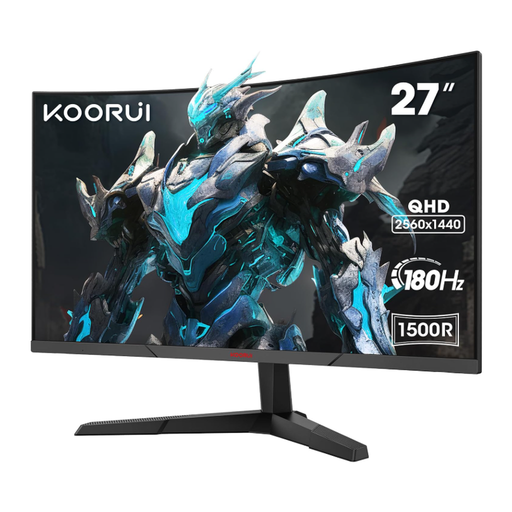
KOORUI MG27A12QV3, curved 27-inch QHD monitor

KOORUI MG27A12QV3, curved, 27-inch, QHD

If you’re considering a curved model, check its positioning and your viewing distance against the space available.

Listed features include 2560 × 1440 resolution, 180 Hz and a VA panel. The description also mentions tilt adjustment and VESA 75 × 75 mm.

View at Joybuy

Frequently asked questions

Do I need the highest possible refresh rate for city-building games?

No, not just for this style of game. Start by checking how easy maps and menus are to read, how much desk space you have and which connection your computer supports. ASUS lists different refresh rate ranges for HDMI and DisplayPort on the VG27AQ3A.

How should I position a monitor in a shared bedroom?

Measure the width and depth, including the stand, and position the screen to minimise reflections from light sources. ASUS lists an anti-glare screen for the VG27AQ3A, but its stand isn’t height-adjustable; BenQ lists 100 mm of height adjustment for the EX2710Q. Guidance from the German Federal Institute for Occupational Safety and Health (Bundesanstalt für Arbeitsschutz und Arbeitsmedizin) on glare relates to screen work and isn’t a legal requirement for a private bedroom.

How can I keep the sound down for the other person while I’m gaming?

Consider using headphones and adjust the game or system volume to suit. ASUS lists a headphone jack on the VG27AQ3A, as does BenQ on the EX2710Q; you don’t have to use the built-in speakers.

What do the energy label and HDR tell me about power consumption?

The EU energy label for electronic displays uses efficiency classes from A to G and also provides information about use with HDR. The European Commission provides this labelling to help you compare products. Compare like-for-like information for specific models; your usage and electricity tariff also affect your individual energy costs.

What are my rights when buying online in Germany?

According to Verbraucherzentrale, consumers who buy online generally have a 14-day right to cancel, although exceptions and when the period starts depend on the contract. Your statutory rights against the seller if goods are faulty are separate from any voluntary guarantee.