What should you look for when buying?
First, decide how large your garden images need to be. If you’re looking to print garden photos in a small classroom, focus on the buying consideration that matters most to you.
Postcard prints
A good fit if: individual garden images in 100 × 148 mm format are enough and you’re looking for a compact printing solution.
Things to consider: Canon Germany specifies a ribbon-and-paper set for the SELPHY CP1500. Postcard prints aren’t a substitute for A4 classroom worksheets.
A4 photo printing with an ink tank
A good fit if: you print photos or photo-and-text materials up to A4 regularly and have room for a larger printer.
Things to consider: Canon’s and Epson’s quoted page yields aren’t directly comparable as a measure of ink used per classroom photo unless the testing and printing conditions are the same.
A4 photo printing with individual cartridges
A good fit if: you want one printer to print photos and everyday classroom documents, as well as scan and copy.
Things to consider: Epson lists six individual photo ink cartridges for the Expression Photo XP-8700, so remember to factor in the cartridges and paper you’ll need.
Mini instant prints from a smartphone
A good fit if: a small image is enough for a collage and you have a compatible smartphone.
Things to consider: Fujifilm lists an image area of 62 × 46 mm for the instax mini Link 3; film is sold separately.
| Buying consideration |
What to look for |
Who it matters most to |
| Image size and detail |
Decide how much space you need for plant details and labels. Canon Germany and Epson Germany list A4 photo printing for the relevant models. |
For plant comparisons and labelled picture cards, I need room to show visible detail; around 31% of consumers say this is their top priority. |
| Supplies for photo sets |
Factor in the ink, ribbon and paper you’ll need for the planned number and size of prints. Only compare manufacturers’ quoted yields when the conditions are comparable. |
If I print several garden pictures regularly, I want to plan reliably for the consumables I’ll need; around 31% of consumers say this is their main concern. |
| Spontaneous prints and connectivity |
Check that your existing devices can connect using a suitable option, such as Wi-Fi, USB, a memory card or an app. |
For individual prints straight from my desk, I need a connection that works with the school devices available; around 23% of consumers prioritise spontaneous postcard prints. |
| Mini prints for crafts |
Check the image area and the media required. Fujifilm lists 62 × 46 mm for the instax mini Link 3, with instax mini film sold separately. |
A small image may be enough for a collage, even if there’s little room for labels; around 15% of consumers prioritise mini creative prints. |
Joybuy products for printing on the go
These Joybuy products are designed for printing photos and images on the go. Before buying, check the specific print format and colour output for your garden images. A mini printer isn’t automatically suitable for labelled A4 classroom worksheets.
 Image unavailable
Portable mini thermal printer for smartphone photos
For printing photos on the go if a mini device suits your needs. Check the specific format and colour output before printing garden photos.
Bluetooth connections to smartphones, tablets and laptops are listed.
View at Joybuy
 Image unavailable
Bluetooth mini thermal printer for photos and labels
For printing photos and creative projects on the go, provided the format and print output suit your garden project.
Bluetooth and an app for iOS and Android are listed. The description also mentions stickers and labels as possible print uses.
View at Joybuy
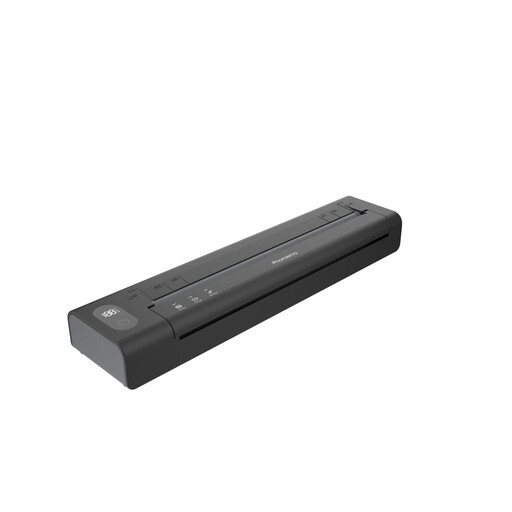 Image unavailable
Phomemo A282U, black, 1 piece
For printing text and images on the go if an app connection works with your devices.
Bluetooth printing via an app and a weight of 600 g are listed.
View at Joybuy
 Image unavailable
Portable mini thermal printer for smartphones, black and white, 1200 mAh
The listed black-and-white printing won’t be suitable if you need the colours in your garden images to show.
Bluetooth printing from a smartphone is listed, and the title also specifies a 1200 mAh battery.
View at Joybuy
 Image unavailable
Xiaomi Portable Photo Printer 1S
For small smartphone photo prints if the listed paper size of 50 × 76 mm is large enough for your project. It isn’t a replacement for an A4 picture card.
ZINK printing, self-adhesive paper and Bluetooth are listed.
View at Joybuy
Frequently asked questions
How can I stop plant details looking too small in a photo?
Choose A4 if you need space for comparisons or labels; individual postcard prints may be enough for smaller images. Canon Germany lists 100 × 148 mm for the SELPHY CP1500, while Fujifilm lists an image area of 62 × 46 mm for the instax mini Link 3. These are format specifications, not a guarantee of how sharp a particular print will be.
What should I check before printing with school devices?
Check that the printing method you plan to use works with the devices available. Canon Germany lists Wi-Fi, USB and memory cards for the SELPHY CP1500; the instax mini Link 3 requires a compatible smartphone and the relevant app. Before your lesson, test the connection and printing media with a sample image.
Who should I contact if a product is faulty after purchase?
For consumer purchases in Germany, the seller is generally responsible for the statutory warranty, which is different from a voluntary manufacturer’s guarantee. For sales contracts from 31 July 2026 onwards, the Verbraucherzentrale describes an obligation on the seller to inform consumers that, if a product is faulty, they can choose between repair and replacement. Whether these rules apply to a purchase made by a school as an organisation depends on the contractual arrangements.
Do I need consent to take photos of garden plants only?
The rule on photographs of people described by the Berlin Commissioner for Data Protection and Freedom of Information concerns identifiable individuals; it doesn’t mean that blanket consent is required for photos of plants alone. If pupils or other people are identifiable, taking and using the photos must have an appropriate legal basis. Publication should be considered separately; specific school rules may depend on the federal state and intended use.
What are the rules on labelling and disposing of a printer?
The Bundesnetzagentur describes CE marking as mandatory for products covered by relevant EU harmonisation legislation and placed on the EU market; the mark is not an independent quality seal. Printers that have reached the end of their useful life should be taken to a separate collection point for waste electrical equipment. The Umweltbundesamt lists local collection points and in-store take-back options; if the printer belongs to the school, arrange its return with the responsible authority.


