Brands and specific model ranges
The information below relates to the model ranges mentioned and isn’t a general assessment of each brand.
Canon
The PIXMA G650 offers A4 photo printing with refillable ink tanks, while the SELPHY CP1500 is designed for smaller prints using compatible ink and paper sets.
- Canon Germany lists six dye-based inks, as well as scanning and copying functions, for the G650. According to Canon Germany, the SELPHY CP1500 supports postcard-size prints measuring 100 × 148 mm.
- The CP1500’s battery isn’t included. In 2021, Druckerchannel described the G650’s colour reproduction on glossy paper as fairly neutral. This historical observation relates to the model mentioned and isn’t a current model comparison.
Epson
The EcoTank ET-8500 combines A4 photo printing with refillable tanks and features for document tasks.
- Epson Germany lists six inks, including grey photo ink, pigment black for text on plain paper, and scanning and copying functions.
- The photo yield is a manufacturer’s figure, not a measured cost estimate for your classroom portraits. Use it only in the context of the printing conditions specified by Epson.
HP
The Envy Photo 7230 combines photo printing with scanning and copying for a mix of photo and document tasks.
- HP lists a photo paper tray, along with printing, scanning and copying functions, for this specific model.
- HP notes that the Envy Photo 7230 has dynamic security measures that may block cartridges with modified or non-HP circuitry. Before choosing, check which consumables are suitable for your needs.
Joybuy products for portable printing
The models listed include portable thermal printers and a compact photo printer. In particular, check whether the output size and black-and-white or colour printing are suitable for your portrait templates.
 No image available
Mini Bluetooth thermal printer for photos, notes and labels, with 10 rolls of thermal paper
Could be suitable for portable photo printing if black-and-white output is enough for your classroom template.
- The product title mentions Bluetooth, photos, notes and labels.
- The product description specifies black-and-white output; thermal prints may turn black when rubbed.
- The title mentions 10 rolls of thermal paper.
View at Joybuy
 No image available
Portable mini thermal printer for smartphones, photos and notes
A portable option for printing photos if you prefer a smartphone connection and a compact device.
- The product title mentions photos and notes.
- The product description mentions Bluetooth and smartphone connectivity.
- Before choosing, check that the format and colour reproduction are suitable for your portrait templates.
View at Joybuy
 No image available
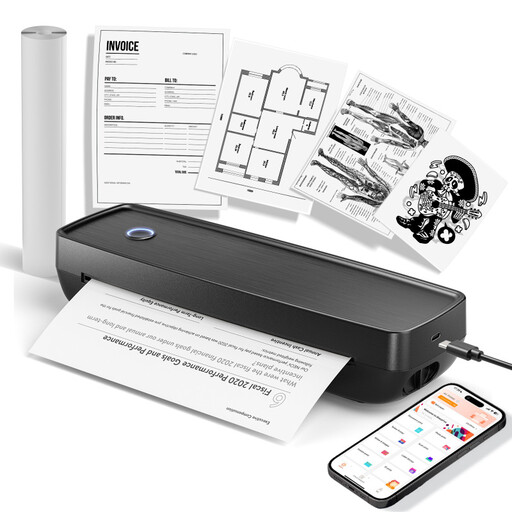
Portable wireless thermal printer for photos and US Letter and Legal document sizes
Could suit portable printing if the document sizes listed and photo output are right for your intended use.
- The title lists the US Letter and Legal sizes.
- The product title mentions compatibility with iOS, Android and laptops.
- The product description mentions Bluetooth, thermal printing and photos.
- Check whether the output size and colour reproduction are suitable for portrait templates.
View at Joybuy
 No image available
Xiaomi Portable Photo Printer 1S
For small photos to hand out, if the stated 2 × 3 inch size is large enough for your template.
- The product description mentions Zink printing and the 2 × 3 inch (50 × 76 mm) format.
- It also mentions Bluetooth, self-adhesive photo paper and a weight of 180 g.
- Check that the format and colour reproduction are suitable for your portrait template.
View at Joybuy
Frequently asked questions
Do I need A4 for portrait templates, or is 10 × 15 cm enough?
If learners need to examine facial features and tonal values more closely on their own sheet, check for A4 support and compatible photo paper. For small templates to hand out, the Canon SELPHY CP1500’s postcard size may be enough. The size that works best for teaching depends on the template and the viewing distance.
What should I set up before printing my first portrait?
Choose the size of the paper you’ve loaded in the print dialogue, then print one of your own templates as a test. If a Canon PIXMA print has streaks or gaps, Canon recommends running a nozzle check and cleaning the print head if needed.
What ongoing costs and limitations should I check?
Factor in photo paper and the consumables for your model. Canon Germany bases the G650’s yield on photos measuring 10 × 15 cm; it isn’t a yield figure for A4 portraits. For the HP Envy Photo 7230, also check HP’s information about dynamic security measures for cartridge circuitry.
Can I use photos of identifiable people as classroom templates?
Not automatically: photos of identifiable living people contain personal data. The State Commissioner for Data Protection and Freedom of Information of Rhineland-Palatinate notes that taking such photos requires consent or another applicable legal basis. Processing and sharing the images must also be assessed separately, and additional rules may apply to schools. Using an image in a lesson does not give you blanket permission.
Can I print any portrait I find online for use in the classroom?
No. The image’s source and terms of use matter. Under section 60a of the German Copyright Act (UrhG), subject to the conditions set out there, up to 15% of a published work may be reproduced for non-commercial purposes to illustrate teaching and learning at educational institutions. Subsection 2 deals separately with illustrations, and subsection 3 sets out exceptions. This does not amount to blanket permission to use every image found online or to republish it. The German Federal Ministry of Justice explains the provision; data protection must also be considered when identifiable people are shown.


