What should you look for when buying?
First, work out whether your quiz sheets are mainly text or also include colour graphics. You can then compare features, running costs and connectivity based on what you actually need for your lessons.
| What you need |
What to check before buying |
Who is this important for? |
| Printing class sets |
Check the A4 paper capacity and automatic A4 duplex printing for the full model number. |
If I regularly print lots of text-based quiz sheets, I don’t want to keep topping up the paper. Around 40% of consumers put printing class sets first. |
| Planning for running costs |
Work out your print volume and how much colour you use; compare compatible ink or toner, and drum units and maintenance cartridges where applicable. |
For regular printing, I want to consider more than just the printer’s price. Around 30% of consumers place particular importance on the cost of consumables and replacement parts. |
| Colour and worksheets |
Check whether you need colour printing, copying, scanning and, if necessary, an automatic document feeder. |
If quizzes include colour graphics or I want to digitise paper worksheets, I need the right additional features. Around 20% of consumers have this as their main priority. |
| Shared printer |
Check Wi-Fi, USB or the network connections you need, as well as your school’s IT setup and where printouts will be collected. |
If several people use the same printer, I want its connection and location to work for our lessons. Around 10% of consumers prioritise a shared printer. |
Printers for quizzes at Joybuy
This selection includes printers for A4 black-and-white or colour printing, as well as portable document printers. For quiz sheets, check that the paper size and printing method suit the way you plan to use them.
 No image available
HP Envy 6520 All-in-One Wireless Inkjet Printer
Could be worth considering if you want to print quiz sheets double-sided and also copy or scan worksheets.
Automatic duplex printing and an input capacity of up to 125 sheets are listed.
An automatic document feeder is specified for scanning and copying multi-page documents; connections include Wi-Fi, Bluetooth and USB.
View at Joybuy
 No image available
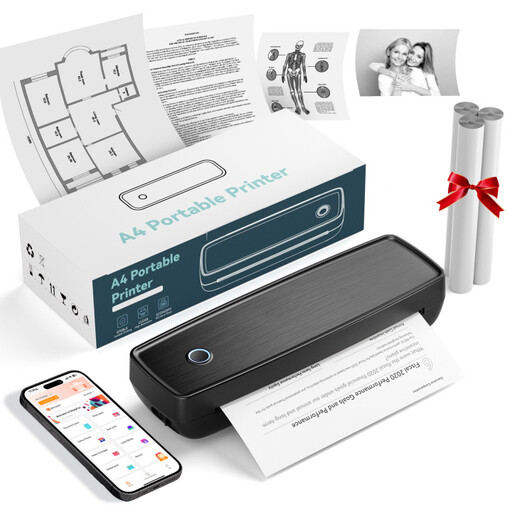
Portable Thermal Printer with Bluetooth and USB-C
The product name describes a portable device for the office and on the go. Before printing quizzes, check that its printing method and paper size suit your worksheets.
Bluetooth and USB-C are listed as connection options.
View at Joybuy
 No image available
Portable Wireless Inkless Printer for US Letter and Legal
Its portable design may be useful for printing documents on the go. Before buying, check that the listed paper sizes suit the quiz sheets you need.
US Letter and Legal are listed as supported sizes. The product name lists iOS, Android and laptop devices as compatible; Bluetooth and USB-C are specified as connection options.
View at Joybuy
 No image available
HP Color LaserJet Pro MFP 3302sdwg
Could be an option if your quiz sheets include colour graphics and you also need to copy or scan.
Colour printing, a flatbed scanner and a copier are listed.
Automatic duplex printing and a 350-sheet input capacity are specified; connections include Wi-Fi, Ethernet and USB.
View at Joybuy
 No image available
PANTUM BM2300NW A4 Mono Laser All-in-One Printer
Could suit text-based A4 quiz sheets if black-and-white printing is enough and you also need copying or scanning.
A4 mono printing and a 150-sheet input capacity are listed; duplex printing is manual.
Copying, colour scanning and Wi-Fi are listed. USB, Wi-Fi and Bluetooth are specified as connection options.
View at Joybuy
Frequently asked questions about printers for quizzes
Do I need a scanner for quizzes?
Only if you also want to digitise or copy paper worksheets. Brother describes the HL-L2400DW as a printer, while Canon UK lists a flatbed scanner for the MAXIFY GX3050. If you regularly scan stacks of pages, also check whether the printer has an automatic document feeder.
What should I consider when choosing a laser printer for a small classroom?
Think about where you’ll put it and check your school’s guidance. Germany’s Federal Environment Agency recommends considering low-emission devices when buying; the Blue Angel eco-label can help you compare options. Its specific recommendation to place large-format printers in separate rooms applies to those devices and is not a general ban on small laser printers in classrooms.
What should I know about faults and a manufacturer’s warranty?
For a consumer purchase in Germany, the statutory guarantee is a claim against the seller. A manufacturer’s warranty is separate and subject to its own terms. If you’re buying for a school or another organisation, check the applicable contract terms separately.
How should I dispose of an old printer?
In Germany, electrical waste must not go in household rubbish; it should be collected separately. The Federal Environment Agency lists local collection points and retailer take-back schemes. If the printer has processed confidential information, also consider how to protect any stored data before passing it on or disposing of it. Germany’s Federal Office for Information Security provides guidance on protecting sensitive information in printing infrastructure.
Are specific data protection features required for printed quizzes?
There isn’t one printer feature that can be prescribed for every situation. If quizzes contain personal or confidential information, make sure the printer, collection point and technical setup comply with your school’s IT and data protection requirements. Guidance from the State Commissioner for Data Protection and Freedom of Information in Rhineland-Palatinate applies to that authority’s jurisdiction.


