If you want to film your hands and modelling surface mainly from above, and plan to use a computer at your workspace, start by looking at a USB document camera. For more flexibility over close-ups and wider shots, a mirrorless camera with the right lens gives you more options. A webcam, compact camera or camcorder may also work, provided its focusing distance, framing and recording process suit your setup. The key is to test the camera, lighting and mount in your actual workspace – video resolution alone won’t tell you whether it’s right.
Which camera might suit you?
For filming fine details
If you want to show fine clay textures and individual steps, the focus, magnification and working distance all need to work together. Elgato states that the Facecam Pro can autofocus from 10 cm; Sony gives the separate SEL30M35 a 1:1 magnification ratio.
For filming from above
If you want to show your hands and modelling surface from a fixed position, camera height, mounting and the area actually captured are all important. IPEVO states that the V4K PRO has a maximum capture area of 34,2 × 25,5 cm; Logitech describes the MX Brio as offering a downward-tilting desk view.
For longer recording sessions
If you’re recording a longer modelling session, make sure your recording setup works with your computer, power supply, storage and planned session length. IPEVO describes the V4K PRO as a USB document camera for use with a computer; Panasonic lists an ergonomic grip on the HC-VX3 for longer recording sessions.
What to look for when buying
USB document camera
A good fit if: You mainly film your hands and work surface from above, and use a computer at your workspace. IPEVO states that the V4K PRO can autofocus from 10 cm.
Bear in mind: The base, USB connection and area captured need to suit your desk. The maximum capture area doesn’t guarantee the framing will work at every camera height.
Webcam connected to a computer
A good fit if: You record on a computer and can position the webcam suitably above your work surface. Elgato states that the Facecam Pro can autofocus from 10 cm; Logitech describes the MX Brio as offering a tiltable desk view.
Bear in mind: A downward-tilting view isn’t automatically a straight-down view. Logitech lists up to 30 fps at 4K for the MX Brio, while Elgato lists 60 fps for the Facecam Pro.
Mirrorless camera with interchangeable lens
A good fit if: You want to film both wide shots and small surface details, and adjust the lens and camera height to suit. Sony describes the ZV-E10 II as using an E-mount; the separate SEL30M35 offers 1:1 magnification, according to Sony.
Bear in mind: The kit zoom isn’t the separate macro lens. At its closest focusing setting, the SEL30M35 has a working distance of 2,4 cm from the front of the lens, according to Sony.
Compact camera
A good fit if: You want to switch between a wider view of your workspace and closer shots without changing lenses. The Canon PowerShot V1 has a built-in 16–50-mm zoom lens, according to Canon.
Bear in mind: You can’t change the lens. Check the framing and focus using the video settings, from the camera position you plan to use.
Camcorder
A good fit if: You’d prefer a standalone camera with a built-in zoom. Panasonic describes the HC-VX3 as having 24× optical zoom.
Bear in mind: Panasonic’s wide-angle figures apply to specific recording formats; they don’t confirm that small clay details will be in focus from your chosen distance.
| What you need |
What to check before buying |
Who it matters to most |
| Show small details |
Distance from the subject, focus range and how large the detail appears in the frame; for interchangeable lenses, check the magnification ratio too. |
If I want to show fine textures at a larger size, the camera needs to focus close enough without getting in the way of my hands or lighting. Around 33% of consumers put detail first. |
| See the whole work surface |
Make sure the work surface and hand movements fit in the frame; check camera height and mounting. |
If I want to see both hands and the modelling area at the same time, getting the right framing matters more than an extreme close-up. Around 27% of consumers prioritise an overhead view of their work. |
| Judge colours and lighting |
Take a test shot under your own lights; check the white balance and, if you see banding, the available anti-flicker settings. |
If I want to show clay colours accurately under the lighting in my spare room, I need to check how the image looks before recording. Around 20% of consumers put lighting and colours first. |
| Record longer sessions |
Check the recording time for the specific mode, power supply, storage and, where applicable, computer connection. |
If I want to record a longer modelling session without unwanted interruptions, the whole recording setup needs to suit the planned duration. Around 20% of consumers prioritise a setup that works for longer recordings. |
Common camera-buying misconceptions
-
Assuming 4K means you can shoot close-ups
Resolution, focus range and magnification describe different features. Sony lists a zoom lens for the ZV-E10 II kit; the 1:1 magnification applies to the separately sold SEL30M35, not the kit zoom.
Compare the exact camera and lens combination with the distance to your clay and the size of detail you want to show.
-
Assuming a tilted webcam guarantees an overhead view
Logitech describes the MX Brio’s Show Mode as a downward-tilting desk view. That doesn’t tell you whether your hands and clay piece will stay fully in frame from the position you plan to use.
Check the angle and framing with a test recording in your intended setup.
-
Planning your setup around the camera body alone
Depending on the camera you choose, you may also need a lens, mount, power or storage solution and, for a USB camera, a computer.
Before buying, work out which parts you’ll need for the specific model and planned recording duration.
Depending on your setup, you may also need a suitable lens, mount, or power and storage solution.
Camera brands to consider
IPEVO
Document cameras for viewing a work surface on a computer. IPEVO states that the V4K PRO can autofocus from 10 cm and has a maximum capture area of 34,2 × 25,5 cm.
- Worth considering for a fixed desk view, provided the base, USB connection and computer suit your workspace.
- The maximum capture area doesn’t confirm that the whole surface will fit in frame at every mounting height.
Elgato
Webcams for recording on a computer. Elgato states that the Facecam Pro can autofocus from 10 cm and supports 2160p60.
- The focus range is relevant to the distance you plan to film from.
- According to Elgato, the Facecam Pro needs USB 3.0 or higher with a Type-C connector and a compatible computer.
Sony
The ZV-E10 II uses interchangeable E-mount lenses. Sony lists a 16–50-mm zoom for the model kit and describes the separately available SEL30M35 as offering 1:1 magnification.
- Choosing a separate lens lets you tailor your setup to either wider views or close-up details.
- The SEL30M35 isn’t the kit zoom; its short working distance may leave less room for your hands and lighting.
Canon
The EOS R50 V is a camera with an RF mount; the PowerShot V1 has a built-in zoom lens.
- Canon lists RF and RF-S lenses as compatible mounts for the EOS R50 V.
- According to Canon, EF-M lenses aren’t compatible with the EOS R50 V. The lens on the PowerShot V1 can’t be changed.
Panasonic
The HC-VX3 is a standalone camcorder with built-in optical zoom. Panasonic lists 24× optical zoom.
- A built-in zoom lens means you don’t need to change lenses.
- The wide-angle figures on the German product page apply to specific recording formats; check the close-focus performance for your setup separately.
Joybuy products for video recording
This selection of Joybuy products includes compact cameras and webcams for video recording. For each model, check that the mounting, focusing distance and framing suit your modelling surface.
 No image available
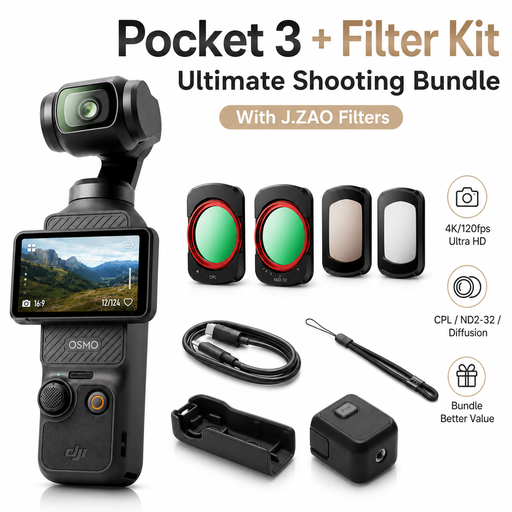
DJI Osmo Pocket 3 Standard Combo with J.ZAO Filter Kit
Could be worth considering if you’re looking for a compact video camera; check how it can be mounted and positioned at your modelling table.
The product title lists 4K/120 fps and a mechanical 3-axis gimbal. According to the product description, the bundle includes CPL, ND, UV and Black Mist filters.
View at Joybuy
 No image available
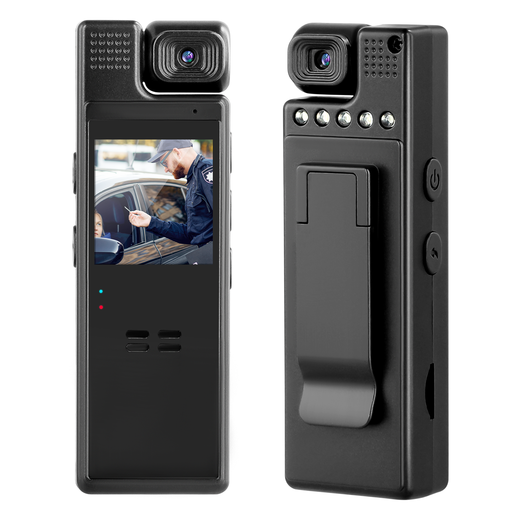
Compact camera with 1080p video and rotating lens
Could be worth considering for longer recordings if the stated recording time suits your session; test the setup and positioning at your table.
The product description lists 1080p video, a recording time of 8–10 hours and a lens that can be rotated manually through 180°.
View at Joybuy
 No image available
AOC 4K PRO webcam with Sony IMX363 sensor
Could be a good fit if you record on a computer and can position the webcam above your work surface. Check that the viewing angle gives you the view you want.
The product title lists a Sony IMX363 sensor, PDAF autofocus, a 75° field of view, and USB-A and USB-C.
View at Joybuy
 No image available
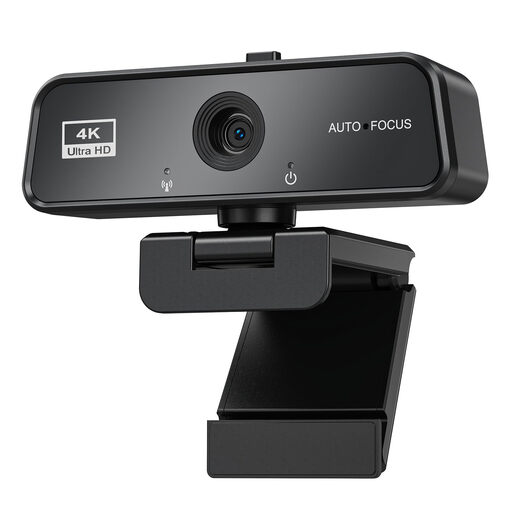
Maxineer 4K webcam with autofocus
Could be an option for recording on a computer if the connection and operating system suit your setup. Test the camera position and framing at your desk beforehand.
The product title lists 3840 × 2160 at 30 fps, autofocus, USB 3.0 and compatibility with Windows and Mac.
View at Joybuy
 No image available
Logitech ConferenceCam
Could be considered for recording on a computer if you can position the camera to suit your work surface. Check that the perspective and framing work for your modelling.
The product description lists HD video at 1920 × 1080 pixels, autofocus, and pan, tilt and zoom functions. It also lists a USB-A connection and a remote control.
View at Joybuy
Frequently asked questions
Is a 4K camera enough to show fine clay textures?
No. Also check the focusing distance and how large your subject appears in the frame from the camera position you’ll actually use. Manufacturer information on focus range and, for a macro lens, magnification describes different features from video resolution.
How should I set up a camera in a spare room?
First, measure your work surface, allow for your hand movements and check the distance to your planned camera position. Take a test recording to check the framing. If you’re using a USB document camera, make sure the computer connection and camera position work in your workspace.
How can I judge clay colours more accurately in changing light?
Test the room’s actual lighting with a neutral reference object in frame, and check the white balance on your chosen camera. Look for banding in the test recording too; Sony notes that how effective the available anti-flicker settings are depends on the recording conditions.
What extra equipment should I check for my recording setup?
For a mirrorless camera, check what’s included and whether you’ll need an extra lens or mount. Service details apply to the specific model: IPEVO states that the V4K PRO comes with a three-year manufacturer’s warranty from the date of purchase.


