First, choose a label material suited to how the bottle will actually be used. Then pick a device that can print it at a width that’s easy to read. A handheld label maker is ideal for short labels without a smartphone, while app- or PC-connected devices offer different ways to enter text. Manufacturers’ claims about tape resistance don’t necessarily apply to every cleaning product, and printing a product name yourself doesn’t replace any required warnings or instructions.
Who this choice matters to
Frequent bottle labellers
If you handle or wipe down cleaning bottles regularly, it’s important that the label remains readable. Brother Germany and DYMO describe the properties of certain tapes for this kind of use; their claims apply to the specific tape types mentioned.
Safety-conscious organisers
If you need to tell several products apart, a name label shouldn’t cover any existing warnings or instructions. The Federal Institute for Occupational Safety and Health and gesund.bund.de explain the risks of incorrect labelling and confusion between products.
Occasional home office users
If you only need to label a few bottles, the way you enter text can be a practical deciding factor. Brother Germany lists a QWERTZ keyboard for the PT-H110, while Brother and DYMO also offer devices that let you enter text on a connected device or directly on the label maker.
What to look for when buying
| What matters |
What to check before buying |
Who it matters most to |
| Readability when exposed to moisture and rubbing |
Choose the tape material and compatible cassette together. If needed, check that it sticks and remains readable in the conditions you expect it to face. |
If I wipe bottles down often, I want to be able to read the label afterwards. Around 33% of consumers prioritise a durable label. |
| Clear labelling |
Measure the available space and check that the product name and any required information will fit without covering existing details. |
If you need to distinguish between several cleaning products, you need a clear label that doesn’t obscure important information. Around 27% of consumers put clear labelling first. |
| Entering text on the device or in an app |
Decide whether you want to label bottles without a smartphone, and check how text is entered on the specific model. |
If I only print short names now and then, entering text directly on the device may be enough. Around 20% of consumers prioritise simple text entry. |
| Compatible supplies |
Compare the tape or cassette type, compatibility and usable length for the labels you plan to print. |
If I want to restock on suitable tape or rolls easily, the material needs to be compatible with the device. Around 20% of consumers focus mainly on supplies. |
Common buying mistakes
-
Assuming wipe resistance means resistance to every cleaning product
Claims from Brother Germany and DYMO apply to specific tape ranges and the conditions described. They don’t prove that every label will stand up to every cleaning product or bottle surface.
Check that the specific tape is compatible with your device and intended use. If needed, test how well it sticks and remains readable in the conditions you’ll actually use it in.
-
Covering safety information with a name label
Confusing household chemicals or using them incorrectly can have health consequences. The Federal Institute for Occupational Safety and Health explains labelling requirements where they apply.
Keep any existing warnings and instructions readable. Check separately what labelling is required for the specific bottle and how it will be used.
-
Choosing a device without checking the tape
The PT-H110, LetraTag and D1 Durable use different supplies. Information from Brother Germany and DYMO doesn’t indicate that their cassette systems are interchangeable.
Compare the device and compatible material together, and check the exact tape type before buying.
Key brands at a glance
Brother
A good choice for short labels printed on the device itself, or labels designed using a smartphone or PC. The models featured here use TZe tapes.
- Brother Germany promotes laminated TZe tapes as resistant to wiping and chemicals.
- The PT-H110 handles TZe tapes up to 12 mm wide, while the CUBE Plus handles tapes up to 24 mm wide. These specifications don’t prove resistance to every cleaning product.
DYMO
The LetraTag 100H is an option for simple labels printed directly on the device; D1 Durable is a separate tape for compatible LabelManager devices.
- DYMO promotes D1 Durable as resistant to moisture and household cleaners.
- This claim doesn’t apply to LetraTag tapes. DYMO describes LetraTag plastic labels as wipeable, not as resistant to every cleaning product.
NIIMBOT
The B1 is a thermal label printer option if your bottle has enough flat space for a longer label.
- NIIMBOT lists label widths of 20 to 50 mm for the B1.
- The width doesn’t tell you how well a label will stick to a curved bottle or how resistant that specific label is to the cleaning product you use.
Joybuy products for labelling
This selection features mobile label printers with Bluetooth or app-based input for home office labelling. Before buying, check that the label width and material are suitable for your bottle and intended use.
 No image available
Phomemo M110 Label Printer
A good choice if you want to design product labels in an app and print them via Bluetooth.
The description lists label widths of 20 to 50 mm, a Print Master app and a rechargeable battery. A label roll is listed in the product name.
View at Joybuy
 No image available
Phomemo P15 2-in-1 Satin Ribbon Printer
An option if you want to design labels or personalised ribbons using a connected device.
The description lists Bluetooth and use with a smartphone, tablet or PC via the Print Master app. A label tape is included in the standard package.
View at Joybuy
 No image available
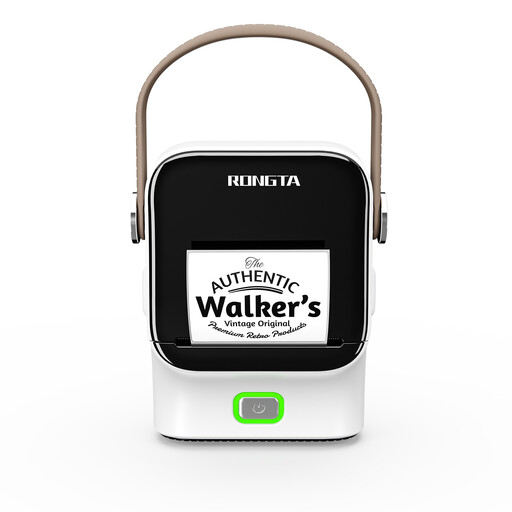
Rongta R22 Bluetooth Label Printer
A good choice if you want to design labels in an app and need a wider roll.
The description lists Bluetooth, app control and roll widths from 16 to 54 mm; the maximum print width is stated as 48 mm.
View at Joybuy
 No image available
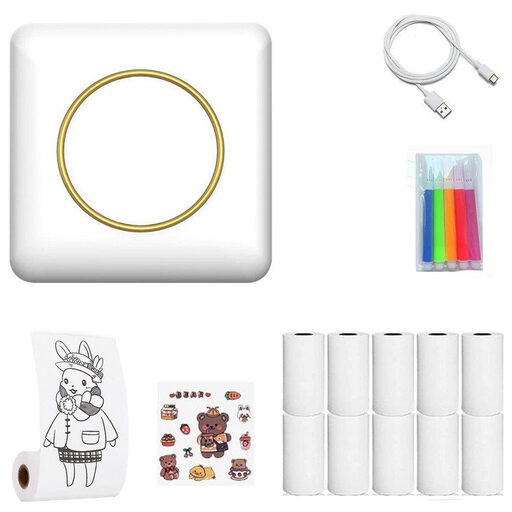
Portable Bluetooth Thermal Printer
An option if you want to connect a portable device to your mobile phone to print short labels.
The description lists thermal printing, Bluetooth and a built-in tear bar. Labels, notes and lists are listed as print options.
View at Joybuy
 No image available
Phomemo D30 Bluetooth Creative Label Printer
A good choice if you want to design labels at home or in the office using a smartphone or tablet.
The description lists Bluetooth, a rechargeable battery and app features for text, symbols and QR codes. A label roll is listed in the product name.
View at Joybuy
Frequently asked questions
Is a label with the product name enough if I pour a cleaning product into another bottle?
No. It’s not a blanket substitute for warnings and instructions. Check the information on the original container and don’t cover any existing hazard information. Whether a specific relabelled bottle needs particular, complete labelling depends on factors including whether it’s for private use, used as part of work or being placed on the market. The Federal Institute for Occupational Safety and Health explains labelling requirements where they apply.
Do the same labelling rules apply in a private home office as in a workplace?
You can’t determine that from the term ‘home office’ alone. The Federal Institute for Occupational Safety and Health distinguishes between labelling before a product is placed on the market and labelling in the workplace. To answer the question for a specific case, you need to establish whether the bottle is being used as part of a work activity.
Can I use paper tape on a bottle that’s wiped down regularly?
Don’t choose paper tape for this purpose without checking it first. The DYMO LetraTag 100H supports different materials, including paper and plastic; DYMO specifically describes its LetraTag plastic labels as wipeable. Check the specific tape and how well it sticks to the bottle.
What can I do if the print is faint or the tape jams?
First, check the cassette and tape feed, then follow the cleaning instructions for your specific device. DYMO recommends cleaning the LetraTag if labels jam or print quality is poor. Sharp tools can damage the feed roller.


