What should you look for when buying?
First, check that the microphone and recording device are compatible. Then use positioning and a test recording to strike the right balance between a clear voice and preserving the atmosphere of the room.
| What matters |
What to check when buying |
Who should consider this? |
| Clear speech |
Attach the microphone close to the speaker; listen to a test recording made where you plan to record, with the fan running. |
If I want every word to be clear despite the fan, I’ll check the position and sound first; around 36 % of consumers prioritise speech intelligibility. |
| Device compatibility |
Check your device model, microphone input, the required plug standard and, if necessary, an adapter. |
If you want to record with a smartphone, camera or recorder you already own, you’ll need a compatible signal path; around 29 % of consumers prioritise the connection to their recording device. |
| Preserving the room sound |
Compare test recordings using your intended microphone position and, if available, with noise reduction switched on and off. |
If I want to keep the atmosphere of the club audible, I don’t want to filter out the background without checking first; around 21 % of consumers prioritise preserving the background sound. |
| Movement and number of transmitters |
Decide whether one or two people will be speaking; check the number of transmitters, the receiver and the connection to your recording device. |
If I want to move around while recording or capture two voices at once, I’ll check the set configuration carefully; around 14 % of consumers prioritise freedom of movement or recording two speakers. |
Joybuy products for recording
The following Joybuy products cover both wired and wireless voice recording. With wireless sets, the number of transmitters and a compatible connection to your recording device are key considerations.
 No image available
DJI Mic Mini 2S (2 TX + 1 RX + Charging Case)
A suitable set option for recording two people, each mic’d up at close range at the same time.
The product details list two transmitters, one receiver, a charging case, internal 32-bit float recording and two-stage noise reduction. Test the noise reduction at your recording location and check that the receiver is compatible with your device.
Joybuy
 No image available
SYNCO S8 Lavalier Microphone
This wired microphone may suit a fixed, single-person recording if it’s compatible with the signal path to your device.
The product description lists a 3.5 mm connection and adapters for iOS, Android and desktop devices. Check which connection and adapter you need for your specific device model before buying.
Joybuy
 No image available
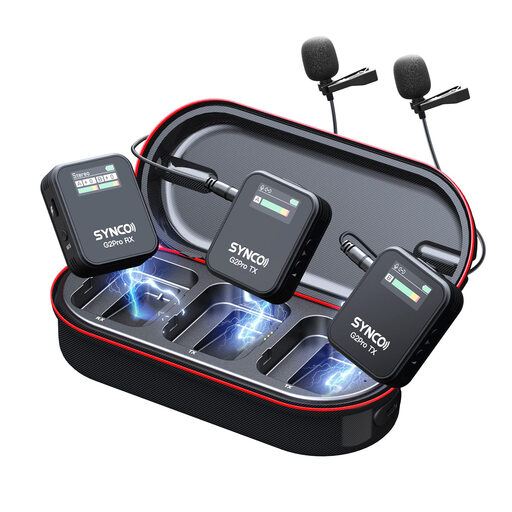
SYNCO G2(A2) Pro
This wireless option may suit you if the speaker needs to move around while recording.
The product description lists 2.4 GHz transmission, automatic pairing, three recording modes and adjustable noise reduction. Check how many transmitters and receivers are included, and how the set connects to your recording device. The best way to assess how it handles fan noise is to listen to a test recording.
Joybuy
 No image available
Wireless Lavalier Microphone Set with 2 Transmitters, 2.4 GHz, USB-C and Lightning
A set with two transmitters may suit you if you want to record two people at the same time and it’s compatible with your recording device.
The product details list 2.4 GHz, two transmitters, and USB-C and Lightning connections. Check which connection is intended for your specific smartphone or camera. The stated noise reduction isn’t independent evidence of how well it will handle a fan.
Joybuy
 No image available
Moman M1CXT, USB-C, 2TX+1RX
This set may suit you if you want to record two speakers using a compatible USB-C Android smartphone.
The product title lists two transmitters, one receiver and a range of 150m. The product description also mentions DSP noise reduction. Test how it handles fan noise in the room where you plan to record.
Joybuy
Frequently asked questions
Will a clip-on microphone remove fan noise?
No, not automatically. RØDE says that placing the microphone close to the speaker and further away from the source of the noise can help, but it won’t necessarily remove all background noise. Listen to a test recording made where you plan to record.
How should I attach and test the microphone before recording the anniversary message?
Attach the microphone close to the speaker and make a short test recording with the fan running. Make sure clothing or cables don’t rub against the microphone when you move. For wireless sets, also check the connection and battery level; for wired models, check that you have the right microphone input.
Do I need two transmitters to record two people speaking at the same time?
If you want to record each voice with its own microphone at close range, choose a set with two transmitters. DJI specifically offers Mic Mini versions with either one or two transmitters.
What should I do if the product is faulty after purchase?
If you buy from a trader in the EU, you’re covered by statutory rights if the product is faulty. The EU’s Your Europe information site states that the minimum guarantee period is two years from receipt of the goods. This is separate from any additional manufacturer’s warranty. Contact the seller if there’s a problem.
Can private conversations in the background be recorded and published?
Buying a microphone doesn’t in itself give you blanket permission to do so. The BfDI explains that processing personal data requires a legal basis, and that consent must be informed and freely given. A 2019 report by the Research Services of the German Bundestag describes the protection of non-public spoken words under § 201 StGB. Whether this applies to a particular background conversation depends on the circumstances. Avoid recording private conversations unintentionally, and discuss your plans to record and publish with the people involved beforehand.


