Which microphone is right for you?

Practising alone at a shared desk

If you want to record your own pronunciation, a microphone worn close to the body is a sensible place to start. However, it won’t necessarily block out background noise. Nuremberg University of Applied Sciences explains that a clip-on microphone mainly picks up the voice of the person wearing it.

Practising with a smartphone or laptop

The key is whether your specific device supports the microphone input used by your chosen model: USB-C, 3.5 mm TRRS and 3.5 mm TRS are different connection types. Sennheiser and RØDE list different connections for their respective models.

Practising in pairs

If you want to record both voices, for example during a question-and-answer exercise, allow for one microphone per person or choose a set with two transmitters. Nuremberg University of Applied Sciences describes a clip-on microphone worn close to the body as suitable for recording one person.

What should you look for when buying?

Wired USB-C lavalier

Best if: you’re recording alone at your desk and your device supports the connection.

Trade-off: The cable limits your movement and needs to be positioned so it doesn’t rub against your clothes.

Wired TRRS or TRS lavalier

Best if: you’ve confirmed that your recording device has the relevant microphone input.

Trade-off: TRRS and TRS aren’t interchangeable; some device combinations require an adapter.

Wireless set with one transmitter

Best if: you want to move around while speaking or don’t want a cable running to your recording device, and you’re recording your voice alone.

Trade-off: The transmitter and receiver need to be charged and paired correctly. Noise cancellation is no substitute for a test recording.

Wireless set with two transmitters

Best if: two people are taking part in the same exercise and you want to record both voices.

Trade-off: Check exactly what’s included and whether the set supports the recording mode you need; two transmitters don’t automatically mean separate audio tracks.

Buying priority What to look for Who is it important to?
Your voice, despite background noise Attach the microphone close to your body, avoid rubbing against clothing and test it with the settings you’ll actually use. If I want to assess my pronunciation at a shared desk, I need a clear recording of my voice without assuming that other people’s voices will disappear. Around 36 % of consumers put this first.
The right connection for your device Check the specific microphone input and receiver connection, and whether you’ll need any adapters. If I want to record with my smartphone or laptop, the microphone needs to work as an input. Around 29 % of consumers prioritise compatibility with their device.
Recording two voices Check the number of transmitters, what’s included and the recording mode you need. If we’re practising pronunciation in pairs, I want to record both people clearly. Around 21 % of consumers prioritise capturing both voices.
Freedom to move Consider whether a cable will do or whether you need a wireless set with a compatible receiver; compare battery-life claims only under the stated conditions. If I want to move around while speaking or keep my distance from the recording device, a cable could get in the way. Around 14 % of consumers put freedom of movement first.

Common buying and usage mistakes

  • Assuming noise cancellation blocks out everything

    A manufacturer’s claims about noise reduction don’t prove that it will reliably remove other voices at a shared desk or preserve subtle details of your pronunciation.

    Wear the microphone close to your body and test a recording using the settings you’ll actually use.

  • Treating TRS, TRRS and USB-C as interchangeable

    These connections are different. For the TRRS smartLav+ used with a Wireless GO II transmitter, RØDE specifies a TRRS-to-TRS adapter as a necessary connection.

    Check your device’s microphone input against the connection type of the exact model, and find out whether you need an adapter.

  • Overlooking the number of transmitters and the receiver in a wireless set

    A receiver that can connect to two transmitters doesn’t automatically mean that the set on offer includes two transmitters. Two transmitters also don’t guarantee separate, editable audio tracks.

    Check what’s included and which recording mode is supported if you want to record two voices.

  • Ignoring clothing noise and other people’s conversations

    Contact with fabric or jewellery can spoil a recording. Section 201 of the German Criminal Code also sets a legal limit on recording another person’s private conversations without authorisation.

    Attach the capsule so it doesn’t touch fabric, and make sure you don’t record other people’s conversations without permission.

Brands and suitable product ranges

Sennheiser

The XS Lav USB-C is a wired option for recording a single voice on compatible mobile devices and computers.

  • The official product page lists USB-C, a 2 m cable, a clip and a windscreen.
  • The cable limits your movement. Check compatibility with your specific device and recording app.

RØDE

The smartLav+ and Lavalier GO use different connection types: TRRS for the smartLav+ and TRS for the Lavalier GO.

  • RØDE lists the connection types for compatible devices and TRS microphone inputs.
  • For the smartLav+ connected to a Wireless GO II transmitter, RØDE specifies an additional TRRS-to-TRS adapter. Check your exact device combination.

DJI

The Mic Mini is an example of a wireless microphone system whose receiver can connect to up to two transmitters, according to DJI.

  • DJI lists two levels of noise cancellation and the ability to connect one receiver to up to two transmitters.
  • Noise cancellation doesn’t independently prove that subtle details of your pronunciation will be preserved or that other people’s voices will disappear.

BOYA

The BY-V20 is an example of a wireless configuration with two transmitters and one USB-C receiver.

  • The BOYA manual describes two transmitters for the BY-V20 configuration.
  • Check compatibility with your specific device and the recording mode you need.

Hollyland

The LARK M2 is a wireless option with a clip-on transmitter for anyone who doesn’t want a cable running to their recording device.

  • Hollyland lists noise cancellation and up to 10 hours of operation per transmitter on a single charge.
  • These are manufacturer claims. Check the set variant and receiver connection, and make sure the processing suits your pronunciation practice.

Joybuy products at a glance

The following Joybuy products include a wired lavalier, as well as wireless lavalier microphones and microphone systems. Before buying a wireless set, check the receiver connection, number of transmitters and frequency details.

SYNCO S8 lavalier microphone for smartphone, PC, laptop and camera

SYNCO S8 lavalier microphone for smartphone, PC, laptop and camera

Listed as a wired lavalier for smartphones, PCs, laptops and cameras; check that your device supports a compatible 3.5 mm microphone input.

Joybuy

Moman MS1X(C) wireless lavalier microphone, 2.4 GHz, USB-C for Android, 2 transmitters and 1 receiver

Moman MS1X(C) wireless lavalier microphone, 2.4 GHz, USB-C for Android (2 TX + 1 RX)

Listed with two transmitters and one USB-C receiver, making it worth considering if two people will be taking part in the exercise. The title specifies USB-C Android smartphones as compatible devices, so check compatibility with your specific model.

Joybuy
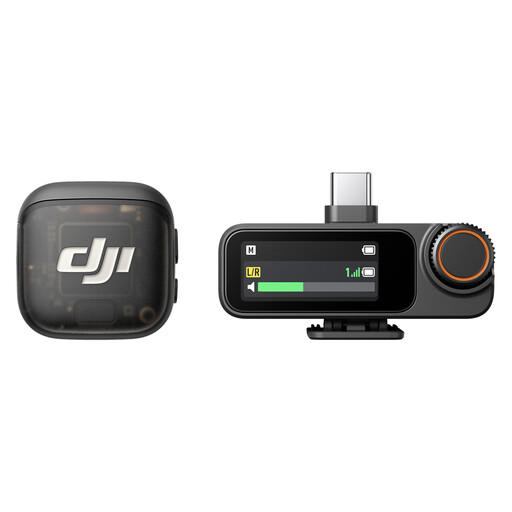
DJI Mic 3 set with 1 transmitter and 1 receiver

DJI Mic 3 (1 transmitter + 1 receiver)

The listed configuration, with one transmitter and one receiver, is designed for one speaker. The title lists iPhone, camera and Android as compatible devices; check that the receiver connection matches your recording device.

Joybuy
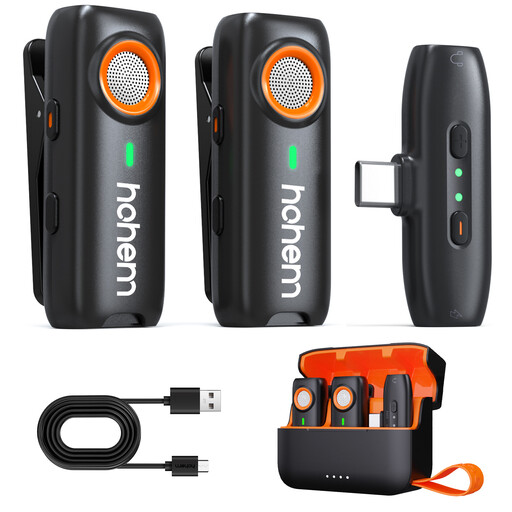
hohem wireless lavalier microphone with TF card recording

hohem wireless lavalier microphone with TF card recording

The product description lists TF card recording as a local backup option; the card isn’t included. Also check that the receiver connection works with your recording device.

Joybuy
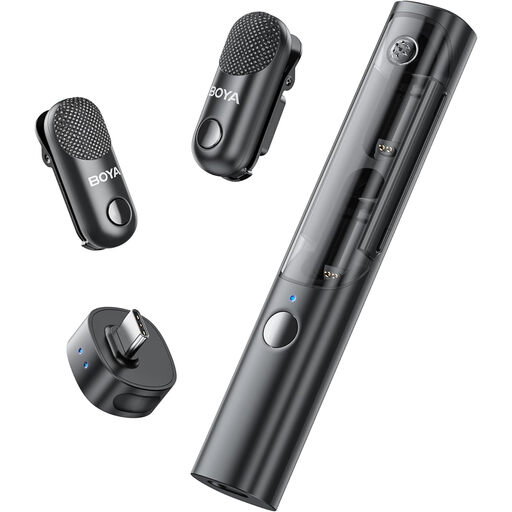
BOYA Magic-05 USB-C wireless lavalier microphone, 2 transmitters, 1 receiver and charging case

BOYA Magic-05 USB-C wireless lavalier microphone (2 TX + 1 RX + Charging Case)

The set is listed with two transmitters, one receiver and a charging case, so it’s an option if two people need to be recorded. Check that USB-C and the included receiver are compatible with your specific device.

Joybuy

Frequently asked questions

Can a single clip-on microphone record both people equally well at a shared desk?

You shouldn’t count on it: Nuremberg University of Applied Sciences describes a clip-on microphone worn close to the body as suitable for recording one person. If both voices matter, plan for one microphone or transmitter per person.

How should I attach the microphone for a short pronunciation test?

Attach it close to your body, making sure the capsule or foam cover won’t rub against clothing or jewellery as you speak. Record a test sentence in the conditions you’ll actually be using it in, and listen for clarity and any rubbing noises.

Do I need an adapter to use the smartLav+ with a Wireless GO II transmitter?

Yes. RØDE specifies a TRRS-to-TRS adapter such as the SC3 to connect the TRRS smartLav+ to this transmitter’s TRS input. This applies to this particular device combination, not to all smartphones.

Can I secretly record other people’s conversations at a shared desk?

No. Under Section 201 of the German Criminal Code, recording another person’s private conversations without authorisation is a criminal offence. If other people’s conversations could be picked up, check that you have permission first or choose a recording situation where they won’t be captured.

Does a wireless microphone in Germany always need an individual frequency allocation?

Not necessarily. The Federal Network Agency provides general allocations with specified frequency ranges and conditions. Check the details of your specific wireless set against the current allocation; Decision 37/2026 of 15 April 2026 superseded the older microphone allocations mentioned in it.