What should you consider when choosing?
Wired lavalier
A good fit if: the speaker stays seated and the input and cable length suit the device you already have.
Things to consider: You’ll need to route the cable, and an adapter may be required depending on the connection.
Wireless set with transmitter and receiver
A good fit if: the speaker moves around or a cable to the recording device would get in the way.
Things to consider: Check the receiver connection, what’s included in the set, the connection itself and the charge level before recording.
Body-worn recorder
A good fit if: you want to record the voice locally, independently of a smartphone or camera some distance away.
Things to consider: Recording this way involves extra steps for storage and file transfer.
For a seated museum talk, start by making sure the voice is clear and the microphone can be positioned without anything getting in the way. The connection, recording workflow and freedom of movement will then help you choose the right setup.
| Consideration |
What to check before buying |
Who is it most relevant to? |
| Clear voice |
Clip and mounting position; listen back to a test recording wearing the clothes you plan to use. |
If I want the voice to stay clear even when the speaker is seated, I’ll attach the microphone where clothing won’t rub against it. Around 36% of consumers put clear speech and suitable positioning first. |
| Compatible connection |
Check the recording device model and input; consider any power supply or adapter needed. |
If I want the microphone to work directly with the device I already have, I’ll check its exact input rather than just the plug size. Around 29% of consumers prioritise a connection that suits their recording device. |
| Controlled recording workflow |
Plan for a test take, power supply, storage and file transfer. |
If a talk can’t easily be repeated, I want a clear recording and file workflow. Around 21% of consumers put control over the recording first. |
| Freedom of movement |
For wireless, check that the set includes a transmitter and a compatible receiver; test the connection and charge level. |
If the speaker moves from their usual position or a cable gets in the way, I want to connect to the recording device without a cable. Around 14% of consumers prioritise freedom of movement and a cable-free recording setup. |
Joybuy products for this recording setup
The Joybuy products below include a wired lavalier microphone and wireless sets with different transmitter configurations and device connections. The key is to make sure the specific connection suits your recording device.
 No image available
SYNCO S8 lavalier microphone for smartphone, PC, laptop and camera
For recording a single seated voice, attaching the microphone with the clip described is one possible solution.
Check that the 3.5-mm connection and adapter kit described are compatible with your recording device.
View at Joybuy
 No image available
Moman M1CXT, USB-C, 2TX+1RX
If a cable to the recording device would get in the way, this wireless set may be an option. Check that the USB-C recording connection is suitable.
The product title specifies 2.4 GHz, two transmitters and one receiver, as well as a range of 150m.
View at Joybuy
 No image available
Moman M1CT, USB-C, 1TX+1RX
This set includes one transmitter for recording a single seated speaker. Its wireless connection can avoid a cable to the recording device.
The product title specifies USB-C and a range of 150m. Check that the connection is compatible with your recording device.
View at Joybuy
 No image available
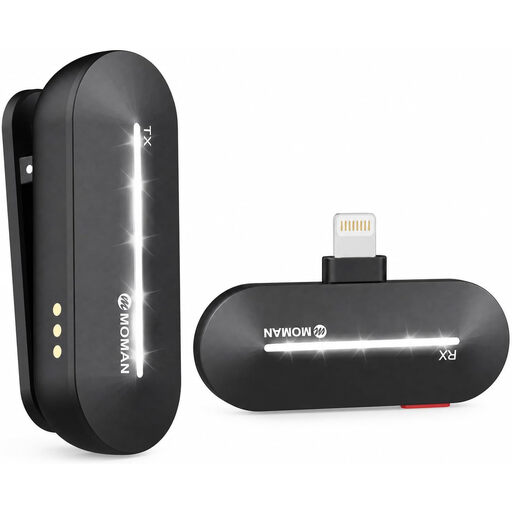
Moman M1CL, iPhone 14/13/12/11/X, 1TX+1RX
If you want a wireless recording setup, the product title says this set is designed for the iPhone models listed.
One transmitter and one receiver; check your specific device against the stated model range.
View at Joybuy
 No image available
Moman MC1(C), USB-C, 1TX&1RX
If a wireless connection to the recording device is important, this set may suit a compatible USB-C phone.
The product title specifies 2.4 GHz, one transmitter and one receiver. Check that your device is compatible with the stated recording connection.
View at Joybuy
Frequently asked questions
Where should I attach the microphone when someone is speaking while seated?
RØDE Microphones recommends starting at the chest, about a hand’s breadth or 20–30 cm from the mouth. Keep the capsule clear of clothing that could rub against it, and test it while sitting in the position you’ll be using.
Can I connect a smartphone lavalier directly to a camera?
Not just because the plugs are the same size. RØDE Microphones specifies a TRRS connection for the smartLav+ and a TRRS-to-TRS adapter for the connection to the Wireless GO described here. Check the specific microphone input on your camera or recorder.
What should I plan for power and file handling?
It depends on the setup. BOYA specifies an LR44 battery for the BY-M1 in camera mode. With a Zoom F2, you’ll need to plan for power, suitable storage and transferring the file afterwards. For a wireless set, also check which transmitters, receivers and charging options are included in the version you choose.
Can the museum simply record and publish a volunteer’s talk?
No, you shouldn’t assume that. Section 201 of the German Criminal Code (StGB) prohibits the unauthorised recording of another person’s non-public spoken words. Before processing an identifiable voice or planning to publish it, the museum must establish the relevant legal basis and specific purpose. According to the German Data Protection Conference, consent must be freely given, informed and specific to the particular case. Whether another legal basis applies in an individual case depends on the circumstances.


