Who this buying guide is for

Clubs with widely spaced seating

If guests will also be sitting to the sides of the screen, assess the size and picture quality from the seats at the edges, not just from the centre. The Verbraucherzentrale and RTINGS.com list viewing distance and angle as important factors when assessing picture quality.

Clubs with a brightly lit event space

If windows or hall lighting can’t be dimmed enough, check for reflections and make sure both bright and dark scenes are easy to see at the planned viewing location. The Verbraucherzentrale highlights lighting conditions as a factor in choosing the right screen size and picture quality.

Clubs with existing film files

If you’re showing your own anniversary films, check in advance that the playback method, file formats and audio all work together. LG Deutschland notes that supported file extensions and codecs can vary between TV models.

What to consider when buying

OLED TVs

Suitable if: The seats are spread out and you can control the room lighting during the screening. Check the specific model from the seats at the edges.

Trade-off: The technology label alone doesn’t tell you how clearly the picture will remain visible in a bright room or under direct lighting. You’ll also need to test playback of your film files separately.

LCD with Mini LED backlighting

Suitable if: The screening will take place in daylight or under lighting that can’t be fully dimmed, and you can check the brightness and reflection handling of the specific model.

Trade-off: Mini LED and advertised HDR brightness don’t show how the picture looks from seats to the sides. Compare viewing-angle measurements for the specific model instead.

LCD with a wide viewing angle

Suitable if: Many guests will be sitting to the sides and you can compare LCD TVs using measurements for each specific model.

Trade-off: RTINGS.com describes IPS LCDs as having wider viewing angles than VA LCDs, while VA LCDs generally offer higher contrast but narrower viewing angles. Panel type and implementation can vary by model.

Priority What to check when buying Who is it important to?
Visibility from the back Measure the furthest viewing distance and available space before comparing screen sizes. For HDTV, the Verbraucherzentrale gives 2.40 to 3.10 m as a guide for a 65-inch (163 cm) screen, not as a fixed rule for every hall. If I want to make sure people and on-screen text are still clear from the back row, the screen size needs to suit the viewing distance. Around 25% of consumers put visibility from the back first.
Picture from the side Check the specific model from the seats furthest to the sides, or compare viewing-angle measurements. RTINGS.com treats viewing angle as a separate picture quality factor. If guests will be sitting well to the sides, I want to know whether colours, brightness and contrast still look good from those seats. Around 25% of consumers prioritise picture quality from side seats.
Playing film files Test the complete original files, including audio and subtitles, on the device you plan to use. LG Deutschland notes that file formats and codecs vary by model; if you’re using an external player, check that you have the required connection too. If we’re showing our own anniversary films, I want to be sure that picture and sound work with the planned playback method. Around 20% of consumers put playback of their existing films first.
Visibility in room lighting Check for reflections and make sure dark scenes are visible at the planned viewing location. Compare model-specific measurements for reflections and brightness rather than relying on advertised peak figures alone. If windows or hall lighting can’t be dimmed enough, I need to assess the picture in the actual lighting conditions. Around 15% of consumers prioritise visibility in room lighting.
Sound and running costs Test the sound with typical film scenes at the venue and check whether your existing speakers can be connected. Also compare the energy labels for the specific models; the Verbraucherzentrale notes that larger screens generally use more electricity. If lots of guests need to understand the dialogue, I want clear sound and to make sure existing equipment can be connected without unnecessary hassle. Around 15% of consumers put sound and manageable running costs first.

Avoiding buying pitfalls

  • Comparing screen size alone

    Screen size, viewing distance, room lighting and viewing angle all affect how clearly people can see the films. A larger TV also usually needs more space and generally uses more electricity, as the Verbraucherzentrale explains.

    Mark out the seating positions and assess the screen size and picture from the least favourable seats before deciding on a screen size.

  • Assuming OLED or Mini LED guarantees a good view from every seat

    The technology label alone doesn’t guarantee a good view from the side or low levels of reflection. With LCD TVs, viewing angle and contrast can vary depending on the panel type and model.

    For the exact model, compare both side-on picture quality and how well it handles reflections at the planned viewing location.

  • Assuming a USB port means films will play

    Even if a storage device is recognised, playback may not work if the video or audio format isn’t supported. LG Deutschland notes that file extensions and codecs vary by model.

    Before the event, test every original file you need, including audio and subtitles. Depending on the playback method, you may need an external player or adapter.

  • Confusing buying a TV with having screening and music rights

    Buying a TV doesn’t establish whether a particular club film can be shown publicly at an event. Using other people’s music in films you’ve produced yourself may require separate rights clearance.

    Check the nature of the event, film rights and, where relevant, music rights separately from your choice of equipment. Section 15 of the UrhG and GEMA’s guidance on music in film productions are useful starting points.

    Checking this may involve additional organisational work; what’s required will depend on the film and the event.

Brands and model ranges to consider

LG

OLED model ranges may be worth considering for widely spaced seating, provided you can control the room lighting.

  • For the German OLED65C5ELB model, LG lists a 65-inch screen, 4K OLED and webOS 25.
  • These specifications don’t show how clearly the picture can be seen from your club’s seats. LG Deutschland also notes that USB playback file formats and codecs vary by model.

TCL

The QD Mini LED range is one option to consider for a brightly lit room.

  • TCL lists the 65C7K as a 65-inch QD Mini LED TV.
  • The manufacturer’s claims about local dimming and HDR brightness don’t independently show how the picture looks from the seats at the edges.

Samsung

The GQ65S90FATXZG is a specific 65-inch OLED model to include in your comparison.

  • Samsung lists this model as OLED and 4K.
  • The model specifications are no substitute for testing it in the room you plan to use or checking your own film files.

Sony

The BRAVIA 8 II K-65XR8M2 is another OLED model range to consider when comparing screen sizes and features.

  • Sony lists a nominal screen size of 65 inches for this model.
  • Screen size alone doesn’t tell you how clearly your existing films will be visible from your particular seats or whether they’ll play back compatibly.

Joybuy products for club film screenings

The models below include OLED TVs and a 65-inch QLED Mini LED model. Match screen size and picture quality to the viewing distance, side seats and room lighting, and test your film files in advance.

LG OLED83C67LA 83-inch OLED TV

LG OLED83C67LA 83-inch OLED Evo AI 4K Smart TV

A large-screen option to consider if the seats are far apart; assess the picture from the seats at the edges too.

83 inches; OLED; 4K; Dolby Vision HDR.

View at Joybuy

LG OLED55B68LA 55-inch OLED TV

LG OLED55B68LA 55-inch OLED Gaming TV

A 55-inch option for a seating area where you can check the viewing distance and visibility from the back row before buying.

55 inches; OLED; 4K; 144 Hz according to the product name.

View at Joybuy

LG OLED77C67LA 77-inch OLED TV

LG OLED77C67LA 77-inch OLED 4K Smart TV

Worth considering if the viewing distance is greater; check the picture from seats at the back and to the sides.

77 inches; OLED; 4K; 120 Hz; energy efficiency class D; 2026 model year.

View at Joybuy
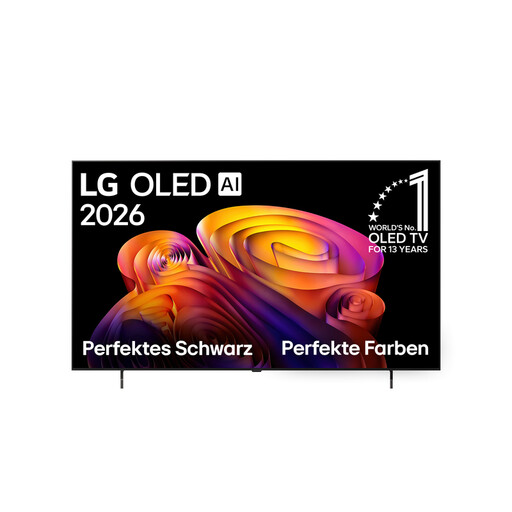
LG OLED65B68LA 65-inch 4K OLED TV

LG OLED65B68LA 65-inch 4K OLED Smart TV

A 65-inch option whose suitability you can assess based on the viewing distance and side seats in your event space.

65 inches; 4K; OLED; Dolby Vision; Dolby Atmos.

View at Joybuy
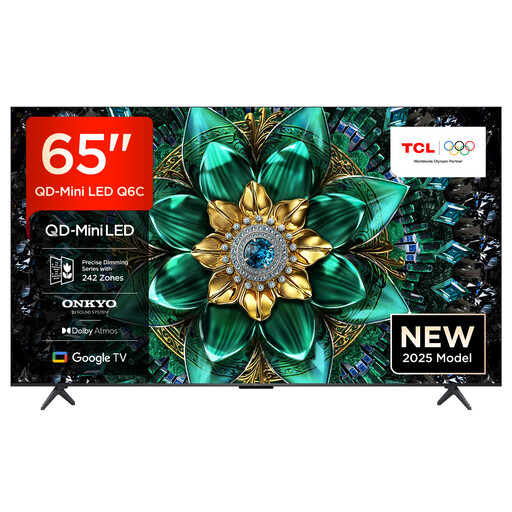
TCL 65Q6C 65-inch QLED Mini LED TV

TCL 65Q6C 65-inch QLED Mini LED TV

An LCD alternative to consider for a room with lighting; test reflections and picture quality from side seats on the specific TV.

65 inches; 4K; QLED Mini LED; Dolby Vision IQ; Dolby Atmos; Onkyo 2.1 sound system.

View at Joybuy

Frequently asked questions

Is 65 inches big enough for our audience?

The number of viewers alone won’t determine that. Measure the distance to the back row, check whether small details are clear and take side seats into account. The viewing-distance table from the Verbraucherzentrale is a guide for TV content of a particular quality, not a fixed rule for hall size.

Can the TV play our anniversary films directly from a USB stick?

A USB port alone doesn’t guarantee playback. The file system, file format and audio codec must be compatible with the specific TV; LG Deutschland notes that requirements vary by model. Test the complete original files with audio in advance, or check a laptop or player using the right input.

What should we consider when using older film playback equipment?

Older equipment may not have connections that your TV needs. The Verbraucherzentrale notes that newer TVs often no longer have a SCART socket. Check whether you need an adapter and test the whole connection before the event.

What running and connection costs should the club check?

Compare the EU energy label for the specific model and, if necessary, check the costs of delivery, connection or any audio and video cables you need. Without a specific quote, it isn’t possible to give a reliable figure.

Can we show club films at an anniversary celebration without checking rights first?

There isn’t a simple yes or no answer. Under Section 15 of the UrhG, a screening is public if it is intended for a number of members of the public; whether that applies to your particular event needs to be assessed based on the circumstances. Films you’ve produced yourself may also need rights clearance for any third-party music used in them; GEMA explains this separately. Buying a TV does not grant screening rights.