For club interviews, a lapel microphone placed close to each speaker, along with a test recording made while the fan is running, is the most sensible starting point. Noise reduction is no substitute for good microphone placement or the quietest possible recording environment. A wired microphone may suit a single speaker if the input and power supply are compatible; for two people speaking at the same time, you’ll need a set with two transmitters. A body-worn recorder or a wireless set with local recording offers another way to capture audio, but requires extra checks and file transfers later.
Who are these setups suitable for?
Archive team in a noisy club room
If you want to capture people’s stories while a fan is running, position the microphone close to the speaker and listen back to a test recording made in the actual room. Shure points out that being too far from the speaker can affect sound quality.
Team recording two-person interviews
If you want to record both the person telling the story and the interviewer, check how many transmitters and microphones are included in the specific package. DJI describes a Mic Mini version with two transmitters; according to RØDE, the Wireless PRO comes with two Lavalier II microphones.
Team with an existing recorder
If you want to keep using your existing recording device, check the microphone input, connector wiring and power requirements before buying. A 3.5 mm plug alone doesn’t guarantee compatibility.
What should you look for when buying?
Wired lapel microphone
Suitable if: One person does most of the talking in a fixed position and the recording device has a compatible, powered input.
Bear in mind: The cable, connection and power supply all need to be right; the lapel microphone doesn’t record a file itself.
Wireless set with clip-on transmitters
Suitable if: Two people need to wear microphones at the same time, or a cable would get in the way of the conversation.
Bear in mind: Check the exact transmitter configuration, receiver connection and wireless version. Test any noise reduction feature in the room where you’ll be recording.
Lapel microphone with body-worn recorder
Suitable if: You want to record one speaker locally, without relying on an active wireless transmission.
Bear in mind: Starting the recording, power, storage and transferring the file later are all part of the process; a single recorder is not a confirmed two-person set.
| What you need |
What to check when buying |
Who should pay particular attention |
| Clear speech despite fan noise |
Clip the microphone close to the speaker and listen to a test recording with the fan running. |
If I want to record club stories clearly despite fan noise, microphone placement is crucial. Around 36% of consumers prioritise clear speech when there’s background noise. |
| Recording two voices |
Check that the selected version actually includes two transmitters and the microphones you need. |
If the storyteller and interviewer are to be recorded at the same time, you need to account for both voices. Around 29% of consumers prioritise recording two people speaking. |
| Connecting to an existing device |
Check the connector wiring, microphone input and power requirements for the specific recorder. |
If I want to keep using my existing recorder, I need to make sure the connection is compatible. Around 21% of consumers focus above all on compatibility with their device. |
| Keeping a local copy of the recording |
Check the recording status, power supply and storage, and try exporting a test file. |
If the conversation would be difficult to repeat, I want to be able to check the recording itself and transfer it safely. Around 14% of consumers prioritise an additional recording backup. |
Common buying mistakes
-
Assuming noise reduction will make an interview completely noise-free
DJI lists fan noise as one use case for its noise reduction feature. That doesn’t tell you how clear a recording will sound in your particular club room; the distance from the speaker also matters.
Try the setting you plan to use with the fan running, then listen back to the recording. If possible, reduce the noise at source or move the microphone closer to the speaker.
-
Assuming a 3.5 mm plug is compatible without checking
The RØDE Lavalier GO has a TRS connection and requires plug-in power; the Shure MVL has a TRRS plug. Matching plug diameters alone isn’t enough to confirm compatibility.
Check the connector wiring, microphone input and power requirements for the specific recording device, and make a test recording before the interview.
-
Confusing a one-transmitter package with a two-transmitter one
DJI describes different Mic Mini versions for one or two people. A single transmitter isn’t a confirmed solution if you want to record two separate voices.
Check what’s included in the version you choose and test that both voices are recorded as intended.
-
Assuming 32-bit float filters out fan noise or applies to every file
According to RØDE, 32-bit float on the Wireless PRO applies to local transmitter recordings, not automatically to the camera file. The format also doesn’t remove fan noise.
Enable local recording, check an exported file and listen to the original audio to make sure the speech is clear.
Brands to consider
RØDE
The range includes everything from wired lapel microphones to a wireless set with local recording on the transmitters.
- According to RØDE, the Wireless PRO comes with two Lavalier II microphones; local transmitter files can be recorded in 32-bit float.
- According to the manufacturer, the Lavalier GO needs a compatible TRS input with plug-in power and doesn’t record a file itself.
DJI
The Mic Mini is a compact wireless microphone system; if you’re recording two people, the exact transmitter configuration matters.
- DJI describes a Mic Mini Combo with two transmitters and one receiver for recording two people.
- DJI’s information about noise reduction is based on the manufacturer’s claims. Check the results with a test recording in the room you’ll be using.
Shure
The MVL is designed for compatible mobile recording devices with a TRRS connection.
- Shure’s manual recommends positioning the MVL 15–25 cm from the mouth.
- Before using it with a TRS input, check full compatibility; the documentation doesn’t confirm that it automatically removes room noise.
Zoom
The F2 is a body-worn recorder with a lapel microphone for recording one speaker locally.
- According to Zoom, the F2 saves recordings to a microSD card and offers local 32-bit float recording.
- You’ll need to operate the recorder and transfer the file later; a single F2 isn’t a designated two-person set.
Sennheiser
EW-DP wireless sets are available with different lapel microphone options, including the ME 2 and ME 4.
- Sennheiser describes the ME 4 as a cardioid lapel microphone and an option for noisier environments.
- Suitability also depends on positioning and frequency version; the manufacturer’s description is no substitute for testing at your recording location.
Joybuy products for wireless recording
The selection below includes wireless microphone sets with specified transmitter configurations, as well as a camera audio bundle. Before the interview, check that the version you choose is suitable for one or two voices and works with your recording device.
 No product image available
DJI Mic Mini 2S (2 TX + 1 RX + Charging Case)
The two transmitters listed in the name make this relevant for a two-person conversation; check that the connection is compatible with your recording device first.
Version as listed in the product name: 2 TX, 1 RX and Charging Case.
View at Joybuy
 No product image available
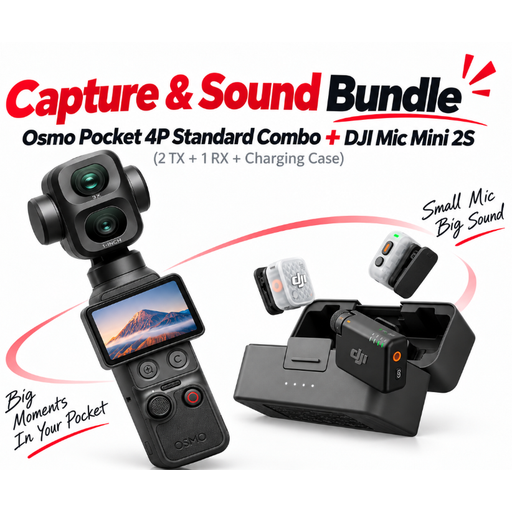
DJI Osmo Pocket 4P Pro Audio Bundle – Pocket 4P Standard Combo + Mic Mini 2S (2 TX + 1 RX + Charging Case)
This bundle may suit you if you’re looking for the camera named in the product title as well as the microphone set; it isn’t just a microphone set.
Version as listed in the product name: Pocket 4P Standard Combo and Mic Mini 2S with 2 TX, 1 RX and Charging Case.
View at Joybuy
 No product image available
Moman M1CXT Wireless Lavalier Microphone (USB-C, 2TX+1RX, 150 m range)
The listed configuration with two transmitters may suit a two-person interview, provided your recording device supports USB-C.
Product name: USB-C, 2TX+1RX and 150 m range.
Compatibility depends on the specific recording device; a stated range doesn’t guarantee a connection in the room you’ll be using.
View at Joybuy
 No product image available
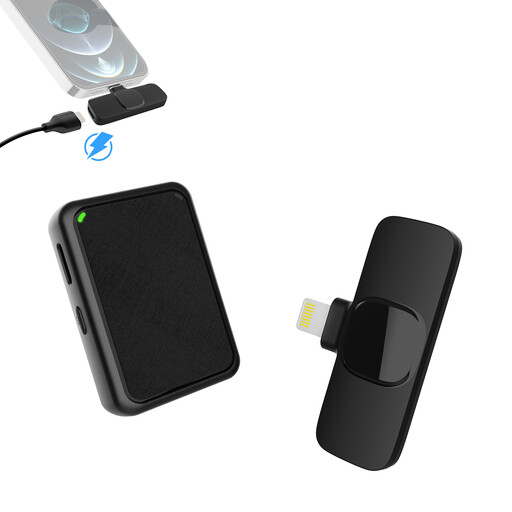
Moman MB1X(A) Wireless Lavalier Microphone (2.4GHz, 2TX&1RX, for iPhone)
The two-transmitter configuration listed in the name may suit recordings with two voices; check that the receiver is compatible with your specific iPhone.
Product name: 2.4GHz, 2TX&1RX and use with iPhone.
View at Joybuy
Frequently asked questions
Will a windscreen help with the sound of a fan in the room?
According to Shure’s manual, the windscreen on the Shure MVL is designed to deal with wind and plosive sounds at the microphone, not to prove that it will eliminate a fan in the room. Avoid directing air straight at the capsule and compare test recordings made with the fan running.
How should I position a lapel microphone for a speech recording?
For the Shure MVL, Shure recommends a distance of 15–25 cm from the mouth in its manual. This advice applies to that model and isn’t a universal rule; with the microphone you’re using, also check for clothing rustle and make sure the test recording is clear.
Do I generally need to register a frequency to use a wireless lapel microphone in Germany?
Not in every case: the Bundesnetzagentur lists general frequency allocations that allow use without registration or charges, provided their conditions are met. For your specific wireless set, check the frequency band, version and conditions of the applicable allocation; the product name alone won’t tell you.
Can I record club members and publish their stories without further ado?
You shouldn’t assume that you can: Section 201 of the German Criminal Code (StGB) covers, among other things, the unauthorised recording of privately spoken words and the sharing of a recording made in this way. Processing personal data also requires a legal basis under Article 6 of the GDPR; consent is one possible legal basis. So make sure you discuss the recording and how you plan to use it with the people involved beforehand.


