Designers working with lots of templates
If you keep images, text and your poster layout open side by side, workspace and window layout are important factors to consider. LG Deutschland lists the 34U650A-B as having a 21:9 aspect ratio.


If you want to see your poster design and several templates at the same time, start by looking at a wide 21:9 monitor and checking whether your software supports the window layout you need. For fine details or a regular print workflow, a 27-inch 4K model or a calibratable graphics monitor may be a better fit. Screen specifications alone cannot guarantee that colours will match in print.
If you keep images, text and your poster layout open side by side, workspace and window layout are important factors to consider. LG Deutschland lists the 34U650A-B as having a 21:9 aspect ratio.
If you need to assess club colours or designs for a specific print process, a consistent colour workflow matters more than a large screen alone. EIZO lists hardware calibration for the CS2740; the right output profile is also important for print.
Resolution and sensible scaling matter when you’re working with small text, logos and image crops. BenQ and Dell both list 4K resolution for the 27-inch models considered here.
First, decide what matters most when you’re designing: several open references, print colours, fine details or connecting your laptop.
| What matters | What to check before buying | Who it matters most to |
|---|---|---|
| Room for your design and templates | Compare the aspect ratio, native resolution, available desk space and the window layout you have in mind. | If I want to see my design, club details and image templates at the same time, I need a wide workspace that’s easy to divide up. Around 36% of consumers put working with multiple templates first. |
| Colours for poster printing | Check calibratability and the colour space you need, and match the document and output profiles to the printer and paper. | For regular print jobs, I want to assess colours under the intended print conditions rather than rely on a colour-space figure alone. Around 29% of consumers prioritise matching print colours. |
| Small text and image details | Consider native resolution and screen size alongside your preferred display scaling. | When I’m checking small text, logos and image crops, a clear view of the details matters more than having as many templates open as possible. Around 21% of consumers put checking details first. |
| Laptop connection | Check video transmission, cables, charging requirements and the USB-C port’s power output on the specific model. | If I want my laptop to send a picture and charge through a compatible monitor connection, I need to check that it’ll work beforehand. Around 14% of consumers prioritise the laptop connection. |
A colour-space coverage figure doesn’t describe the entire process from document to printed output.
First, check the print process and output profile. Then decide which calibration features your workflow requires.
Calibration and matching printer and paper profiles can add extra work.
The specified 21:9 WQHD model offers more horizontal window space than a 16:9 QHD model, while the 4K models described have more vertical pixels than 21:9 WQHD models.
Think about your actual window layout to decide whether working with several templates side by side or seeing your design in detail matters more.
Connections and power specifications vary by model. A USB-C port alone doesn’t tell you whether a particular laptop will receive video and power as you need it to.
Check your laptop, cable and the specifications of the specific monitor before relying on a single-cable connection.
The 34U650A-B and 34BA75QE-B are options if you need a wide workspace for several reference windows.
The DesignVue PD2705Q and PD2705U models let you choose between 27-inch QHD and 27-inch 4K.
The ColorEdge CS2740 is an option for regular print projects where you’re considering a calibratable 27-inch 4K graphics monitor.
The UltraSharp U2725QE is a 27-inch 4K model with hub features for a laptop-based workstation.
The ProArt PA279CRV is a 27-inch 4K wide-gamut option if a broad colour space and USB-C matter for your workflow.
The Joybuy products below range from 24-inch FHD and 27-inch QHD and 4K models to a portable QHD monitor. Compare their resolution and available screen space with the number of poster details and references you want to see at once.
 No image available
The stated 4K resolution is suited to checking fine poster details; PIP and PBP are listed for split-screen viewing.
27 inches, 3.840 × 2.160 pixels, IPS, 120 Hz, HDR500, FreeSync, PIP/PBP and USB-C with 90 W Power Delivery.
 No image available
The WQHD resolution provides a basis for viewing your poster; check whether the stated colour-space coverage suits your print workflow.
27 inches, WQHD, IPS, USB-C with 98 W Power Delivery, daisy chaining, KVM and an integrated webcam. The product specification lists 84 % sRGB.
 No image available
This 24-inch option could suit basic poster viewing; FHD offers fewer pixels for small text and image details than the 4K models described.
FHD, IPS, USB-C and a height-adjustable stand. The product name includes a 3-year warranty claim; check the applicable terms.
 No image available
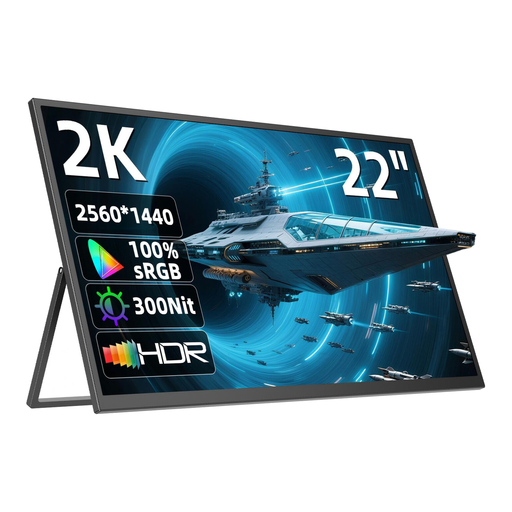
The portable design could suit a mobile workstation; its stated screen area is smaller than that of the 27-inch options considered here.
22 inches, 2.560 × 1.440 pixels, QHD, IPS, adjustable stand, USB-C, Mini-HDMI and VESA compatibility.
A 21:9 model such as the LG 34U650A-B provides 3.440 horizontal pixels. How many windows remain easy to read also depends on their size and your scaling settings.
Match the output profile to the printer and, where relevant, the paper. Adobe describes using a suitable ICC profile and a colour proof for the relevant output conditions. A calibratable monitor helps you assess colours, but it doesn’t replace these steps.
This only works if your laptop and cable support the required video transmission and the monitor’s charging output is suitable for your laptop. For example, the BenQ PD2705U is specified with DisplayPort Alt Mode and 65 W USB-C.
A consistent colour workflow may involve extra work for calibration and profile matching. In Germany, the Verbraucherzentrale distinguishes between the statutory warranty provided by the seller and a voluntary guarantee. Many online purchases are generally covered by a 14-day right to cancel. Contract terms and legal exceptions apply.
Yes. According to the European Commission, standard computer monitors are covered by EU rules for electronic displays. The energy label uses a scale from A to G and includes details such as screen size and resolution.