Who needs to think carefully about their router choice?

Archive managers who need remote access

If your club files are stored on a device on the club network, you’ll need to establish where the VPN connection terminates and who can access it. If your archive is held with an online service, you won’t necessarily need a VPN server on your own router.

Teams making video calls at the same time

If archive files are being transferred during a video call, both activities share the internet connection. Check the available upload speed and how fixed workstations connect to the network.

Clubs planning to replace their router

Before buying, check whether your connection uses DSL, cable or fibre, and whether you already have a suitable modem. This will determine whether you need a router with a built-in modem, one with an Ethernet WAN port or a device for a direct fibre connection.

What should you look for when buying?

DSL router with a built-in modem

A good fit if: You want to use a DSL connection without a separate modem.

Consider: The available connections vary by model. More or faster LAN ports won’t increase your internet connection’s upload speed.

Router connected behind an existing modem

A good fit if: You already have a suitable DSL, cable or fibre modem.

Consider: The FRITZ!Box 4060 needs a modem in front of it, or an existing connection, to access the internet.

Router for a direct fibre connection

A good fit if: You want to connect the router directly to a fibre connection.

Consider: The fibre technology, connection details and compatible SFP variant must all match your specific connection.

What you need What to check when buying Who is this particularly important to?
Secure remote access Check where the archive is stored, where the VPN endpoint is and who has permission to access it; check the VPN features of the specific router. If I need to access files on the club network from elsewhere, I want to know where the secure connection is set up and who can use it. Around 31% of consumers put remote access to a locally stored archive first.
Video calls while transferring files Check upload speed under typical usage; connect fixed workstations by LAN wherever possible. For group calls in its web app at 720p HD, Zoom recommends an upload speed of 2.6 Mbit/s and a download speed of 1.8 Mbit/s per connection. If several people are on calls while files are being transferred, I want to avoid both applications competing for the same upload capacity. Around 31% of consumers prioritise video calls while files are being transferred at the same time.
The right connection Identify the connection type, any existing modem and the login details; for a direct fibre connection, also check that the technology and SFP variant are compatible. When preparing to replace a router, I want to connect the device to my DSL, cable or fibre connection without an unsuitable modem function. Around 25% of consumers focus mainly on compatibility with their connection and modem.
Wi-Fi at the workstation Check the connection where you actually work; if Wi-Fi is weak, compare adding an access point or mesh node with replacing the router. If I use the archive and make video calls in a room further away, the connection in that exact location is what matters to me. Around 13% of consumers prioritise Wi-Fi coverage where they work and access the archive.

Common router-buying misconceptions

  • Confusing maximum Wi-Fi speed with available upload speed

    A fast Wi-Fi standard won’t fix a bottleneck in your internet connection when archive files are being uploaded and video calls are taking place at the same time.

    Check the connection at your workstation and your internet connection’s upload speed separately, ideally during a typical period of use.

  • Buying a router without checking whether it has a modem

    A router designed to work behind a modem won’t automatically replace a DSL modem you need or provide the interface for a direct fibre connection.

    Before choosing a model, check your connection type and any existing modem. For a direct fibre connection, you’ll also need to make sure the technology and SFP variant are compatible.

    Depending on your connection, you may need to buy an additional compatible modem.

  • Assuming a retailer’s description matches the manufacturer’s specifications

    The Joybuy Germany description of the FRITZ!Box 7690 lists four Gigabit LAN ports. FRITZ! lists one 2.5 Gbit/s WAN/LAN port, one 2.5 Gbit/s LAN port and two Gigabit LAN ports for this model.

    Before choosing a device for a specific network setup, check the full model number and compare the listed connections with the manufacturer’s specifications.

Router brands to consider

FRITZ!

The models covered here include DSL routers with a built-in modem, routers designed to work behind a modem and routers for direct fibre connections.

  • FRITZ! lists WireGuard and IPSec VPN support for the 7690, 7530 AX and 4060 models.
  • According to FRITZ!, the 7690 operates on 2.4 and 5 GHz, not 6 GHz. The 4060 needs a modem in front of it, or an existing connection, to access the internet.

TP-Link

The Archer AX55 is an example of a Wi-Fi 6 router with Gigabit ports and a USB port for use with a suitable internet connection.

  • TP-Link advertises OFDMA and simultaneous connections for multiple devices on the AX55.
  • These manufacturer claims don’t prove that video calls will be uninterrupted on a club internet connection. The AX55 Pro’s 2.5 Gbit/s port should not be attributed to the AX55.

ASUS

The RT-AX88U Pro is worth considering if you’re looking for two 2.5 Gbit/s Ethernet ports and detailed VPN client settings.

  • ASUS describes VPN Fusion as a way to route selected devices through a VPN while others use a standard internet connection.
  • This client feature isn’t automatically the right solution for remote access to an archive hosted by your club. Check the specific VPN server or endpoint configuration you need.

NETGEAR

The Nighthawk RS300 is a Wi-Fi 7 router designed to work with a suitable internet connection.

  • NETGEAR advertises Wi-Fi 7 for the RS300.
  • Advertised Wi-Fi speeds are manufacturer maximums, not measured results for simultaneous archive access. NETGEAR Armor is an optional subscription; check its terms separately.

Joybuy products for networking and router connections

The products below include mesh systems designed to work behind a modem, as well as a DSL router. Whatever the model, check your connection speed, where your archive is stored and the connection at your workstations.

TP-Link Deco BE22 Wi-Fi 7 mesh system, 2-pack, white

TP-Link Deco BE22, 2-pack

This mesh system may suit a network setup behind a compatible modem and can connect wired workstations.

Wi-Fi 7, dual-band and two Gigabit WAN/LAN ports per unit.

View at Joybuy
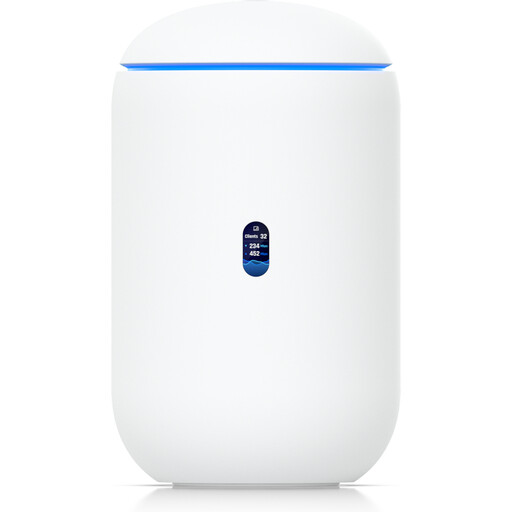
Ubiquiti UniFi Dream Router 7 with built-in Wi-Fi 7 and 10G SFP+ port, white

Ubiquiti UniFi Dream Router 7

The product description lists VPN features. Check whether it supports the VPN endpoint you need to access your club archive.

Tri-band Wi-Fi 7, four 2.5 GbE RJ45 ports and one 10G SFP+ port.

The description also lists 64 GB microSD.

View at Joybuy

TP-Link Deco M4 mesh Wi-Fi system, AC1200, 3-pack

TP-Link Deco M4, AC1200, 3-pack

This three-unit mesh system may suit a network setup behind a modem and can be useful for wired workstations.

Dual-band and Gigabit ports.

View at Joybuy

FRITZ!Box 7530 AX, Wi-Fi 6 DSL router with VDSL Supervectoring 35b modem

FRITZ!Box 7530 AX

This router may suit a DSL connection without a separate modem. Its suitability for remote access depends on the VPN configuration you need.

Wi-Fi 6, VDSL Supervectoring 35b, dual-band, mesh and VPN.

Four Gigabit LAN ports.

View at Joybuy

TP-Link Deco S4 mesh Wi-Fi system, AC1200, 3-pack

TP-Link Deco S4, AC1200, 3-pack

This mesh system is described as suitable for a network setup behind a modem. For fixed workstations, check the wired connection at each location.

Dual-band and two Gigabit ports per unit.

View at Joybuy

Frequently asked questions about routers for clubs

Do I need a router with a VPN server for every club archive?

No. What matters is where the files are stored and how access is managed. For an archive on the club network, a VPN connection to that network may be suitable. If you use an external online service, check its access arrangements instead.

How can I plan my router and network for video calls and archive work?

Check your connection’s upload speed as well as your Wi-Fi, and connect fixed workstations by LAN wherever possible. Keep your router’s firmware up to date. If your connection is under heavy load, you can also check whether the specific device offers traffic prioritisation features. Recommendations from one video service won’t necessarily apply to others.

What changes if the club buys a router instead of renting one?

If the club owns its router, it will be responsible for installation, configuration and updates. The Verbraucherzentrale advises that, if a device develops a fault, the retailer is the point of contact under the statutory warranty. Compare this with what the specific rental offer includes.

Can a club in Germany use its own router with its internet connection?

The Bundesnetzagentur describes the right to choose a suitable router and the provider’s obligation to supply the necessary access details. On 22 January 2025, it confirmed the right to choose terminal equipment for passive optical fibre networks. This freedom of choice doesn’t replace the need to check technical compatibility with your specific connection.

Is a VPN enough if the club archive contains members’ personal data?

No. A VPN alone doesn’t cover every requirement for handling personal data. The Rhineland-Palatinate State Commissioner for Data Protection and Freedom of Information points to the need for an appropriate legal basis; the European Data Protection Board advises using technical and organisational safeguards proportionate to the risk. So be sure to check permissions and the entire data-processing process as well.