When choosing a laptop for club videos with multiple video tracks, start by considering your editing software, resolution and recording format. For Premiere on Windows at 4K and above, Adobe recommends 32 GB of RAM or more. This isn’t a general minimum for every editing programme, nor does it guarantee smooth playback across multiple tracks. You’ll also need to allow for storage for original footage, proxy files, cache and exports, as well as consider the display, ports and portability. Proxies can make editing easier, but they don’t replace the original files.
Who is this laptop comparison for?
People responsible for multicam editing
You’re combining footage of the same club event shot from several camera angles. The key is to choose editing software and a laptop that suit your footage and workflow. Adobe describes a workflow in Premiere for synchronising and editing footage from multiple camera angles.
People managing the club archive
You’re collecting lots of original clips and need extra space for working copies, cache and project files. Adobe recommends fast storage for video editing and describes proxy files as smaller working copies.
Mobile club editorial teams
You review and discuss edits in different locations. You’ll need to weigh up screen space and ports against the size and weight of the particular device.
What should you look for when buying?
Windows creator laptop
A good fit if: you often edit multiple 4K tracks and need a larger display, card reader or plenty of built-in storage.
Things to weigh up: Manufacturer specifications don’t prove a particular multicam editing speed. You should also consider the weight and how you’ll actually use the laptop.
Windows gaming laptop
A good fit if: you’re looking for a specific configuration with dedicated graphics and a larger display, and usually work at a fixed editing station.
Things to weigh up: A gaming focus doesn’t prove a particular editing speed or that the display is suitable for your work.
Portable MacBook Pro
A good fit if: your editing software and required plug-ins run on macOS, and you review edits in different locations.
Things to weigh up: Unified memory isn’t the same as dedicated GPU memory. Check the screen size and whether a power adapter is included separately.
For Premiere on Windows at 4K and higher resolutions, Adobe recommends 32 GB of RAM or more. Check the requirements for your specific software, version and footage before choosing a configuration.
| Priority |
What to check when buying |
Who is this important to? |
| Editing multiple tracks |
Editing programme, version, resolution and recording format; check that the RAM and graphics memory meet the requirements of the software you actually use. |
If you want to synchronise and review footage from several camera angles at the same time, multicam editing is your main priority. Around 36% of consumers put this first. |
| Space for footage and working files |
Estimate the storage needed for original footage, proxies, cache and exports; check SSD capacity and the options for connecting external drives. |
If you want to keep lots of original clips and additional working files, available storage matters to you. Around 29% of consumers prioritise space for footage and working files. |
| Reviewing edits on the move |
Compare the screen size and weight of the specific version; check which power adapter is included and whether it has the ports you need for your devices. |
If you want to show or discuss edits at different club venues, portability matters. Around 21% of consumers put reviewing footage on the move first. |
| Screen and ports at your editing station |
Check the display and required ports against your camera cards, drives and external displays; don’t mistake manufacturer specifications for independent test results. |
If you want a clear view of your timeline and to connect your existing devices, screen space and ports are particularly important. Around 14% of consumers prioritise these features. |
Which buying mistakes should you avoid?
-
Using HD requirements as a guide for 4K multicam editing
Adobe’s recommendations differ for HD and for 4K or higher resolutions. Meeting a minimum requirement doesn’t guarantee smooth playback across multiple 4K tracks.
Check the requirements for your software version, resolution and footage. A proxy workflow can be an alternative for editing demanding footage.
-
Allowing storage only for the finished video
Original footage, proxy files, cache, project files and exports all take up storage while you’re working.
Estimate the storage needed for your whole editing workflow and check whether an external drive and the necessary ports will work for you.
A fast external drive can provide extra space for files, but it also means another device and may require additional ports.
-
Assuming a spec sheet proves multicam performance
Component specifications from manufacturers don’t measure how your specific footage will play back. A creator or gaming label alone doesn’t tell you how fast the laptop will be in your editing software, either.
Compare the exact model variant against your software, recording formats, display, ports and storage requirements.
-
Assuming a power adapter is included with a portable laptop
What’s included can vary by configuration. One MacBook Pro M5 configuration we reviewed didn’t list a power adapter.
Before you buy, check what’s included and the charging power required by your chosen configuration.
Which brands are worth considering?
ASUS
The ProArt P16 is a creator range. For the H7606WP-RJ090W variant, ASUS lists 32 GB of RAM, an RTX 5070 with 8 GB of graphics memory, a 2-TB SSD and a 16-inch OLED display.
- The ports and card reader listed for this variant may be useful for compatible source footage.
- These specifications come from the manufacturer and aren’t measured proof of multicam performance for this configuration.
Lenovo
The Legion Pro 5 is a performance-focused Windows gaming range. For model 83LT004NGE, Lenovo lists 32 GB of RAM, an RTX 5070 with 8 GB of graphics memory, a 1-TB SSD and a 16-inch display.
- The specific configuration lets you compare named components and storage capacity.
- Its gaming focus doesn’t prove a particular editing speed or display quality for your work.
Apple
The 14-inch MacBook Pro with M5 is worth considering if your editing software runs on macOS and you prefer a smaller display. Apple lists support for H.264, HEVC and ProRes with the M5, as well as configuration options with unified memory.
- You can compare the documented Media Engine and chosen memory configuration with your software requirements.
- Unified memory isn’t the same specification as dedicated GPU memory. Also check the version you want and whether a power adapter is included.
Dell
Precision mobile workstations are another option if you’re considering a workstation configuration and want to check how it performs with your specific application.
- Dell says it has Precision workstations tested with specific software applications.
- This manufacturer statement about the range doesn’t prove that any particular model, or your specific club project, will run faster.
Laptops at Joybuy
This selection includes laptops for reviewing edits on the move and macOS editing workflows, as well as Windows gaming models for a more stationary editing setup. Compare the specific specifications with your software, resolution and footage.
 No image available
Apple 15-Inch MacBook Air (M5, 2026), 10-Core CPU, 10-Core GPU, 16 GB, 512 GB SSD, Midnight, German QWERTZ keyboard
For reviewing edits on the move with macOS: this configuration is listed with M5, 16 GB of unified memory and a 512-GB SSD. The display measures 15.3 inches and the stated weight is 1.51 kg. The product description says that a power adapter isn’t included.
View at Joybuy
 No image available
Apple 16-Inch MacBook Pro (M5 Pro Chip, 2026), 18-Core CPU, 20-Core GPU, 48 GB, 1 TB SSD, Silver, German QWERTZ keyboard
For a macOS editing station with more screen space: this specific configuration lists 48 GB of unified memory, an M5 Pro chip and a 1-TB SSD. The display measures 16.2 inches and includes an SDXC slot. The stated weight is 2.14 kg. The product description says that the power adapter isn’t included.
View at Joybuy
 No image available
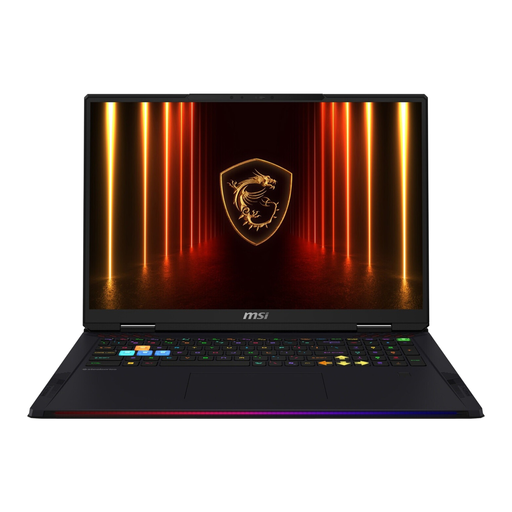
MSI Raider 18 HX AI A2XWJG-074, Core Ultra 9 285HX, 64 GB RAM, 4 TB SSD, 18-inch UHD+ display, RTX 5090, Windows 11
For a fixed editing station where plenty of built-in storage and a large display matter: the listed specifications include 64 GB of RAM, a 4-TB SSD, 24 GB of graphics memory and an 18-inch UHD+ display. According to the description, the laptop weighs 3.6 kg, which is worth considering if you’ll be carrying it around often.
View at Joybuy
 No image available
HP OMEN 16-ap1071ng, AMD Ryzen 7 8745HX, 16 GB RAM, 1 TB SSD, GeForce RTX 5060 with 8 GB, Windows 11 Home
For a Windows editing station with dedicated graphics: the specifications include a 16-inch QHD display, 16 GB of RAM, a 1-TB SSD and a GeForce RTX 5060 with 8 GB of graphics memory. For Premiere on Windows at 4K or higher, the listed 16 GB of RAM is below Adobe’s recommendation of 32 GB or more.
View at Joybuy
 No image available
HP OMEN 17-db1071ng, AMD Ryzen AI 7, 16 GB RAM, 1 TB SSD, 17.3-inch Full HD display with 144 Hz, GeForce RTX 5050 with 8 GB
For a more stationary Windows editing setup with plenty of screen space for reviewing footage: the product title lists a 17.3-inch Full HD display with 144 Hz. It also lists 16 GB of RAM, a 1-TB SSD and a GeForce RTX 5050 with 8 GB of graphics memory. The stated weight is 2.95 kg. For Premiere on Windows at 4K or higher, the 16 GB of RAM is below Adobe’s recommendation of 32 GB or more.
View at Joybuy
Frequently asked questions
Is 32 GB of RAM essential for every club video?
No. For Premiere on Windows, Adobe recommends 16 GB of RAM for HD footage and 32 GB or more for 4K and higher resolutions. The right specification depends on your editing programme, version and footage; these figures aren’t a general minimum requirement for all editing software.
How can I edit footage from multiple camera angles and work with footage that’s difficult to play back?
In Premiere, you can combine and synchronise footage from different cameras in a multicamera source sequence. For demanding footage, Adobe describes proxy files as smaller working copies for editing. You’ll still need to allow for storage space for the original files.
How much SSD storage should I allow for video editing?
As well as original clips, remember to allow for project files, cache, proxies and exports. Adobe recommends fast SSD or NVMe storage and suggests fast external drives as an option if internal storage is limited. The amount of space you’ll need depends on the size and workflow of your project.
What rights do you have when buying online as a consumer in Germany?
Online purchases generally come with a 14-day right to cancel, starting when you receive the goods; exceptions may apply. If goods are faulty, you also generally have statutory warranty rights against the seller for two years. A voluntary manufacturer’s guarantee is separate.
Does a new laptop in Germany have to support USB-C charging?
The EU’s common charger rules have applied to laptops since 28 April 2026. You can’t tell whether the rules apply to a specific device from its purchase date alone. Either way, check whether the specific configuration can be charged via USB-C, what charging power it needs and which power adapter is actually included.


