What should you look for when buying?
First, decide which device you’ll be playing on and how many separate player inputs you need. Treat switching the video source on screen as a separate step.
| What matters |
What to look for |
Who it matters most to |
| Compatibility |
Check the device you’ll play on, the full model variant and connection mode against the specific game version. |
If I switch between PC and Switch, I check the exact variant rather than assuming it’s compatible based on a similar model name. Around 36% of consumers put compatibility with their gaming device first. |
| Separate player inputs |
Count the number of players, the controllers you already have and the play styles the game supports. |
For a local multiplayer session, I want to know whether we have enough controllers for everyone. Around 29% of consumers prioritise the number of separate player inputs they need. |
| Switching video sources |
Decide which device is running the game, and whether you’re just switching the display or actually trying to play together across devices. |
If I’m switching between a PC and console display on the same screen, I plan the inputs for each gaming device separately. Around 21% of consumers mainly want to keep controller input and switching video sources separate. |
| Additional costs and effort |
Check the available player slots, what’s included in the box, connection accessories and how the exact model is charged. |
If I just want to add more player slots, I want to spot unnecessary purchases and any accessories I’ll need beforehand. Around 14% of consumers put extra costs and accessories first. |
Controllers for co-op cooking games at Joybuy
This selection includes controllers for adding separate player inputs on Switch and Switch 2, as well as full-size gamepads for PC, Xbox and PlayStation setups. For multi-platform models, check the exact variant and game support.
 No image available
Nintendo Switch 2 Joy-Con 2 2-Piece Set (Blue/Light Yellow)
This pair is designed to provide extra separate player inputs on Switch 2, provided the specific game supports this play style.
The set includes two Joy-Con 2 and, according to Nintendo, isn’t designed for the original Switch.
View at Joybuy
 No image available
Microsoft Xbox Wireless Controller Deep Pink (Xbox One/Xbox Series X/S/PC)
A good fit for a PC or Xbox setup where each player needs a full-size gamepad. Also check that your specific version of the cooking game recognises it.
The product details list Bluetooth and Xbox Wireless. According to Microsoft, you may need an adapter to use Xbox Wireless on PC.
View at Joybuy
 No image available
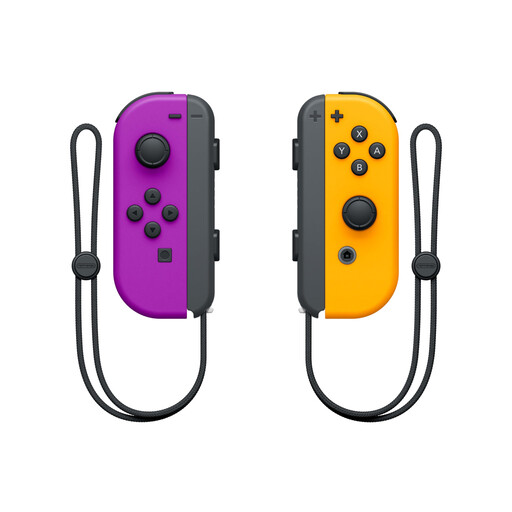
Nintendo Switch Joy-Con Pair (Neon Purple/Neon Orange)
With a supported play style, this pair can provide two separate player inputs for a local Switch game.
Nintendo says an individual Joy-Con can be held sideways and used as a controller in supported games.
View at Joybuy
 No image available
PlayStation DualSense Wireless Controller Midnight Black (including USB cable)
For PS5 or compatible PC games when each player needs their own full-size controller.
According to Sony, haptic feedback and adaptive triggers depend on the game and platform. Supported PC games require a USB connection for haptic feedback.
View at Joybuy
 No image available
BEITONG PanGu Modular Wireless Gaming Controller
The product details list PC, Nintendo Switch and Switch 2 as compatible platforms. Before buying, check that your specific version of the cooking game recognises the gamepad.
Wired, wireless and Bluetooth connections are listed. Check which mode is right for your device before you buy.
View at Joybuy
Frequently asked questions
Is one Joy-Con per person enough on Switch?
It depends on whether your specific game version supports using a single Joy-Con held sideways. Nintendo describes individual Joy-Con as separate controllers in supported games; for Overcooked! 2, Nintendo specifies one compatible controller per person. Before you play, check that everyone can connect the inputs they need.
Can I use Joy-Con interchangeably between Switch and Switch 2?
Not both ways. According to Nintendo, older Joy-Con can be used wirelessly with Switch 2, but they can’t be attached to or charged directly on the console. Joy-Con 2 are designed for use with Switch 2.
What should I check if my PC controller doesn’t respond in a cooking game?
First, check the connection mode for your exact model and whether your PC and specific game version recognise its input. Microsoft lists USB, Bluetooth and Xbox Wireless for the Xbox Wireless Controller, although you may need an adapter to use Xbox Wireless on PC. For the Ultimate Bluetooth Controller, 8BitDo lists 2.4 GHz or USB for PC. A successful connection to your device doesn’t automatically mean every game will support the controller.
Can a gamepad switch between the PC and console display?
No. A gamepad sends input to the gaming device you’re using; it doesn’t control the screen input. Set up the controller connection and switch the video source shown on screen separately.


