Who is this controller guide for?

Switch couch group

You want to get several people in the room playing Overcooked! 2 and need to know whether your existing Joy-Con or some extra individual Joy-Con will be enough. Nintendo UK says that up to four chefs can play the game, each using one Joy-Con.

PC group with remote guests

Some players aren’t in the same room as the host. Distinguish between local input slots and remote participation: Valve says guests can join a local co-op session using Remote Play Together.

Console group using full gamepads

You prefer a full gamepad for each active player and need to make sure the platform, pairing and power supply all work together. Sony says you can use up to four DualSense controllers at once with PS5.

What should you check first when choosing controllers?

Individual Joy-Con for local Switch games

A good fit if: you’re playing Overcooked! 2 locally on Switch and want each active player to use a single Joy-Con.

What to bear in mind: A Joy-Con held sideways is smaller than a full gamepad. Check compatibility separately for other games and versions.

Full gamepads for console or PC

A good fit if: each player prefers a full gamepad and the specific model is compatible with your gaming platform.

What to bear in mind: You’ll need enough devices for all your players and should plan how to keep them powered.

PC session with remote guests

A good fit if: your specific PC game version supports Remote Play Together and remote guests can join a local co-op session.

What to bear in mind: The host doesn’t automatically need an extra controller for every remote guest. Check which input method each guest will use.

ConsiderationWhat to check before buyingWho is this important for?
Platform and game version Check the console or PC, exact game version and supported input methods. If I want to use the controller with my existing system, I’ll check that the model is compatible with my game version. Around 36% of consumers put platform and game version first.
Inputs for active players Count your existing controllers and the local player slots available in the game. If several people are playing together in person, I want to make sure there’s a suitable input method for everyone taking part. Around 29% of consumers prioritise having enough separate inputs for active players.
Remote participation Check whether the specific game version supports remote play and how guests can join. If guests aren’t in the same room as the host, I want to find out how they can join the game before buying extra devices. Around 21% of consumers put remote participation first.
Cables and power Check the cable length and distance between seats, or plan how to charge the controllers you need. If everyone has a fixed seat, I want to know whether the cable will reach and how to power several devices. Around 14% of consumers pay particular attention to set-up and power.

Avoid common buying mistakes

  • Counting spectators as active players

    You need controllers for the actual player slots, not automatically for everyone watching.

    Before you buy, note who’ll be playing in person or remotely, then count the controllers you already have that are supported by the specific game.

  • Assuming Bluetooth works the same way on every platform

    For the 8BitDo Ultimate 2C Wireless, the manufacturer lists 2.4 GHz or cable for Windows, while Bluetooth is listed for Android.

    Before you decide, compare the connection options for the exact model variant with your device.

  • Assuming a wired Switch controller suits every way of playing

    PowerA says that the wired model featured here can only be used when the Switch is docked.

    Before you buy, check whether you’ll be playing with the console docked, whether the cable will reach your seats and whether the game supports the features you need.

Controller brands at a glance

Nintendo

Joy-Con are a good choice for local Switch games when the game supports one individual controller per active player. The Switch Pro Controller is an alternative with a full-size design.

  • Nintendo describes a pair of Joy-Con as two controllers that can be used individually in supported games. Nintendo UK also lists individual Joy-Con for Overcooked! 2.
  • According to Nintendo, original Joy-Con can only be paired wirelessly with Switch 2, not attached directly. Check support for the specific game separately.

Microsoft Xbox

The Xbox Wireless Controller Carbon Black is a full gamepad for the Xbox systems or Windows PCs listed by the manufacturer.

  • Microsoft lists Xbox Series X|S, Xbox One and Windows as supported systems for this model.
  • Also check that the specific game supports it and plan how to power the controllers you’ll be using.

PlayStation

DualSense is a full gamepad for PS5 gaming. Sony also describes USB and Bluetooth connections with supported Windows PCs.

  • Sony says you can use up to four DualSense controllers at once with PS5.
  • On PC, individual features depend on the game and connection. This doesn’t guarantee support for every DualSense feature.

8BitDo

The Ultimate 2C Wireless is an option for Windows PCs if you’re happy to connect using a 2.4 GHz receiver or cable.

  • For this model on Windows, 8BitDo lists 2.4 GHz or cable as the connection options.
  • The manufacturer lists Bluetooth for Android, so don’t assume it’s supported on Windows.

PowerA

The wired Switch controller featured here is an option for a fixed set-up with the console docked.

  • PowerA lists a detachable 3-m cable and says this model doesn’t need batteries.
  • According to PowerA, the model can only be used with a docked Switch and doesn’t support certain Joy-Con features.

Joybuy controllers for co-op gaming

The controllers below list Switch, PC or other platforms in their product titles. Before you buy, check that the input method is compatible with your specific cooking game version.
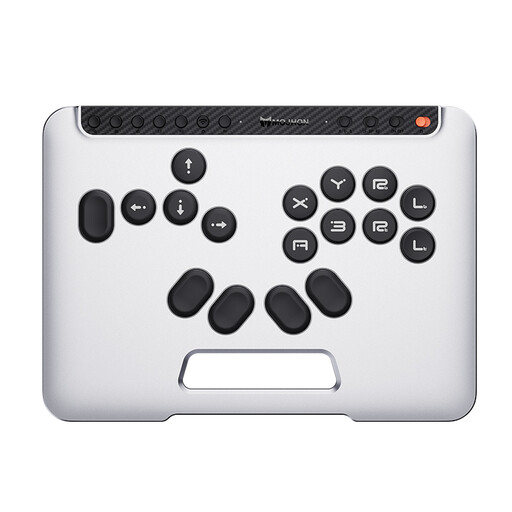
BIGBIG WON Fight Master Leverless Controller

BIGBIG WON Fight Master Leverless Controller

The product title lists Switch, Switch 2 and PC. Check that your specific cooking game supports this type of input.

Described as an all-button hitbox controller; the title lists Bluetooth, 2.4 GHz and cable. Other platforms mentioned in the title: iOS and Android.

View at Joybuy
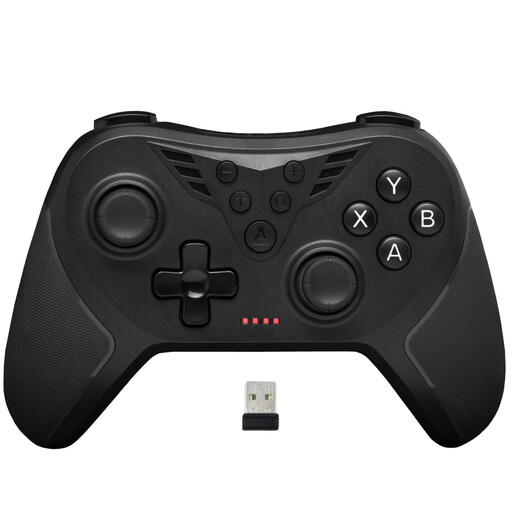
The G-Lab K-PAD-HELIUM-WL Wireless Gaming Controller

The G-Lab K-PAD-HELIUM-WL Wireless Gaming Controller

The product title lists the controller for PC games. Check compatibility with your specific game version.

The title lists a wireless 2.4 GHz connection and two rear buttons.

View at Joybuy
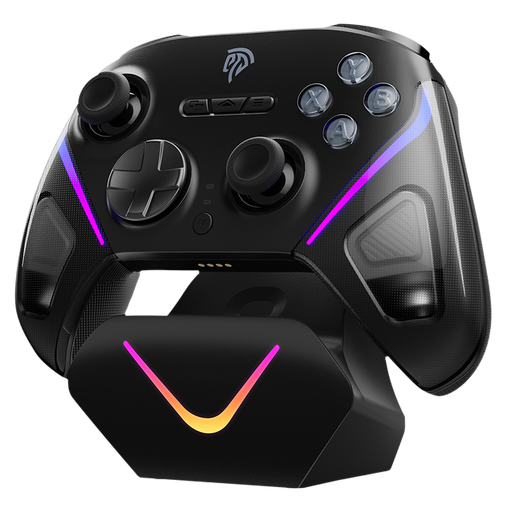
EasySMX D10 PC Controller

EasySMX D10 PC Controller

The product title lists PC and Switch. Before you buy, check that your specific cooking game supports the controller.

The title lists a TMR joystick and PC, Switch, Android and iOS as supported platforms.

View at Joybuy
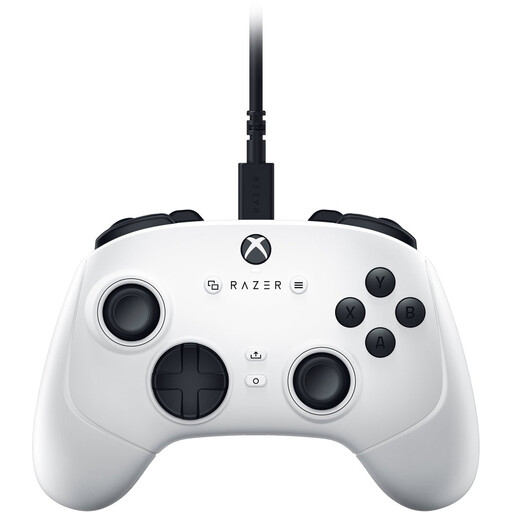
Razer Wolverine V3 Tournament Edition White

Razer Wolverine V3 Tournament Edition White

The product title lists the controller for PC, Xbox Series S and Xbox Series X. Check that the platform is compatible with your game version.

Described in the title as a USB gamepad.

View at Joybuy
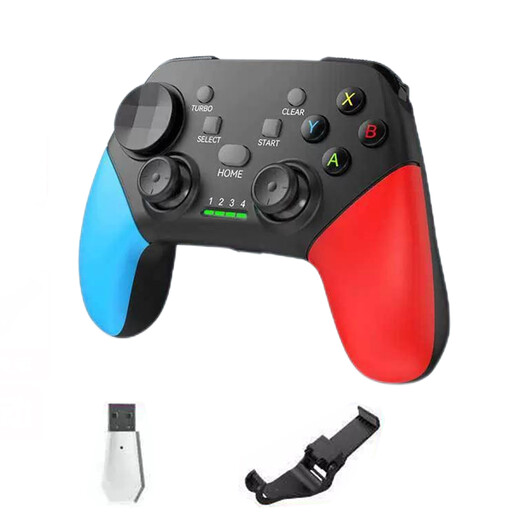
NAXSIR Wireless Bluetooth Gamepad with Phone Mount

NAXSIR Wireless Bluetooth Gamepad with Phone Mount

The product title lists PC and Switch among other platforms. Check that your specific game version supports this connection and input method.

The title lists Bluetooth 5.2 and 2.4 GHz, as well as PC, Smart TV, PS3 and Switch.

View at Joybuy

Frequently asked questions

Does every spectator need a controller?

No. Plan controllers for the people who are actually playing. For Overcooked! 2 on Switch, Nintendo UK says that up to four chefs can each use one Joy-Con. For other game versions, check the available player slots and supported controls.

Can a remote guest play without me buying an extra controller for the host?

That may be possible if the PC game version you’re using supports Remote Play Together. Valve says invited guests can join a local co-op session on the host PC remotely. Check in advance which input method the guest will use on their device.

How many DualSense controllers can I use with a PS5 at once?

According to Sony, you can use up to four DualSense controllers with a PS5 at the same time. Sony says to connect the first controller using USB, then pair any additional controllers wirelessly through the accessories settings.

What should I charge or have ready before a longer gaming session?

Check the charge level of your Joy-Con and plan how you’ll recharge them. The wired Switch model described by PowerA doesn’t need batteries, according to the manufacturer. The console must be docked, and the 3-m cable needs to reach your seats.

What are my rights when buying a controller online from a business seller?

According to the European Union’s official consumer information, when you buy goods at a distance, you generally have 14 days from receipt to withdraw from the purchase; exceptions may apply. For faulty goods, EU consumer information says you have a legal guarantee of at least two years from receipt, which applies against the seller and is separate from any voluntary warranty.