Switch cooking crew
Want to know whether the Joy-Con you already have will be enough for everyone, or whether someone would prefer to use a full gamepad? For Overcooked! 2 on Switch, Nintendo specifies one Joy-Con per person.


For Overcooked! 2 on Nintendo Switch, not everyone automatically needs a full gamepad: Nintendo says one Joy-Con per person is enough. For local play on PC, Team17 says two people can share a keyboard. First check the game, platform and inputs you already have. Only then choose extra controllers based on comfort, connection and the lighting you want.
Want to know whether the Joy-Con you already have will be enough for everyone, or whether someone would prefer to use a full gamepad? For Overcooked! 2 on Switch, Nintendo specifies one Joy-Con per person.
Looking for controls that are easy to find in the dark, and want to know whether a model lights up its casing or actually illuminates the button labels? PowerA describes the Lumectra model as having RGB casing lighting.
You need the right inputs for your platform and want to check which wireless or wired connections are available. Microsoft specifies Xbox Wireless for Xbox consoles and Bluetooth for Windows 10/11; with 8BitDo, connections vary by model version.
Start with the specific game and the inputs you already have. Then decide whether you need extra controllers, and only after that check the lighting, connection and power options.
For your group, the key considerations are the platform, how many separate inputs you need, how easy the controls are to see, and whether the connection works well from where you’re sitting.
| Consideration | What to check before buying | Who it matters to most |
|---|---|---|
| Platform and game compatibility | Check the exact model version, console or operating system, and controller support for the specific game. | If I’m playing on a platform I already own, the controller needs to work with both the device and the game. Around 31% of consumers prioritise platform and game compatibility. |
| Separate inputs for everyone | Count the Joy-Con or keyboards you already have, then check which input options the game supports for the number of players you want. For Overcooked! 2 on Switch, Nintendo specifies one Joy-Con per person; Team17 says two people can share a keyboard for local play on PC, Mac or Linux. | When several people are playing, I want to make the most of the usable inputs we already have. Around 25% of consumers prioritise having enough separate inputs. |
| Finding the controls in the dark | Check the exact model to see whether the casing, controls or button labels light up, and whether you can adjust the lighting. | In a dark room, I want to see the controls, not just a glowing casing. Around 25% of consumers prioritise being able to see the controls. |
| Connection and power | Check the cable length and ports, as well as the supported wireless connection and any batteries or charging options required. For the PowerA Enhanced Wired, the manufacturer specifies a 3 m cable and use with the Switch docked. | If players are sitting in different places, I need a suitable connection and a practical power option. Around 19% of consumers prioritise connection, power and space. |
PowerA describes the Lumectra models covered here as having a lit design. That doesn’t confirm that the button labels are illuminated.
Check the exact model to see which parts light up and whether you can adjust the lighting.
For Overcooked! 2 on Switch, Nintendo says each person can use one Joy-Con. For local play on PC, Mac or Linux, Team17 says two people can share a keyboard.
First count the inputs you already have and check the options for the specific game.
For the 8BitDo Ultimate 2C Wireless, the manufacturer specifies 2.4 GHz or a wired connection for Windows; Bluetooth is listed for Android.
Check the connection table for the exact model version and your operating system.
Nintendo says the original Joy-Con can be used wirelessly with a Switch 2, but can’t be attached to the console or charged directly from it.
Before you buy, check both the connection and the available charging options.
A good option for Joy-Con and Pro Controllers for Switch gaming sessions.
Xbox Wireless Controller for Xbox consoles and compatible Windows PCs.
Ultimate 2C models vary by platform and connection.
Switch controllers in wired and wireless versions, including models with illuminated casings.
DualSense for PS5 and supported games on compatible PCs and other devices.
This selection includes controllers for Switch and Switch 2 gaming sessions, as well as gamepads for Xbox and Windows PCs, including illuminated models.
 No image available
For local gaming sessions with up to two people on Nintendo Switch 2 when you need two separate inputs.
Includes left and right Joy-Con 2. For wireless use; according to the product description, designed exclusively for Nintendo Switch 2.
 No image available
For a Switch gaming session when you’d like a wireless gamepad with lighting.
The product description specifies Bluetooth, Nintendo Switch and a 7-colour LED. The LED description doesn’t mean the button labels are illuminated.
 No image available
For Xbox or Windows gaming sessions, provided the listed platforms suit your setup.
The product name lists Xbox One, Xbox Series X/S and PC. The description specifies Xbox Wireless, Bluetooth and two AA batteries.
 No image available
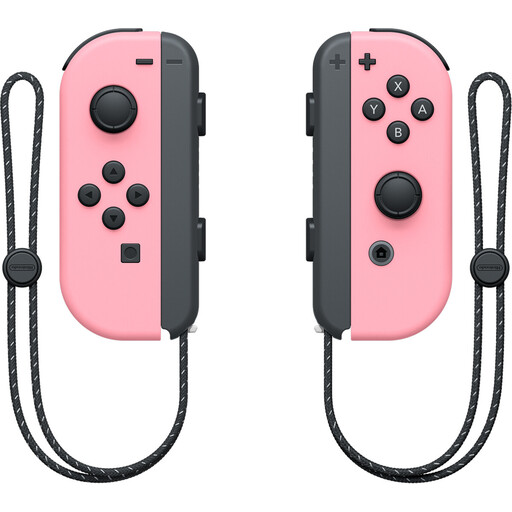
For local Switch gaming sessions when you need two separate inputs and want to use the Joy-Con individually.
The set includes left and right Joy-Con. According to the product description, they’re designed for Nintendo Switch; the Joy-Con Grip is sold separately.
 No image available
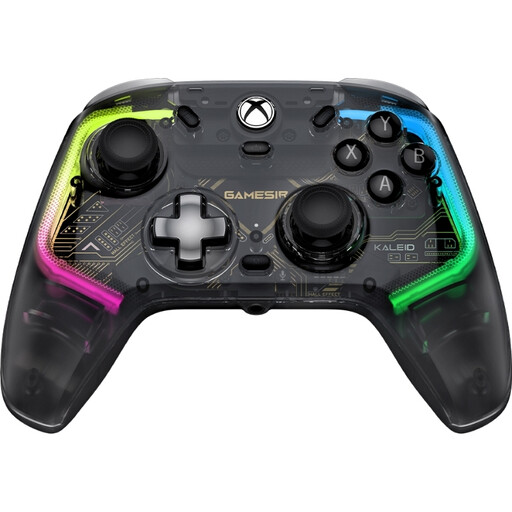
For Xbox or Windows gaming sessions if you’re considering a wired controller with illuminated controls.
The product description lists Xbox Series X|S, Xbox One and Windows 10/11, along with RGB lighting on the front buttons and analogue sticks. The detachable USB-C cable is 3 m long.
No. For the Switch version, Nintendo says each person can use one Joy-Con. Check how many working Joy-Con you already have; other games may offer different input options.
Yes, Nintendo specifies a wireless connection. Original Joy-Con can’t be attached to the Switch 2 or charged directly from it, so check which charging option will work for your gaming session too.
Not necessarily. PowerA describes the Lumectra models covered here as having an illuminated casing, but that doesn’t confirm that the button labels light up. Check exactly which parts of the model you’re interested in are illuminated.
For the PowerA Enhanced Wired, the manufacturer specifies a detachable 3 m USB cable and use with the Switch docked. Check that the distance from your seat, available port and cable route will work in your gaming space.
No, the connection supported depends on the exact model. For the 8BitDo Ultimate 2C Wireless, the manufacturer specifies 2.4 GHz or a wired connection for Windows, and Bluetooth for Android. So check the details for the specific version.