Whether you need extra controllers depends first on the game, the platform and the input devices you already have. For Overcooked! 2 on the original Switch, Nintendo says each player can use one Joy-Con; according to Team17, two people can share a keyboard for local play on PC, Mac or Linux. If you’d prefer separate gamepads, check that they’re compatible with your device, then plan for the cable run, connection and charging.
Who is this selection for?
Groups with input devices already to hand
If you want to check first whether your existing Joy-Con or a shared keyboard will do, Nintendo says each player can use one Joy-Con for Overcooked! 2 on Switch; Team17 says two people can share a keyboard for local play on PC, Mac and Linux.
Players with a set platform
If you’re looking for a controller for a Switch, Switch 2, Xbox, PlayStation or PC you already own, check the model and game version against your device. Nintendo, Microsoft and Sony each specify requirements for particular platforms and models.
Groups with limited space
If you’re sitting apart around the bedroom, consider whether a cable will reach the device safely or whether a supported wireless connection would be more practical. Microsoft lists several ways to connect to Windows; for the Ultimate 2C Wireless, 8BitDo lists USB cable and 2.4 GHz connectivity for Windows, among other options.
What should you look for when choosing?
First count the inputs you actually need, then check the platform, game version and connection method. This will help you work out whether you need another controller or whether your preferred way of playing is the deciding factor.
| What you need |
What to check before buying |
Who is this particularly important for? |
| Compatibility |
Check the console or operating system, full model name and game version. For Windows, Microsoft lists USB, Xbox Wireless and Bluetooth as connection options for the Xbox Wireless Controller. |
If I’m buying a controller for a particular device or game, I want to be sure that exact combination will work. Around 36% of consumers put compatibility first. |
| Enough inputs |
Count the players and controllers you already have, then check which local input combinations the specific game supports. For Overcooked! 2 on Switch, Nintendo says each player can use one Joy-Con. |
If we’re playing as a pair or in a larger group, I want to know whether each person needs their own input. Around 29% of consumers focus above all on having enough simultaneous inputs. |
| Connection and space |
Check the distance between seats and make sure any cable can be routed safely. For wireless play, check the supported mode and whether you need particular ports or a receiver. For the Ultimate 2C Wireless on Windows, 8BitDo lists a cable or a 2.4 GHz receiver. |
If the device isn’t right next to everyone’s seat, I want to choose a connection that works well in the room. Around 21% of consumers prioritise connection type and space requirements. |
| Ease of use and setup |
Check which controller shape you prefer and how you’ll charge it. For specific features, check that the game supports them too. Nintendo describes the Pro Controller as a separate input device for Switch; Sony notes that DualSense features on PC depend on the game. |
Once we’ve sorted out the inputs, I want to choose a controller shape both players are comfortable with, without overlooking how it’s powered. Around 14% of consumers prioritise ease of use. |
Avoiding common buying mistakes
-
Rushing to buy a full gamepad for every player
For Overcooked! 2 on the original Switch, Nintendo says each player can use one Joy-Con. On PC, Mac and Linux, Team17 says two people can share a keyboard for local play. So the number of players doesn’t automatically tell you how many new gamepads you need.
First check the input devices you already have and how you’d like to play. Only buy what your group actually needs for the specific platform and game version.
-
Assuming the Ultimate 2C Wireless and Ultimate 2C Bluetooth are the same
8BitDo lists the Ultimate 2C Wireless for Windows and Android, and the Ultimate 2C Bluetooth for Switch. The similar model names don’t mean that both versions are intended for the same platforms.
Before buying, check the full variant name against the compatibility information for your device.
-
Charging older Joy-Con on Switch 2 as you would on the original Switch
Nintendo says older Joy-Con work wirelessly with Switch 2, but can’t be attached to the console or charged directly from it.
Make sure you have a suitable way to charge them, such as an original Switch you already own or compatible accessories.
Depending on what you already have, you may need to buy a separate charging accessory.
-
Assuming “wireless” means it works with every platform
Supported connection modes can vary by device and controller. Microsoft notes that Xbox Wireless may require an adapter on PC; for the standard G7 Pro, GameSir specifies a wired connection on Xbox and wireless or wired connections on PC.
Check the connection options for the exact model variant and the device you want to play on.
Key brands to consider
Nintendo
A relevant choice for Joy-Con and separate gamepads for Nintendo consoles. The Switch generation and the game you’re playing are key.
- For Overcooked! 2 on Switch, Nintendo says each player can use one Joy-Con.
- Nintendo says older Joy-Con can be used wirelessly with Switch 2, but can’t be attached to the console or charged directly from it. Joy-Con 2 are designed for Switch 2.
Microsoft Xbox
An option for compatible Xbox and Windows setups.
- For the Xbox Wireless Controller on Windows, Microsoft lists USB, Xbox Wireless and Bluetooth as possible connection options.
- Xbox Wireless may require an adapter on PC, so check which connection option works with your device.
Sony PlayStation
A relevant choice for PlayStation 5 players who may also want to use a compatible PC.
- Sony lists USB-C and Bluetooth for compatible PCs.
- Not every game supports all DualSense features. Sony says haptic feedback on PC requires a USB connection and support from the game.
8BitDo
The Ultimate 2C variants are designed for different platforms, depending on which version you choose.
- According to 8BitDo, the Ultimate 2C Wireless supports a cable or 2.4 GHz connection on Windows.
- According to the manufacturer, the Ultimate 2C Wireless and Ultimate 2C Bluetooth are designed for different platforms. The Bluetooth version supports Switch 2 with the specified firmware conditions.
GameSir
The G7 Pro could suit Xbox, PC and Android setups, provided the platform and connection you want are supported.
- For the standard G7 Pro, GameSir describes a wired connection on Xbox and wireless or wired connections on PC.
- Connection options vary by platform, so check the requirements for your specific setup.
Controllers at Joybuy
This selection includes Joy-Con sets for Nintendo Switch and Switch 2, as well as individual gamepads for Switch, Xbox, PlayStation 5 and PC setups.
 No image available
Nintendo Switch 2 Joy-Con 2, pair (Blue/Light Yellow)
An option for two separate inputs on Nintendo Switch 2.
The set includes one left and one right Joy-Con 2. The product details list a wireless connection to Switch 2.
Joybuy
 No image available
Nintendo Switch Pro Controller (Black)
A separate gamepad for one player, if you’d prefer a full-size controller to using a single Joy-Con.
Listed as a wireless Nintendo Switch Pro Controller. Check compatibility with your console and game version.
Joybuy
 No image available
Xbox Wireless Controller (Pulse Red, Xbox One/Xbox Series X/S/PC)
An option for an Xbox or Windows setup, provided your specific device supports the connection method you choose.
The product details list Bluetooth and Xbox Wireless; the controller requires two AA batteries.
Joybuy
 No image available
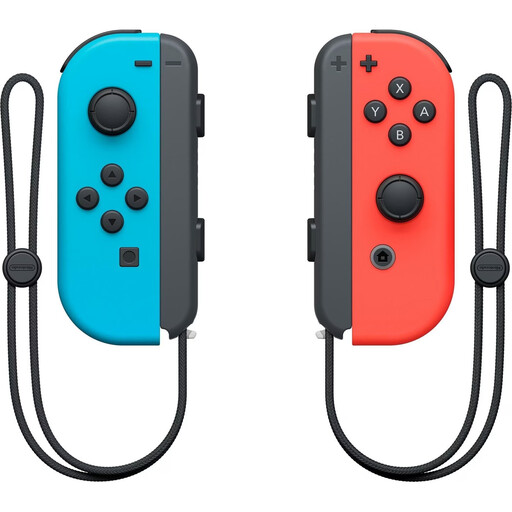
Nintendo Switch Joy-Con pair (Neon Red/Neon Blue)
The pair provides two separate inputs for local play on Nintendo Switch.
According to the product details, the two Joy-Con can be used individually or with a Joy-Con Grip, sold separately.
Joybuy
 No image available
PlayStation DualSense Wireless Gaming Controller (White)
An option for a PlayStation 5 or PC setup, if the game supports the features you want to use.
The product details list Bluetooth and USB-C, as well as PlayStation 5 and Windows PC as platforms. Support for individual features depends on the game.
Joybuy
Frequently asked questions
Do two of us need two full gamepads to play Overcooked! 2 on Switch?
Not necessarily: for the original Switch, Nintendo says each player can use one Joy-Con. Before buying another full gamepad, check whether you’re happy to use the smaller controllers this way.
Can two people play locally on PC without buying two new controllers?
According to Team17, two people can share a keyboard to play Overcooked! 2 on PC, Mac or Linux. This doesn’t automatically apply to other cooking games or every combination of different input devices you might want to use.
Do Joy-Con and Joy-Con 2 work with both Switch generations?
No. Nintendo says Joy-Con 2 are designed for Switch 2. Older Joy-Con can be used wirelessly with Switch 2, but can’t be attached to the console or charged directly from it.
What if a newly bought controller is faulty?
When you buy from a trader in the EU, consumers generally have at least two years of statutory rights for faulty goods, starting from the date they receive them. An additional manufacturer’s warranty doesn’t replace these rights. These EU rules don’t apply in the same way to private sales.
Can you put an old controller in household rubbish in Germany?
No. The German Environment Agency explains that waste electrical and electronic equipment must be collected separately from unsorted household waste. Take your controller to a suitable collection point.


