Playing co-op on one console
If several people are playing locally, first check whether your existing Joy-Con or other inputs will work for everyone. Nintendo says you can play Overcooked! 2 on Switch with one Joy-Con per person.


Choose your controller based first on your console or PC, then check which inputs your version of the game supports for everyone playing. A controller won’t make subtitles bigger: if reading is difficult, check the game’s display options and how it looks on your screen. For Overcooked! All You Can Eat, Team17 lists a scalable user interface and an assist mode.
If several people are playing locally, first check whether your existing Joy-Con or other inputs will work for everyone. Nintendo says you can play Overcooked! 2 on Switch with one Joy-Con per person.
If you want to follow subtitles, recipes or other in-game text, check the text and display options in the game you’re playing. Team17 lists a scalable user interface for Overcooked! All You Can Eat, while the Steam product page lists German subtitles.
If you play on more than one system, check the full model name and stated platform support against your version of the game. Information from Nintendo, Microsoft, Sony, 8BitDo and GameSir applies to specific models and systems.
| Buying priority | What to check | Who is it most relevant to? |
|---|---|---|
| Platform and game | Check the exact controller model and whether it’s supported by your console or PC version of the game. Some models may need a firmware update to work with Switch 2. | If I switch between systems, I don’t want to accidentally choose a model that isn’t compatible with my console or game. Around 36% of consumers would therefore put platform and game compatibility first. |
| Inputs for everyone | Check whether the game supports individual Joy-Con, full controllers or another shared input option. | If I’m setting up a local game for several people, I want to know whether the controllers we already have will be enough. Around 29% of consumers would first check that there’s a suitable input option for everyone playing. |
| Readability and comfort | Check the text size and display options in the game itself, as well as how it looks on your screen. A controller won’t change the text size. | If I want to read subtitles or recipes while playing a cooking game, I need a clear display and controls that feel comfortable. Around 21% of consumers would prioritise readability and comfort above all else. |
| Connection and seating position | Check that the cable length and connection suit your setup, or that wireless connectivity and power meet your needs. | If I’m using a wired controller, the cable needs to reach my seat comfortably; if it’s wireless, I want to keep an eye on the battery level. Around 14% of consumers would put connectivity and related practical considerations first. |
Nintendo’s similarly named models aren’t interchangeable: Nintendo says the Switch 2 Pro Controller only works with Switch 2. The older Switch Pro Controller, on the other hand, can be used wirelessly with Switch 2.
Before buying, check the full product name against your console.
For local play of Overcooked! 2 on Switch, Nintendo says each player can use a single Joy-Con. Team17 says that two people can share a keyboard for local play on the PC version.
First check which inputs your existing version of the game supports.
Controller buttons don’t change how text is displayed. The display and assist options in Overcooked! All You Can Eat are game settings, not controller features.
Check the text display and how it looks on your screen separately from your choice of controller.
According to the manufacturer, the GameSir G7 HE connects via USB-C. The PowerA model for Switch 2 described here can only be used when the console is docked, according to the manufacturer.
Check the connection, docked mode and cable route to your seat.
Joy-Con and Pro Controllers for specified Switch games and consoles.
Xbox Wireless Controllers for specified Xbox consoles and Windows PCs.
DualSense for PS5, plus connections to specified compatible computers.
The Ultimate 2 Bluetooth Controller is specifically listed for Switch and Windows.
The G7 HE is a wired alternative for the Xbox and Windows systems listed by the manufacturer.
A separate wired option for Switch 2 when docked.
This selection includes Joy-Con for local Switch sessions, as well as controllers for specified Nintendo, Xbox and PC setups.
 No image available
This pair may suit local play of Overcooked! 2 on Switch if each person wants to use one Joy-Con; Nintendo describes this input option for the game.
The set includes one left and one right Joy-Con, which can be used separately for multiplayer inputs.
 No image available
An option for Switch players who want a full gamepad instead of individual Joy-Con; Nintendo also confirms that this model can be used wirelessly with Switch 2.
The product description lists a wireless connection. Nintendo states that the older Switch Pro Controller has a battery life of around 40 hours when fully charged.
 No image available
For Xbox or Windows players, provided the specific cooking game supports the controller; Microsoft lists Xbox consoles and Windows PCs for this controller range.
The product description lists Xbox Wireless and Bluetooth, as well as a hybrid D-pad and a 3.5 mm headset jack. Two AA batteries are included, according to the description.
 No image available
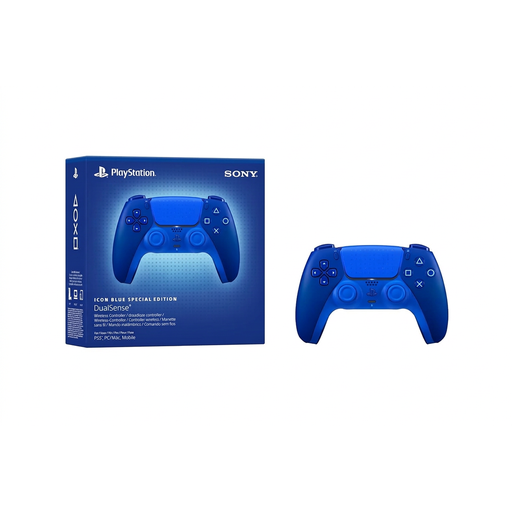
For PS5 players; if you’re using a compatible PC, also check which features the specific game supports.
The product description lists Bluetooth, USB-C and a touchpad. Sony describes USB and Bluetooth connections to PC. A USB cable isn’t included, according to the product description.
 No image available
For Xbox or Windows players if a wired connection to your seat suits your setup; the product description lists Xbox Series X|S, Xbox One and Windows 10/11.
According to the manufacturer, the controller connects via USB-C. Make sure the cable and the route it needs to take work with your setup.
Not necessarily: Nintendo says you can play locally with one Joy-Con per person. If you’re using a different version of the game, check its own input requirements.
No. For Overcooked! All You Can Eat, Team17 lists a scalable user interface and an assist mode. The Steam product page lists German subtitles, but doesn’t specify a particular text size.
Sony says to pair it for the first time using a USB cable with the PS5 switched on. For other controllers, follow the relevant manufacturer’s instructions.
No. Nintendo says the Switch 2 Pro Controller is only for Switch 2. Nintendo also confirms that the older Switch Pro Controller can be used wirelessly with Switch 2.
Your statutory rights against the seller if goods are faulty are separate from any voluntary manufacturer’s guarantee. Under § 438 BGB, the relevant claims for ordinary goods generally become time-barred two years after delivery; if a fault arises, repair or replacement under § 439 BGB is usually the first remedy to consider. This is different from returning an item simply because you’ve changed your mind. This information is based on the German Federal Ministry of Justice’s guidance on its Laws on the Internet website.