First, choose controllers that your specific game supports as two separate inputs on the console or PC you already own. Whether one Joy-Con per person is enough or you need two full gamepads depends on the game. Then check the D-pad, seating distance, cable routing and power requirements. For “It Takes Two” on Nintendo Switch, for example, Electronic Arts recommends either a pair of Joy-Con or one gamepad controller per person.
Who this guide is for
Two-player co-op on a console you already own
If you want to play together on Switch, Switch 2, Xbox or PS5, check whether the specific game supports a single Joy-Con or requires a full gamepad for each player. Electronic Arts and Nintendo set out different game and device requirements for using Joy-Con in local co-op.
Two players using separate inputs on PC
If you’re playing on the same Windows PC, check both the connection supported by the specific model and whether the game recognises both controllers. Microsoft, Sony, GameSir and 8BitDo specify different connection methods and platforms depending on the controller.
Two players with limited seating space
If you’re sitting side by side in a bedroom, choose between a cable you can route safely and a wireless connection supported by your device. The D-pad, power supply and freedom of movement available to you will depend on the controller.
What to look for when buying
Start by matching the game to your platform, then count the inputs you need. Finally, check the controls, connection and power supply for your seating setup.
| What to consider |
What to check before buying |
Who should pay particular attention |
| Compatibility with your platform and game |
Check the platform, game version and exact controller model. Nintendo specifies that Joy-Con 2 are for Switch 2; 8BitDo lists different connection types for Windows and Android for the Ultimate 2C Wireless. |
If I want to make sure the game works on the platform I already own, I may be among the approximately 31% of consumers who value compatibility most. |
| Two separate inputs |
Check the player count and supported play style for the specific game, and count the controllers you already have. For “It Takes Two” on Switch, Electronic Arts recommends either a pair of Joy-Con or two gamepad controllers. |
If your main concern is making sure both people can play at the same time, you may be among the approximately 25% of consumers who prioritise two supported inputs. |
| D-pad and handling |
Check whether your game is mainly played with the D-pad or analogue sticks. Information about the sticks doesn’t tell you how the D-pad feels. |
If I like to use the D-pad to change direction, I may be among the approximately 19% of consumers who consider how the controls feel first. |
| Connection and space |
Check the seating distance, available ports, receiver and a safe cable route against the specific model. GameSir specifies USB-C wired use for the G7 SE; for Windows, 8BitDo describes 2.4 GHz wireless via a USB-A receiver or a wired connection. |
If you sit side by side and want to keep cables out of the seating area, you may be among the approximately 13% of consumers for whom a suitable connection and freedom of movement are particularly important. |
| Power supply |
Check what’s included and how to charge or power both devices. Microsoft notes that rechargeable AA batteries can’t be charged in the Xbox Wireless Controller. |
If I take ongoing costs and the charging accessories needed for two controllers into account, I may be among the approximately 12% of consumers who consider the power supply first. |
Common misconceptions
-
“For Switch” automatically means “for Switch 2”
Nintendo says Joy-Con 2 are for Switch 2 only. Original Joy-Con can be used wirelessly with Switch 2, but Nintendo says they can’t be attached directly to or charged on the console.
Before buying, check the console generation against the controller’s exact name.
-
“Wireless” means universal Bluetooth
For the Ultimate 2C Wireless, 8BitDo specifies 2.4 GHz wireless and a wired connection for Windows, but Bluetooth for Android. You can’t assume a model’s connection method will work across other platforms.
For the exact model, check both the device you want to use it with and the connection type it supports.
-
One extra controller is always enough for two players
Whether a single Joy-Con provides all the inputs needed depends on the game. For “It Takes Two” on Switch, Electronic Arts specifically recommends either a pair of Joy-Con or one gamepad per person.
Check the game’s requirements against the input devices you already have before choosing another model.
-
Rechargeable AA batteries charge in the controller
Microsoft notes that rechargeable AA batteries can’t be charged in the Xbox Wireless Controller.
Check the power requirements for both controllers. For AA batteries, plan to use a suitable external charger or a compatible battery pack.
Rechargeable AA batteries may require an external charger; for battery packs, check the details for the specific version.
Key brands to consider
Nintendo
Joy-Con are an option for supported single-controller play styles on Switch and Switch 2.
- Nintendo describes using a single Joy-Con horizontally when the game supports this play style.
- Joy-Con 2 are for Switch 2 only; original Joy-Con can’t be attached directly to or charged on Switch 2.
Microsoft Xbox
Xbox Wireless Controllers are a platform-specific option for compatible Xbox consoles and Windows PCs.
- Microsoft lists USB, the Xbox Wireless Adapter and Bluetooth as connection options for Windows.
- AA batteries or a compatible battery pack need to be considered separately; rechargeable AA batteries can’t be charged in the controller.
Sony PlayStation
The DualSense is designed for PS5 and for supported games on Windows PCs.
- Sony lists USB-C and Bluetooth for connecting the DualSense to a PC.
- This connection doesn’t guarantee that every PC game will recognise two DualSense controllers or support all their features.
8BitDo
The Ultimate 2C Wireless is a specific option for Windows and Android.
- 8BitDo lists 2.4 GHz wireless via a USB-A receiver and wired use for Windows.
- For this model, the manufacturer lists Bluetooth for Android; the brand name alone doesn’t mean it’s compatible with Xbox or Nintendo Switch.
GameSir
The G7 SE is a wired controller for the Xbox platforms and Windows listed by the manufacturer.
- GameSir lists USB-C connectivity and Hall Effect sticks for the G7 SE.
- You’ll need a safe cable route from your seat; the manufacturer’s claims about the sticks aren’t an independent durability test.
PowerA
The Enhanced Wireless Controller Rechargeable is a Nintendo-licensed option for the Switch models listed by the manufacturer.
- PowerA lists a rechargeable battery and mappable extra buttons for this product range.
- According to PowerA, HD Rumble, IR and amiibo NFC are not included; the C button isn’t available on Switch 2.
Joybuy products for local co-op gaming
This selection includes Joy-Con for Switch and Switch 2, as well as controllers for Xbox, PS5 and Windows PCs. Before buying, check whether your specific game supports the model as an input for two players.
 No image available
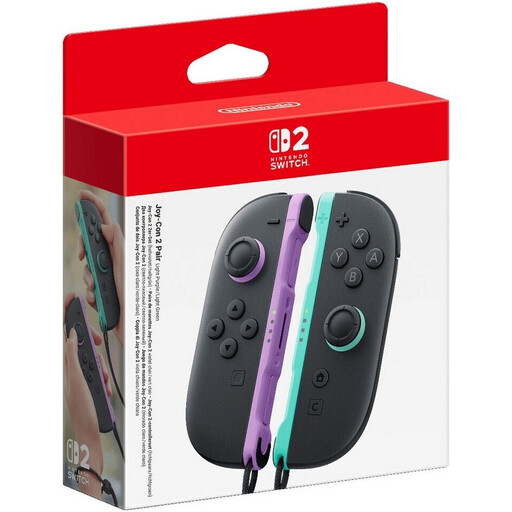
Nintendo Switch 2 Joy-Con 2 Pair – Light Purple/Light Green
An option for local play on Switch 2, provided the game supports the Joy-Con controls you want to use. This set is listed as a pair of Joy-Con 2; Nintendo says Joy-Con 2 are for Switch 2 only.
View at Joybuy
 No image available
Nintendo Switch Joy-Con Pair – Neon Blue/Neon Yellow
For Switch games that support two individual Joy-Con as separate inputs. According to Nintendo, whether one Joy-Con per person is enough depends on the software and supported play style.
View at Joybuy
 No image available
Microsoft Xbox Wireless Controller – Pulse Red
For supported Xbox and Windows games when wireless control suits your seating setup. This model requires two AA batteries; Microsoft notes that rechargeable AA batteries can’t be charged in the controller.
View at Joybuy
 No image available
PlayStation DualSense Wireless Gaming Controller – White
For PS5 and Windows games that support the DualSense. Sony lists USB-C and Bluetooth for connecting to a PC; you’ll need to check separately whether a particular game recognises two controllers.
View at Joybuy
 No image available
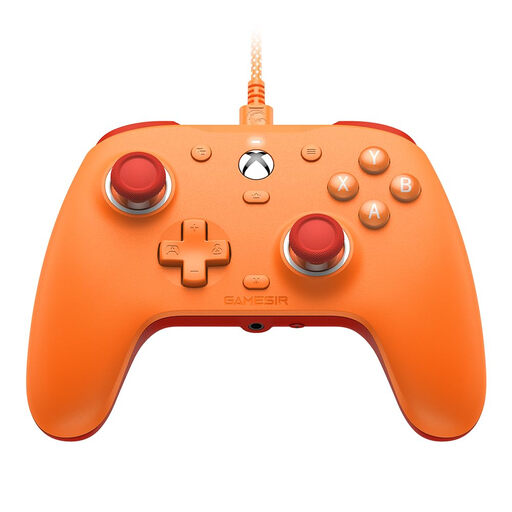
GameSir G7 SE Wired Gaming Controller
A wired option for supported Xbox and Windows 10/11 games, as long as you can route the cable safely from your seat. This model is listed with a 3 m USB-C cable; Hall Effect sticks are a manufacturer’s claim, not a guarantee against faults.
View at Joybuy
Frequently asked questions
Are two Joy-Con enough for every co-op platform game?
No, it depends on the specific game. Nintendo says that using Joy-Con individually in a horizontal position depends on the software and play style. For “It Takes Two” on Switch, Electronic Arts recommends either a pair of Joy-Con or one gamepad controller per person.
Can I use Joy-Con 2 with an original Nintendo Switch?
No. Nintendo says Joy-Con 2 are for Switch 2 only. Original Joy-Con, however, can be used wirelessly with Switch 2.
How do I connect two controllers to a PC?
Connect each model using a supported method, then check whether the game you want to play recognises both controllers separately. For Xbox Wireless Controllers on a Windows PC, Microsoft lists USB, the Xbox Wireless Adapter and Bluetooth; Sony lists USB-C and Bluetooth for DualSense. These connection options don’t guarantee support in every game.
Will a USB-C cable charge regular rechargeable AA batteries in an Xbox Wireless Controller?
No. Microsoft notes that rechargeable AA batteries can’t be charged in the controller. You’ll need a suitable external charger for them; for battery packs, check the details for the specific version.
Can old controller batteries go in household rubbish?
No. Germany’s Federal Ministry for the Environment prohibits disposing of used batteries in household rubbish and lists free return options at retailers or local authorities.


