Shared flat with a PC and shared screen
If you’re connecting a second controller to a Windows PC, check that the game recognises both inputs in local co-op. Microsoft and 8BitDo specify different platforms and connection methods.


Choose an extra controller to match your existing platform first, then check the controls required by your specific version of the game for two players. For example, Nintendo specifies one compatible controller per person for It Takes Two on Switch; whether a single Joy-Con is enough depends on the game’s multiplayer options. Only then should you consider how far you’ll be sitting from the screen, where the cable will run and which connection type you need.
If you’re connecting a second controller to a Windows PC, check that the game recognises both inputs in local co-op. Microsoft and 8BitDo specify different platforms and connection methods.
Check whether a single Joy-Con is enough for each game, or whether each person needs a different compatible controller. Nintendo says the Joy-Con grip position depends on the software’s multiplayer options; Switch and Switch 2 should be considered separately.
If you’re playing on a console you already own, choose between a compatible wireless controller and a wired model based on whether the cable can realistically reach your seat. Microsoft, Sony and PowerA list models for different platforms and connection types.
Check the platform and game version first, then the inputs needed by both players, and only after that consider seating, connection and power.
| What matters | What to check before buying | Who is this especially important for? |
|---|---|---|
| Platform and game | Check the console generation, operating system, game version and support for local co-op separately. | To avoid buying the wrong controller, make sure it works with your platform and specific game version. Around 36% of consumers say this is their main buying consideration. |
| Two usable inputs | Check the game’s player count and controller requirements; on Switch, you may need to adjust the Joy-Con grip position. | If you want to play together on the same screen, make sure both players can use the intended controls at the same time. Around 29% of consumers focus above all on having these two inputs. |
| Seating and connection | Check the cable route and USB port, or the wireless mode intended for your platform. | If you’re sitting further from the device, weigh freedom of movement against having a cable that can realistically reach your seat. Around 21% of consumers prioritise connection and seating. |
| Power and everyday use | Check whether the controller needs batteries or a rechargeable battery, how it can be charged, and the difference between a guarantee and your statutory rights. | If you’re weighing up battery changes, charging and longer-term use first, these points are particularly important. Around 14% of consumers say power and durability are their main concerns. |
For the 8BitDo Ultimate 2C Wireless, the manufacturer specifies Bluetooth for Android. Wireless play on Windows uses the 2.4 GHz receiver; the Bluetooth specification alone does not confirm compatibility with other platforms.
Check the connection for the exact model variant and platform. You’ll need a free USB port for the wireless receiver.
Nintendo says the available Joy-Con grip positions depend on each game’s multiplayer options. For It Takes Two on Switch, one compatible controller per person is specified.
Check the controller requirements for the version you’ll actually be playing before deciding you don’t need an extra controller.
According to the manufacturer, the PowerA Advantage Wired Controller is intended for use with Switch 2 in the dock only. If you’re buying a wired controller for Xbox or PC, the cable will also need to reach your seat.
Before buying, check whether you’ll be playing in docked mode, which platforms are supported and whether you can safely route the cable to your seat.
Consumer advice organisation Verbraucherzentrale distinguishes your statutory rights against the seller from a voluntary guarantee offered by the manufacturer or retailer.
If there’s a fault, keep your proof of purchase and the seller’s details to hand. Check the guarantee terms separately as well.
A manufacturer option for Xbox consoles and Windows PCs.
The DualSense is an obvious choice if you already own a PS5; Sony also describes using it with supported Windows PCs.
Joy-Con are an option for games that support individual controllers; the Switch 2 Pro Controller is designed for Switch 2.
The Ultimate 2C Wireless is a PC option with a 2.4 GHz receiver and USB connection.
The G7 SE is described as a wired model for specified Xbox consoles and Windows 10/11; the G7 Pro uses different connection types depending on the platform.
The Advantage Wired Controller is listed as a wired option for Nintendo Switch 2 in docked mode.
This selection includes controllers for PC, PlayStation, Xbox and Switch 2. For each model, also check whether your specific game version supports local co-op with that controller.
 No image available
An option for PC or Switch if the specific game supports this controller for local co-op.
The product title lists PC, Switch, Android and iOS, as well as a wireless connection, TMR joystick, dual-mode triggers and a polling rate of 1000Hz.
 No image available
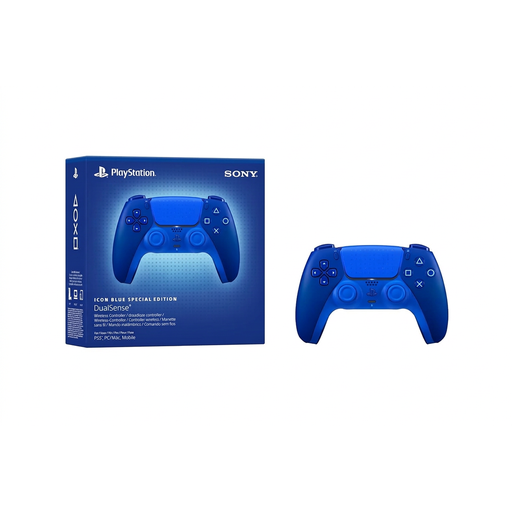
A good starting point for a shared flat with a PS5, as long as the specific game supports local co-op.
This model is listed as a wireless controller. According to the product details, haptic feedback and adaptive triggers depend on support from the game and platform.
 No image available
An option for PC, iOS or Android if the platform and co-op game support this controller.
The product title lists a wireless connection, Hall Effect triggers and four programmable buttons.
 No image available
Suitable for a shared flat with an Xbox or Windows PC if the specific game supports this controller in local co-op.
The product title lists Xbox One, Xbox Series X/S and PC. According to the product details, the controller needs two AA batteries, which are included.
 No image available
An option for a shared flat with a Switch 2, provided the specific game supports this controller for local co-op.
Nintendo lists this model for Nintendo Switch 2 only. According to Nintendo, the battery cannot be removed; a replacement through customer services may incur a charge.
No, there’s no universal answer. Nintendo explains that the available Joy-Con grip positions depend on the software’s multiplayer options. Check the specific game and version before deciding you don’t need an extra controller.
On Switch, open “Controllers”, then “Change Grip/Order”. Nintendo explains which buttons to press for the Joy-Con grip position you want. Then check that the game supports this control setup.
For this specific model, 8BitDo lists Bluetooth for Android. On a Windows PC, the manufacturer specifies the included 2.4 GHz USB adapter or a USB cable; for the 2.4 GHz connection, the manual lists Windows 10 version 1903 or later.
As consumer advice organisation Verbraucherzentrale explains, your statutory rights are against the seller and are separate from a voluntary guarantee. For batteries and rechargeable batteries, the German Environment Agency recommends using designated collection points rather than putting them in household waste. A wired controller doesn’t need its own batteries.
For affected electrical and wireless products, the German Federal Network Agency checks factors including CE marking, manufacturer details, German-language instructions and safety warnings, and the declaration of conformity. The CE mark alone doesn’t mean a government authority has tested every individual model in advance.