Console co-op duo
You play together on one console and want to check whether the specific game supports individual Joy-Con or two full controllers. Nintendo notes that the available ways to hold the controllers depend on the game.


Choose a controller based first on your gaming device and the input options supported by the specific co-op game. Two players don’t need the same controller setup in every game. Check whether your existing devices will do the job before buying another gamepad. Nintendo says whether Joy-Con can be used individually depends on the game; wireless controllers also need to be compatible with your platform and connect correctly.
You play together on one console and want to check whether the specific game supports individual Joy-Con or two full controllers. Nintendo notes that the available ways to hold the controllers depend on the game.
You play on PC and need an input device for the second player that works with your operating system and chosen game. Microsoft lists Xbox Wireless Controllers for Windows PCs, while Sony explains that DualSense can be used with a PC via USB or Bluetooth.
You’re weighing up whether a cable from your seat to the device is practical, or whether a suitable wireless connection would be better. Connection types and power requirements vary by model.
First, check which controllers the game supports on your device and whether you already have suitable ones. Then make sure the connection type and power supply work for your seating arrangement.
| What you need | What to check before buying | Who it matters most to |
|---|---|---|
| Platform and game | Match the game platform to the controller version, and check that the specific game supports local co-op inputs. | If I play on a PC or console, I want to be sure that this particular game supports the controller and input method I’m after. Around 36% of consumers prioritise platform and game compatibility. |
| Inputs for two players | Count the controllers you already have; check whether the game supports individual Joy-Con or two full gamepads. | If we want to share the controllers we already own, I want to know whether both players can actually use them in the game. Around 29% of consumers prioritise having enough input devices for two players. |
| Connection and power | Check the connection type for your platform, and factor in battery or charging needs and the cable route. | If a cable between my seat and the device would get in the way, I want a suitable wireless connection. If I’m using a wired controller, I want to check the cable route first. Around 21% of consumers prioritise connection and power for their seating arrangement. |
| Ease of use | Check that the game supports the grip style you need; only pay extra for features the game actually uses. | When we’re solving puzzles together, what matters most to me is that the necessary inputs are easy to use. I don’t want extra features to sway my choice if the game won’t use them. Around 14% of consumers prioritise straightforward controls that suit their needs over extra features. |
Whether individual Joy-Con work in a game depends on its control options. Joy-Con 2 are not designed for the original Nintendo Switch.
Check the game, console generation and input devices you already have first.
If the game requires two full gamepads, you may need to buy an extra controller.
8BitDo and GameSir offer different connection types depending on the model and platform. A wireless model won’t necessarily work with your gaming device.
Check the connection type of the exact model against your gaming device and seating arrangement.
Depending on the connection, you may need a suitable cable or a different model.
Sony says DualSense haptic feedback on PC requires a compatible game and a USB connection.
Only factor in a special feature if your chosen game and connection type support it.
Xbox Support notes that rechargeable AA batteries can’t be charged in the controller.
Before buying, check which batteries, rechargeable batteries or chargers you already have.
Rechargeable AA batteries need a separate charger.
Joy-Con and Joy-Con 2 are worth considering if two people want to play on one console, each holding a separate controller.
Microsoft says the Xbox Wireless Controller is designed for Xbox consoles and Windows PCs.
DualSense is an option for PS5 players and for compatible PC games.
Ultimate 2C variants differ by platform and connection, so check the exact model.
The G7 Pro is an option if you want extra controls as well as compatibility with Xbox or PC.
The range includes everything from a Joy-Con 2 set for Switch 2 to extra gamepads for PCs and consoles. Check that your specific game supports your platform and chosen input method.
 No image available
For two players on a Switch 2, provided the specific game supports these controller inputs.
The set includes Joy-Con 2 controllers in blue and light yellow.
 No image available
An extra gamepad if your gaming device is one of the platforms listed in the product title.
The product title lists Bluetooth and compatibility with PC, Switch, Android and iOS.
 No image available
A wired option if it’s practical to run a cable from your seat to your gaming device.
The product title lists USB and compatibility with PC, Xbox Series S and Xbox Series X.
 No image available
An extra wireless gamepad if you use a PS4 or PC and your specific game supports the controller.
The product title lists PS4 and PC as compatible platforms.
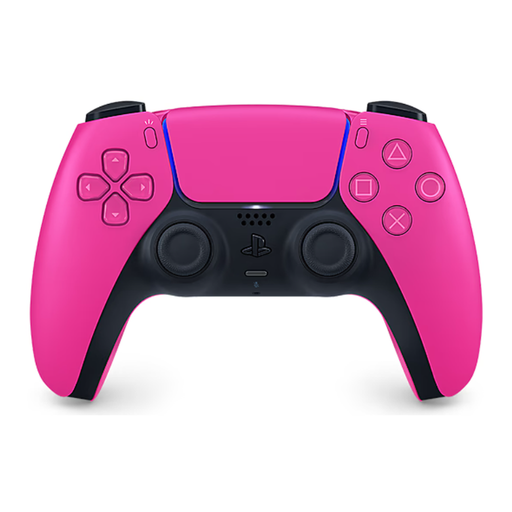 No image available
An extra full gamepad for a PS5, provided the game supports the co-op inputs you want to use.
The product title describes this model as a wireless DualSense controller.
It can work with supported software: Nintendo says each Joy-Con 2 can be used horizontally as a single controller. Check the controls for your specific game; Joy-Con 2 are not designed for the original Switch.
On Switch, Nintendo says you can select “Change Grip/Order” from the “Controllers” menu, then use SL and SR with individual Joy-Con held horizontally. Which grip styles work depends on the game’s multiplayer options.
No. Xbox Support notes that rechargeable AA batteries can’t be charged in the controller, so you’ll need a suitable separate charger.
For a consumer purchase, the seller is generally responsible for the legal guarantee covering faulty goods. The EU’s consumer information states that this minimum protection lasts for two years from the date you receive the goods. Any additional manufacturer’s warranty doesn’t replace these rights.