Co-op players who already own a Switch
If you want to solve puzzles together on the same screen, first check whether the specific game supports using individual Joy-Con as controllers.


Before buying extra controllers, first check whether the specific game supports local co-op, how many people can play and what controls each player needs. A single Joy-Con may be enough for some Switch games; if a game calls for more extensive controls, plan on a full controller for each player. At the dining table, you’ll also need to consider how to connect the controllers and keep them powered.
If you want to solve puzzles together on the same screen, first check whether the specific game supports using individual Joy-Con as controllers.
If another person wants to join in, the controller needs to work with the console you already own. Also check how many people can play together locally.
If your PC is connected to a screen everyone can see, make sure the connection method works for where you’ll be sitting.
First check the platform and the game’s controller requirements, then work out how many controllers you need and how they’ll connect from where you’re sitting.
| What you’re looking for | What to check before buying | Who is this especially important for? |
|---|---|---|
| Platform and game | Check the console or PC, the exact model variant and whether it supports the local mode you want to play. | If I want to play together around the dining table, the controller needs to work with both my device and the specific puzzle game. Around 36% of consumers prioritise compatibility with their platform and game. |
| A controller for everyone | Check the player limit and which controller inputs the game supports; include any controllers you already own in your count. | If several people are playing, I want to know that everyone will have a controller they can use. Around 29% of consumers prioritise having enough controllers for everyone. |
| Connection from your seat | Check the distance to your device, the available USB ports and which wireless connection methods are supported. | If I’m not sitting right next to the PC or console, I want to make sure the connection will work from my place at the table. Around 21% of consumers first look for a connection that suits their seating arrangements. |
| Power | Check the power requirements for the exact variant, including any batteries or charging options you’ll need. | When we play together, I want to make sure the controllers are ready to use before we start. Around 14% of consumers prioritise power and charging requirements. |
Whether a single Joy-Con is enough to use as a controller depends on the specific game.
Before buying, check which inputs the game supports and how many people can play together locally.
Ultimate 2C Wireless and Ultimate 2C Bluetooth are listed for different platforms and connection methods.
Check the full model name and connection method against your platform. For the stated Switch 2 support of the Bluetooth variant, 8BitDo specifies system version 20.1.1 or higher.
Microsoft notes that rechargeable AA batteries cannot be charged inside the Xbox Wireless Controller.
Before your first game, check what power source and accessories you’ll need for the exact variant.
Joy-Con and Joy-Con 2 are worth considering if you play on a Switch and your game supports using individual controllers.
An extra DualSense is a good fit for playing together on a PS5 you already own; it can also be used with supported computers.
The Xbox Wireless Controller is an option for Xbox consoles and Windows PCs.
Depending on the model, the Ultimate 2C variants are listed for Windows and Android or for Switch.
This selection includes controllers for Switch 2, Xbox and Windows PC, as well as other PC and Switch variants and PS5 controllers. Before buying, check that your specific game is supported and confirm the full model name.
 No image available
For two people playing together on a Nintendo Switch 2; whether individual Joy-Con are suitable depends on the game.
Set of two Joy-Con 2 controllers.
 No image available
For Xbox or PC, provided you check the platform and connection details for the exact variant before buying.
The product name lists Xbox One, Xbox Series X/S and PC; the product description specifies two AA batteries for power.
 No image available
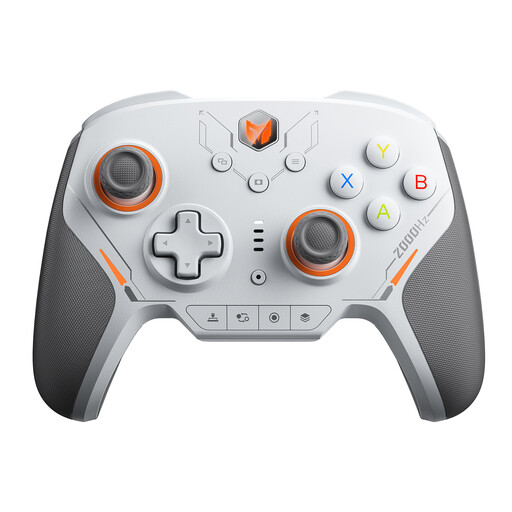
A wireless option for the platforms listed in the product name; check that it works with your specific game.
The product name lists PC, Switch, iOS and Android, as well as 16 Fully Mechanical Micro Switches, a 2000Hz Report Rate and TMR Electromagnetic Joysticks.
 No image available
For the platforms listed in the product name; check compatibility with your chosen co-op game before buying.
The product name lists PC, Switch 2, iOS and Android, as well as 16 Mechanical Keys, a Gyro Sensor and switchable Hall/Micro-Switch Triggers.
 No image available
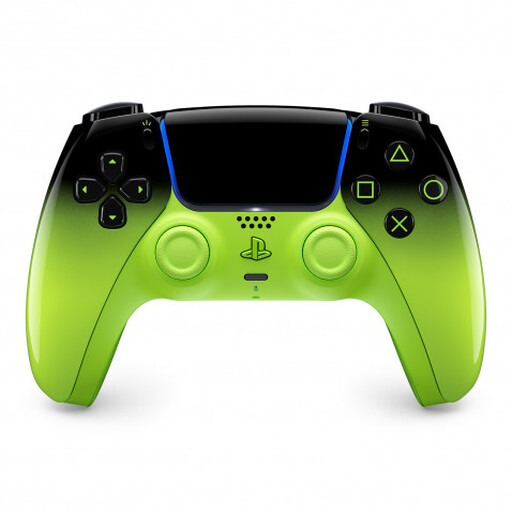
For an extra controller on PS5; on PC, additional features depend on the game and, in some cases, the connection method.
The product name lists PS5, PC, Mac, Android and iOS.
Only if the specific Switch game supports using each Joy-Con horizontally as a separate controller. Nintendo says this depends on the software and play style.
Sony explains that you can pair another controller through the PS5’s Bluetooth Accessories settings. To do this, press and hold the Create and PS buttons on the second controller at the same time.
No. 8BitDo lists Ultimate 2C Wireless for Windows and Android, and Ultimate 2C Bluetooth for Switch. For the Bluetooth variant, the manufacturer specifies system version 20.1.1 or higher for Switch 2.
Check whether you already have the batteries, battery pack or connection accessories you need. When you buy from a trader in the EU as a consumer, you are generally entitled to a minimum two-year legal guarantee from the date you receive the goods. Distance contracts generally come with a 14-day right to cancel, subject to legal requirements and exceptions; Your Europe explains these EU rules.