Co-op players with a specific console
You’re looking for an extra controller for your Xbox, PlayStation or Switch, and need to check which console generation you have.


Choose a controller that suits your console or PC first, then check whether the specific version of your game supports the controller and the local co-op mode you want to play. If you need to read subtitles as you play, easy-to-reach buttons and a comfortable seating position can help. However, the game itself determines the available languages and subtitles. Depending on the model, cables, wireless connectivity and power supply can all have practical drawbacks.
You’re looking for an extra controller for your Xbox, PlayStation or Switch, and need to check which console generation you have.
You want to play together in the same room, each with your own controls. You’ll need to check both the controller connections and whether the game supports local co-op.
You follow the story through subtitles and want to choose controls and a seating position that work for you. Check whether subtitles are available in the specific game you want to play.
| What matters | What to check before buying | Who is this especially important to? |
|---|---|---|
| Platform and game compatibility | Check the exact console generation and model names, and confirm controller support for the specific version of the game. | If I want to use a controller with a particular console or PC, I need to know that the model and game version are compatible. Around 29 % of consumers put platform and game compatibility first. |
| Separate controls in co-op | Check whether the game supports local or online co-op, and which controllers it requires. | When playing with someone else, I want to know whether each person can use their own controls in the mode we plan to play. Around 24 % of consumers prioritise separate controls for co-op. |
| Controls that work while reading subtitles | Check the game’s subtitle language and accessibility options, and compare only the button layouts you need. | When I’m reading dialogue, the game’s subtitle options and easy-to-reach buttons are important to me. Around 18 % of consumers prioritise controls that are easy to use while reading. |
| Seating position and connection | Consider how far you’ll be from the device, which ports are available and how the exact model connects. | When we play together, I want to make sure the cable is long enough and that the available ports work with where I’m sitting. Around 17 % of consumers prioritise seating position and connection type. |
| Power and accessories | Check what’s included and how the chosen version is powered rather than assuming that similar model names mean the same thing. | If I want to avoid interruptions caused by flat batteries or having to recharge, I check how the model is powered. Around 12 % of consumers prioritise power supply and ongoing costs. |
Nintendo says the Nintendo Switch 2 Pro Controller does not work with the original Switch. The 8BitDo Ultimate 2C Wireless and Ultimate 2C Bluetooth are also different models, each with its own listed platforms.
Before you order, check the full model name and console generation.
An incompatible model could mean you need to buy another controller.
Games distinguish between supported controllers and available local or online co-op modes. For the multiplayer mode in It Takes Two, Nintendo specifies one compatible controller per player. The Steam version lists split-screen and local co-op.
For the specific version of the game, check the mode you want, the number of players and the controller requirements separately.
The 8BitDo Ultimate 2C Wireless is listed as supporting Bluetooth on Android, while Windows connectivity is listed as using a 2.4 GHz receiver or a cable. Xbox Wireless Controller bundles also vary: some include a USB-C cable, while others don’t.
Check the connection options, power supply and included accessories for the exact version.
Xbox Wireless Controller for Xbox and Windows PC; the USB-C bundle adds an included cable.
DualSense for PS5 and compatible PC games.
The Switch Pro Controller and Switch 2 Pro Controller are designed for different console generations.
Ultimate 2C Wireless for Windows and the separate Ultimate 2C Bluetooth model for Switch.
The G7 SE is a wired alternative for Xbox and Windows PC.
This selection includes wired Xbox and PC controllers, PlayStation controllers, and models for Switch and Switch 2. For each version, check that it’s supported by your console and the specific version of your game.
 No image available
For Xbox Series X|S and PC, if you’re looking for a wired controller with extra assignable inputs.
The product details list four rear buttons, six assignable buttons and a detachable 3-m USB-C cable. Make sure the cable length and available port suit your seating position.
 No image available
An option if you’re looking for a controller listed as compatible with PS4 and PC. Check support for the specific version of your game.
The product details list a touchpad, a 6-axis gyroscope, vibration motors and a 3.5 mm audio jack.
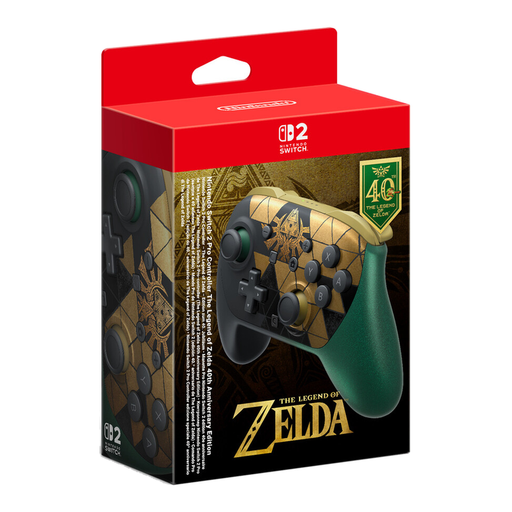 No image available
For co-op games on Switch 2, if you want a separate controller with extra assignable buttons.
The product name lists HD Rumble 2, Mouse Controls, Amiibo and GameChat. Nintendo says the Switch 2 Pro Controller does not work with the original Switch.
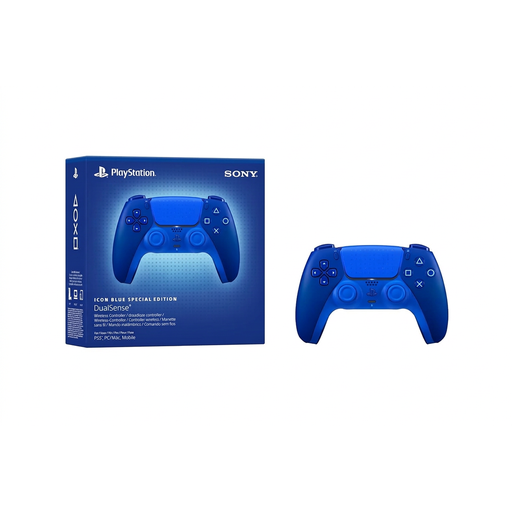 No image available
For PS5 or a compatible PC, provided the game supports DualSense.
Bluetooth and USB-C are listed as connection options. The product description says a USB cable is not included; on PC, individual features depend on the game and connection type.
 No image available
The product name describes this as a controller for Switch and PC. Before buying, check whether it’s supported by the specific version of your game.
The product name lists dual vibration and a gyroscope. Check the connection method and compatibility with your exact platform for the version you choose.
No. Subtitles and the languages available depend on the game. Valve lists German subtitles for the Steam version of It Takes Two, but this doesn’t tell you what’s available in other games or on other platform versions.
Only if the specific version of the game supports the local mode and controls you want to use. For the multiplayer mode in It Takes Two, Nintendo recommends one compatible controller per person; the Steam version lists local co-op with split-screen.
According to 8BitDo, you can connect it to Windows using the included 2.4 GHz USB-A receiver or a cable. Bluetooth connectivity for this model is listed for Android.