What should you look for when buying?
For extended screen work, the DGUV recommends an external keyboard and mouse and, where possible, an external monitor. Plan your whole workstation first, then check that the laptop’s specification suits your tools and existing devices.
| Buying consideration |
What to look for |
Who should pay particular attention? |
| Screen and input devices for long coding sessions |
Check your setup when sitting and standing, as well as the connections for an external monitor, keyboard and mouse. |
If I spend a long time reading code and want to position the screen independently of the keyboard and mouse, I look for a workstation setup that works for me. Around 33% of consumers say display and input are their main buying considerations. |
| Resources and software compatibility |
Check the operating system, processor architecture, RAM and SSD in the exact configuration against the requirements of your IDEs and local tools. |
If you run containers, virtual development environments or larger projects locally, check the requirements of the specific software you use. Around 27% of consumers prioritise local development resources and software compatibility. |
| Ports for your desk setup |
Compare the monitor connection, the ports you need for peripherals and charging, and any adapters you might require with your existing workstation. |
If I want to connect a monitor and input devices without an unnecessarily complicated setup, I check the ports on the exact variant. Around 20% of consumers put easy workstation connectivity top of their list. |
| Moving between work locations |
Consider the weight, built-in screen size, power supply and any adapters you’d need to take with you. |
If you regularly move between your desk and other work locations, weigh up portability against using the laptop without an external monitor. Mobility is the top buying consideration for around 20% of consumers. |
Joybuy products for Windows workstations
The Joybuy models below are Windows laptops for development tools and workstations with an external monitor or peripherals. The ports and resources that are right for you will depend on your specific workflow.
 No image available
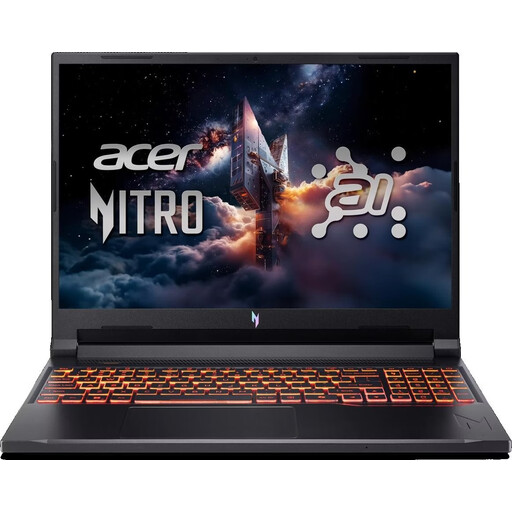
Acer Nitro V 16 AI (ANV16-42-R1PE)
The listed video and peripheral ports are worth considering for a Windows workstation with an external monitor.
Windows 11 Home, 16 GB DDR5, 512 GB SSD and a 16-inch WUXGA display; USB-C 4, HDMI 2.1 and RJ45.
View at Joybuy
 No image available
HP ZBook Fury 16 G1i Mobile Workstation
Check that the listed specification suits a Windows workstation running development environments locally.
Windows 11 Pro, 64 GB RAM, 2 TB NVMe SSD and a 16-inch IPS display with 3840 × 2400 resolution; Thunderbolt 4 and Gigabit Ethernet.
View at Joybuy
 No image available
Microsoft Surface Laptop 7, Snapdragon X Plus, 16 GB, 512 GB, Black
The smaller display and listed weight may suit people who work in different locations; also check how it connects to your external monitor.
Windows 11 Professional, 16 GB RAM, 512 GB SSD, 13.8-inch display and 1.34 kg; Thunderbolt 4.
View at Joybuy
 No image available
Microsoft Surface Laptop 8, Core Ultra 5, 24 GB, 512 GB, Platinum
For a desk setup with external devices, take the listed USB and Thunderbolt ports into account.
Windows 11 Professional, 16-inch WUXGA display, 512 GB SSD, USB 4.0 and Thunderbolt 4.
View at Joybuy
 No image available
Samsung Galaxy Book6 Enterprise Edition 16-inch
The listed RJ45 port may be useful for a permanent workstation with a wired network connection.
Intel Core Ultra 7 355, 16 GB LPDDR5X RAM, 512 GB NVMe SSD, Windows 11 Pro and RJ45.
View at Joybuy
Frequently asked questions
Is a laptop’s built-in keyboard enough for long coding sessions at a standing desk?
For longer work sessions, the DGUV recommends an external keyboard and mouse and, where possible, an external monitor. Position the screen appropriately when sitting and standing. This is an ergonomic recommendation, not a blanket requirement to buy anything for personal use.
What should I check before setting up Docker Desktop on Windows?
Check Docker’s current requirements for the Windows version, processor architecture and chosen backend. Docker documents different requirements and features for WSL 2, Hyper-V and other installation types; not every Windows configuration offers the same options.
What rights do I have if a laptop bought from a business seller is faulty?
For purchases in the EU, you have a statutory guarantee against the seller for at least two years from receiving the goods; a voluntary manufacturer’s warranty does not replace it. If you buy online from a business seller, you generally also have a 14-day right to cancel from delivery, subject to statutory exceptions. Your Europe explains these rules for EU purchases.
Do Germany’s rules on working with screens apply to every home sit-stand desk?
No. ASR A6 sets out employers’ duties within its stated scope, including for screen-based workstations in workplaces and teleworking environments. Under its scope rules, it does not generally apply to personal use outside a teleworking workstation; however, the DGUV’s ergonomic guidance can still help you set up your home workstation.


