Code and testing multitaskers
You want to arrange your editor, test output and documentation so they’re all easy to read at once. Choose a screen size that suits this layout.


A 27-inch QHD monitor is a good starting point if your editor, test output and documentation fit side by side and remain easy to read at your preferred scaling. Dell lists a resolution of 2560 × 1440 pixels for the relevant models. A 27-inch 4K or 31.5-inch 4K monitor may suit you if you want a sharper image or more room for windows, provided your desk and text scaling are suitable; EIZO and BenQ list these options for specific models. If you work with a laptop, also compare its video output and charging requirements with the monitor’s features. For example, Lenovo lists charging of up to 100 W over USB-C for the ThinkVision P27h-30.
You want to arrange your editor, test output and documentation so they’re all easy to read at once. Choose a screen size that suits this layout.
You switch between working on the go and at your desk. Suitable video connections, a USB hub and enough charging power are therefore important things to consider.
You spend a long time reading code and error messages, so you’ll want to consider text size, reflections and an adjustable setup. Germany’s ASR A6 applies only within its stated scope, not as a blanket rule for private study spaces.
Start by choosing a monitor to suit your usual editor, testing and documentation layout. Then check your laptop’s connections and charging requirements, as well as how the monitor will fit on your desk.
| Buying consideration | What to look for | Who it matters to |
|---|---|---|
| Room for multiple windows | Set up your usual editor, terminal and documentation layout at your preferred scaling, then compare screen size and resolution. | If I want to read code, test results and reference material at the same time, the layout needs to suit my text size and desk space. Around 36% of consumers put readable space for multiple windows first. |
| Connecting a laptop | Check video output, supported USB-C features, charging requirements and cables for your specific laptop. | I want to use my laptop at my desk with as few cables as possible, so I need the right video and charging features. Laptop docking is the top buying consideration for around 29% of consumers. |
| Reading comfort and setup | Compare height adjustment or an arm, the space it takes up, reflections and your preferred text scaling. | When I’m reading for a long time, I want to be able to adjust the screen position and text size to suit my space. Around 21% of consumers prioritise reading comfort and setup. |
| Total cost | Consider only the features you need, along with any likely accessories and the energy label for comparable models. | I don’t want to pay for a docking feature or accessory my computer doesn’t need. For around 14% of consumers, the upfront and ongoing costs are the top priority. |
Video transmission and charging power vary by model, and your laptop must also support the features you need.
Check your laptop’s connection and charging requirements against the details for the exact monitor you’re considering and the cable you plan to use.
Before you buy, check whether you’ll need a suitable cable, a separate power supply or a dock for the connection you want.
Native resolution doesn’t determine your text size or the window layout you can use. Both also depend on scaling and the application.
Try your usual layout with the text size and scaling you actually want to use.
Warranty claims are made to the seller; a manufacturer’s guarantee is separate.
Check the guarantee’s coverage and duration separately from your statutory rights.
Check what an additional guarantee covers before factoring it into your plans.
A useful choice to compare 27-inch QHD models with and without a USB-C hub.
The ThinkVision P27h-30 is a 27-inch QHD docking option for laptops with the right features.
The FlexScan EV2740X is a 27-inch 4K option for comparing text scaling and connection requirements.
The RD320UA is a 31.5-inch 4K model for a suitably spacious workspace.
The ProArt PA278CFRV is a 27-inch QHD option if you also need specific connections or colour modes.
These Joybuy products suit different spaces and ways of working, from a large desktop monitor to a portable laptop extension.
 No image available
A large-screen option if you can arrange several windows side by side and have plenty of desk space.
40 inches, 21:9, 5120 × 2160 pixels, IPS and 100 Hz; the product name also specifies a height-adjustable stand and USB-C Power Delivery at 65 W.
PIP and PBP are also listed in the product name. Check that the connections are suitable for your computer.
 No image available
A 27-inch QHD option for a multi-window layout. Check that your preferred text size is easy to read in the available space.
The product name lists SS-IPS, 200 Hz (OC 210 Hz), FreeSync Premium Pro and a height-adjustable stand.
 No image available
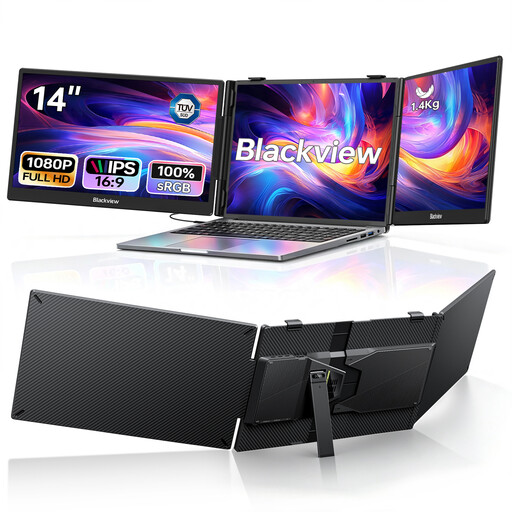
A portable laptop extension if you want to use two additional displays and your computer supports the required USB-C video output.
This model is listed with two 14-inch FHD IPS screens and 100 W Power Delivery pass-through. It’s described as suitable for laptops from 13 to 17.3 inches.
Before buying, check your laptop’s video output and make sure the device will work with your preferred setup.
 No image available
A more compact monitor for a smaller desk. Compared with the 27-inch QHD starting point, it offers less screen space and a lower resolution.
The product name lists an IPS panel, 100 Hz and a height-adjustable stand.
For code and text output, the first thing to consider is whether your layout is easy to read. Refresh rate alone doesn’t indicate any advantage when it comes to passing or running automated tests.
Not just because of the shape of the port. Check which video transmission features your specific laptop supports, along with its charging requirements and the cable you need. Then compare these with the monitor’s features and Power Delivery output.
Choose a text size that’s easy for you to read, check for reflections where you’ll actually be working, and use the height adjustment or a suitable monitor arm if available. Germany’s ASR A6 sets out requirements for workplaces and teleworking within its stated scope; the text says it doesn’t apply as a blanket rule to screen use in private settings.
No. Resolution alone doesn’t determine readability. Set the text scaling and font size to suit your operating system, applications and viewing distance.