What should you look for when choosing?
First decide how you’ll check for duplicates in your software. Then choose a keyboard based on how many numbers you enter, the space available on your desk and your preferred key layout.
| Priority |
What to look for |
Who it matters most to |
| Check duplicates safely |
Choose the fields to compare in your cataloguing software; check matches first and keep a copy of the original data. |
If I’m checking similar entries, I don’t want to accidentally merge two coins I actually own. Around 34% of consumers prioritise safely checking for duplicates. |
| Enter numbers and identification codes |
Check for a number pad and a suitable German layout; in Excel, set fields containing codes with leading zeroes to text before entering data. |
If I often enter dates, measurements or identification numbers, an easy-to-reach number pad is important. Around 33% of consumers say entering lots of numbers is their main priority. |
| Comfort during longer data-entry sessions |
Compare the keyboard’s width, depth and layout, and where the mouse will sit on your desk; try a split keyboard if possible. |
If I type for long periods, I want a layout that suits my workspace, without assuming that marketing claims prove any health benefits. Around 20% of consumers put typing and workspace comfort first. |
| Space for your mouse and coin trays |
Measure the available desk space, including room to move your mouse; check the exact keyboard layout supplied with TKL models. |
If I need room beside my keyboard for a mouse and coin trays, doing without an integrated number pad could be important. Around 13% of consumers want more clear desk space. |
Joybuy products for entering numbers
The following Joybuy products are keyboards or keyboard and mouse sets for cataloguing entries with lots of numbers. Layout, connections and features vary by model.
 No image available
Inateck N0158BK, foldable Bluetooth 5.3 keyboard with number pad and mouse, QWERTZ
The number pad is useful for frequent number entry, while the foldable design is intended for use on the go.
Features listed in the product name: Bluetooth 5.3, QWERTZ layout, number pad and carry case.
View at Joybuy
 No image available
Wireless QWERTZ keyboard and mouse set with detachable wrist rest
This set could be a good fit if you’re looking for a keyboard with a number pad and a mouse together.
Features listed in the product name: full-size keyboard, number pad, detachable wrist rest and 2.4 GHz USB connection.
View at Joybuy
 No image available
Logitech K120, wired keyboard with German QWERTZ layout
This is a wired option if you’re looking for a full-size keyboard with a number pad.
Features listed in the product name: USB connection, full-size design and German QWERTZ layout.
View at Joybuy
 No image available
AJAZZ AK35I V4, mechanical keyboard with German QWERTZ layout
This keyboard could be a good choice if you want a German layout and several connection options.
Features listed in the product name: Bluetooth, 2.4 GHz and USB-C, plus a 1.14-inch TFT colour screen.
View at Joybuy
 No image available
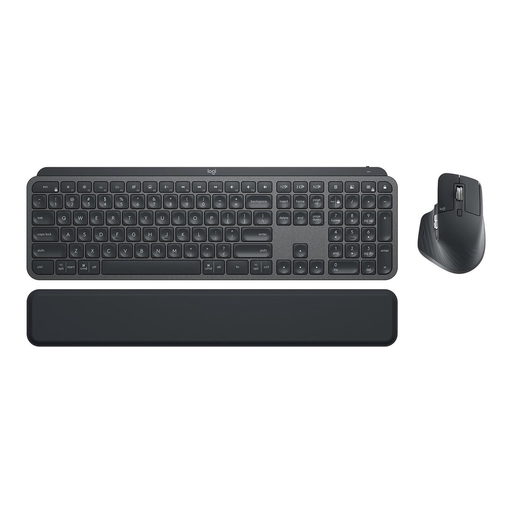
Logitech MX Keys Combo for Business Gen 2, German QWERTZ layout
This set could be a good fit if you need a keyboard and mouse together and want a German layout.
Features listed in the product name: MX Keys and MX Master 3S, Logi Bolt, backlighting and multi-device use.
View at Joybuy
Frequently asked questions
Can a new keyboard automatically remove duplicate coin entries?
No. A keyboard can’t tell whether two entries describe the same coin or two separate coins you own. In Excel, you can highlight matching values first and choose which columns to compare. Save a copy of the original data and check the matches before removing anything.
Why has the leading zero disappeared from an inventory number I just entered?
Excel may remove leading zeroes if it treats an entry as a number. If the number is an identification code rather than a value for calculation, set the field to text before entering or importing it. For other cataloguing programmes, check how they handle data. (Microsoft Support)
Do I need a keyboard with a number pad for a coin catalogue?
A number pad is an obvious choice if you often enter dates, measurements or identification numbers. A compact TKL keyboard may be a better option if desk space is your priority. The German Federal Institute for Occupational Safety and Health recommends choosing between a full-size and compact keyboard based on how often you use the number pad.
What should I check when connecting a keyboard?
Check that the connection on the specific model is compatible with your computer. The manufacturer says the PERIBOARD-512 B uses USB-A; Logitech lists Bluetooth or the included Logi Bolt receiver for Wave Keys. Follow the care and cleaning instructions for the model you actually buy.
What are my rights when buying a keyboard online in Germany?
When you buy online as a consumer from a trader in the EU, you generally have 14 days from delivery to withdraw from the purchase; exceptions may apply. Your Europe, the European Union’s consumer portal, states that new goods bought from a trader have a legal guarantee of at least two years in the event of a fault. This is separate from a voluntary manufacturer’s warranty. Also check whether the seller is trading as a business.


