
Lieferung heute & morgen

Qualitätsgarantie

Willkommens-Angebote freischalten: KOSTENLOSE Lieferung | Bis zu 80 % RABATT | Kostenlose 30-Tage-JoyPlus-Testphase
App herunterladen
A COLORFUL B850 AM5 motherboard is designed for PC builders looking to configure a modern AMD Ryzen PC with DDR5 memory, fast M.2 SSDs and up-to-date networking. However, the product name alone won’t tell you whether a model is right for your case, processor and upgrade plans.
Before buying a B850 motherboard, don’t focus solely on high clock speeds or “gaming” labels. What matters is the number and type of slots, the form factor, operating system support, and how the PCIe and M.2 connections are allocated.
Figures such as DDR5-8000 (OC) or DDR5-8400 (OC) refer to supported overclocking profiles. They don’t guarantee that every memory module will run at that frequency indefinitely with every Ryzen processor. The speed you can achieve depends on several factors, including the memory kit, processor, BIOS version and module compatibility.
So, before buying, check the manufacturer’s memory QVL (Qualified Vendor List). For many systems, a compatible DDR5 kit with an EXPO profile is a better choice than memory with a higher nominal speed that hasn’t been properly matched.
A PCIe 5.0 motherboard doesn’t automatically have several PCIe 5.0 slots. On the COLORFUL models covered here, the primary graphics card slot and at least one M.2 slot typically have PCIe 5.0 connectivity. Other M.2 slots may use PCIe 4.0.
In addition, according to the product information, actual PCIe 5.0 support depends on the AM5 processor you use. When choosing a board, consider whether you want to use a PCIe 5.0 SSD, a powerful graphics card or several expansion cards.
A motherboard with Wi-Fi 7 needs the right antennas, up-to-date drivers and a compatible operating system. For full Wi-Fi 7 functionality, the COLORFUL models listed here specify Windows 11 version 24H2 or later. With older versions of Windows, the connection may be limited to Wi-Fi 6E; according to the product information, no drivers are listed for the relevant Wi-Fi 7 module on Windows 10.
Use of the 6 GHz band may also vary depending on the country and regional regulations. In Germany, you should therefore consider your router, operating system and local frequency regulations together.
The COLORFUL B850 models use the AMD AM5 socket and, according to the product information, support Ryzen 7000, Ryzen 8000 and Ryzen 9000 series processors. Before installation, check the manufacturer’s latest support list to confirm compatibility with your specific CPU. This is particularly important with newly released processors or older BIOS versions.
A BIOS update may be required. Models with a BIOS update button make the process easier, but you’ll still need to check that you have the correct file and follow the installation instructions.
An M-ATX motherboard measuring 244 × 244 mm offers more room for expansion than a Mini-ITX model, but it needs a compatible case. The COLORFUL BATTLE-AX B850M-T WIFI V14 is slightly more compact at 230 × 220 mm. The COLORFUL CVN B850I GAMING FROZEN V14 measures 170 × 170 mm and is designed for Mini-ITX cases.
Before buying, check that:
The models differ significantly in the number of DDR5 slots. Two slots are suitable for compact builds with up to 96 GB, according to the manufacturer. Four slots allow you to upgrade later, and selected models support up to 192 GB.
For M.2 connections, pay attention to the number and type of connections. According to the product specifications, the COLORFUL CVN B850M ARK FROZEN V14 has three M.2 slots, including two with PCIe 5.0/4.0 x4 support and one PCIe 4.0 x4 connection. Other models offer two M.2 interfaces. Depending on the model, there are also two or four SATA 6 Gb/s connections.
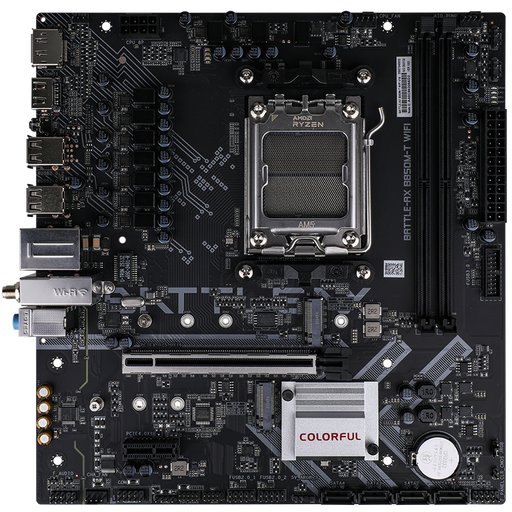
Why this product suits this profile: This compact M-ATX motherboard is a good fit for a carefully planned AM5 PC with two DDR5 modules and two M.2 SSDs.
The specifications clearly list two DDR5 slots, two M.2 interfaces and four SATA connections. This makes it easier to plan your setup realistically before you buy.
PCIe 5.0 x16 slot, 2.5 Gb LAN, Wi-Fi 6E and support for up to 96 GB of DDR5, according to the product specifications.
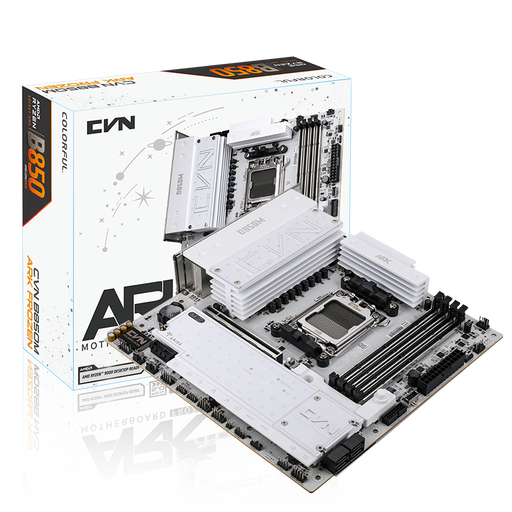
Why this product suits this profile: This M-ATX model is designed for users who want several fast drives, plenty of USB connections and a comprehensive feature set.
Three M.2 slots and four SATA connections reduce the likelihood of needing adapters when you expand your storage later.
Up to 192 GB of DDR5, PCIe 5.0, Wi-Fi 7, 2.5 Gb LAN and USB 3.2 Gen 2×2 Type-C, according to the product description.
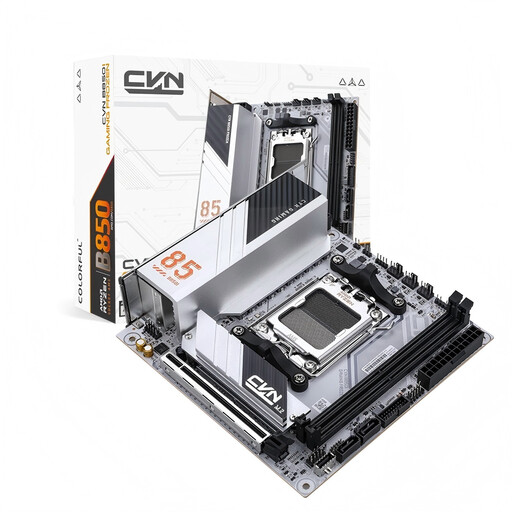
Why this product suits this profile: This ITX motherboard is a good option for compact gaming and work PCs where case size and a streamlined layout are priorities.
The ITX form factor is clearly specified. This makes it easier to check in advance whether your case, cooling and available expansion slots will be suitable.
170 × 170 mm, two DDR5 slots, two M.2 connections, Wi-Fi 6E and a PCIe 5.0 x16 slot.
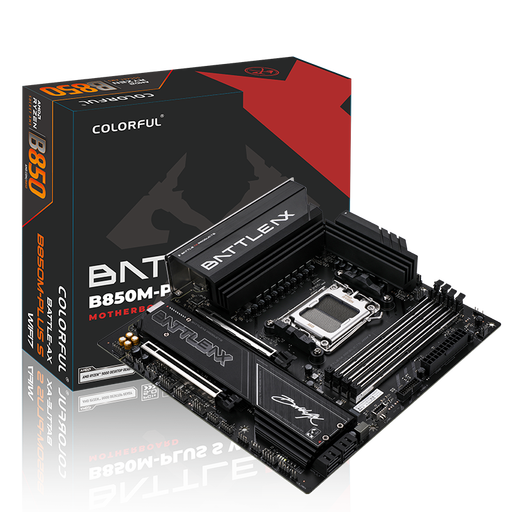
Why this product suits this profile: A good fit for users who want to combine an M-ATX layout, four RAM slots and built-in Wi-Fi 7 connectivity.
The product information lists operating system and driver limitations for Wi-Fi 7. Before installation, buyers can check these requirements against their router and Windows version.
Four DDR5 slots, up to 192 GB according to the manufacturer, two M.2 slots, PCIe 5.0 and 5 Gb LAN.
We’ve put together a complete, regularly updated list of products that meet these strict selection criteria and fully comply with the safety regulations in force in the EU.
According to the product information, the COLORFUL B850 models listed here support Ryzen processors from these series with an AM5 socket. Even so, check the latest CPU support list and the required BIOS version before installation.
For many gaming builds, two compatible DDR5 modules are a practical starting point. If you use memory-intensive applications or want the option to upgrade later, choose a motherboard with four DIMM slots and check the maximum capacity of the specific model.
You can use the motherboard’s Wi-Fi 7 feature with older wireless standards too, but the features available will depend on your router, operating system, drivers and regional regulations. For full Wi-Fi 7 support, all your components need to be compatible.