What should you look for when buying?
First measure the available space, including room for your controls. Then decide which resolution and display performance your system can sensibly support in the games you play.
| What to consider |
What to check |
Who should pay particular attention? |
| Footprint and position |
Measure the width and depth of the available space, then compare them with the dimensions of the specific model, including its stand. BenQ lists the EX240 at 540 × 252 mm, LG lists the 27GP850P-B at 614,2 × 291,2 mm, and MSI lists the MAG 274QRF QD E2 at 613,5 × 196,5 mm. |
If I need to leave room for controls and input devices in my cockpit, the actual footprint matters more to me than the screen size in inches; around 34 % of consumers put footprint first. |
| Orbit map and instruments |
Consider resolution, screen size, viewing distance and scaling together. BenQ lists the EX240 at 1920 × 1080 pixels; LG and MSI list their respective 27-inch models at 2560 × 1440 pixels. |
If I want to view flight paths and small instruments at the same time, I also check how they look in the game I use; around 33 % of consumers prioritise the readability of orbit maps and instruments. |
| Motion and connections |
Check the maximum refresh rate for the specific input and compare it with your computer’s output, cable and game settings. For the MAG 274QRF QD E2 at QHD, MSI lists up to 180 Hz via DisplayPort or USB-C and up to 144 Hz via HDMI. |
If smooth visuals matter to me, I want to know which refresh rate my connection actually supports; around 20 % of consumers put motion and signal transmission first. |
| Contrast and OLED |
For the specific OLED model, check the protective features and warranty terms for the way you plan to use it. LG explains that burn-in from areas of the image remaining unchanged for a long time cannot be ruled out, even with proper use. |
If I prefer dark space scenes with strong contrast, I weigh that against the instrument displays staying on screen for long periods; around 13 % of consumers prioritise contrast. |
Joybuy products for a compact cockpit
The Joybuy models below include compact Full HD displays and 27-inch QHD options. Compare their display specifications with the space available in your cockpit and the connections on your computer.
 No image available
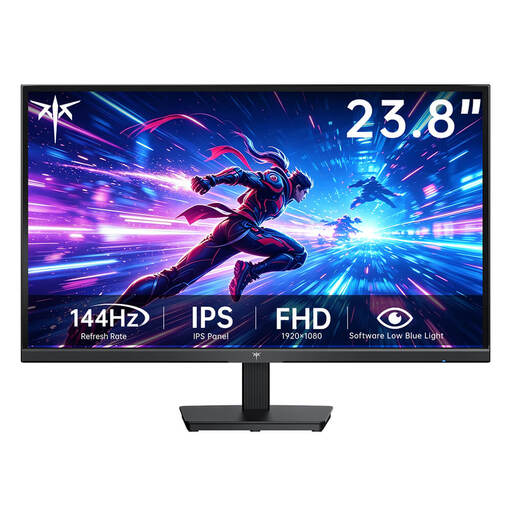
KTC H24B9S-2, 23.8 inches
A 23.8-inch display may be worth considering for a cockpit with limited space. Check the actual dimensions against your setup.
Fast IPS; 1920 × 1080 pixels; 144 Hz; HDMI and VGA according to the product description; 75 × 75 mm VESA mount according to the product description.
View at Joybuy
 No image available
TCL 25G54, 25 inches
This Full HD option may suit you if you’re considering a screen size between the 23.8- and 27-inch models listed here. Check the space it needs separately.
Mini LED; IPS; 1920 × 1080 pixels; 144 Hz; local dimming zones according to the product description.
View at Joybuy
 No image available
INNOCN 2751S PLUS, 27 inches
If you’re considering QHD for maps and displays, check that a 27-inch monitor with its stand will fit in your cockpit and that your computer supports the resolution you want.
IPS; 2560 × 1440 pixels; 275 Hz; 1152 dimming zones according to the product description; stand depth of 195,5 mm according to the product description; height-adjustable stand and 100 × 100 mm VESA mount according to the product description.
View at Joybuy
 No image available
KTC H27D9, 27 inches
This QHD model is worth considering if a 27-inch screen fits your available space. Check how it will sit and connect to your computer.
IPS; 2560 × 1440 pixels; 120 Hz; Adaptive Sync; HDMI and DisplayPort according to the product description; VESA mount according to the product description.
View at Joybuy
 No image available
UPERFECT, portable 18.5-inch monitor
The smaller screen size may suit you if you’re considering a portable display. First check that the device and cable support the refresh rate you want.
Matte IPS display; 1920 × 1080 pixels; up to 120 Hz; Mini HDMI and USB-C according to the product description; VESA-compatible.
View at Joybuy
Frequently asked questions
Is Full HD enough for an orbit map?
Resolution alone won’t tell you: screen size, viewing distance and how your game displays the image all matter. If space is tight, compare the 1920 × 1080 pixels of a compact model with the 2560 × 1440 pixels of a suitable QHD option, and check how small displays look with your preferred scaling.
How do I position a monitor in a cramped cockpit?
Measure the usable space, including room for your controls and cables. Compare it with the manufacturer’s measurements, including the stand. If you’re using a monitor arm, make sure the mounting points and load capacities of both the monitor and arm are compatible. Guidance on working with screens may be useful during long sessions, but it is not automatically a legal requirement for private gaming.
Why might a monitor have a lower refresh rate over HDMI than over DisplayPort?
The limit may depend on the specific input. For the MAG 274QRF QD E2 at 2560 × 1440 pixels, MSI lists up to 180 Hz via DisplayPort or USB-C and up to 144 Hz via HDMI. Also check your computer’s output and display settings. These figures don’t apply to all models.
What should I bear in mind when using OLED instrument displays for long sessions?
Read the protection and warranty terms for the specific monitor, and don’t assume that a protective feature removes all risk. LG describes unchanged still images as a possible cause of burn-in and explains that burn-in cannot be ruled out, even with proper use.
What are my rights when shopping online in Germany?
For a typical online purchase from a business seller, information from Your Europe, the European Union, states that you generally have 14 days from delivery to withdraw from the contract. Exceptions and conditions apply, including those relating to return postage. For faulty goods, EU information states that you have a minimum legal guarantee of two years against the seller. A voluntary manufacturer’s warranty does not replace these rights.


