FPS players with limited mouse space
If you practise at a small desk and need more room to move your mouse, a compact layout can free up space beside your keyboard.


If mouse space is your main priority on a small desk, a 60% model is a sensible starting point. If you regularly need arrow keys close to hand, a 65% model may be a better fit. An adjustable actuation point and Rapid Trigger can be useful for repeated movement inputs, but they’re not essential for practice. Check features such as Snap Tap or Rapid Tap against the rules of the game and tournament you play: Valve announced that certain hardware-assisted movement automation would result in a kick from official Counter-Strike 2 servers (19 August 2024).
If you practise at a small desk and need more room to move your mouse, a compact layout can free up space beside your keyboard.
If you want to fine-tune how your movement keys actuate and reset, check the features of the specific model and your game’s rules.
If you also regularly navigate or type at the same desk, weigh the extra room offered by a 60% layout against the dedicated keys on a 65% model.
Start by comparing the layout and available keys with your desk and daily needs. Then decide whether you really need adjustable movement inputs.
| Buying consideration | What to check | Who is it important to? |
|---|---|---|
| Mouse space | Check the keyboard’s width and the space available for mouse movement on your desk. | If I need as much room as possible for my mouse on a small desk, the actual width matters most to me. Around 36% of consumers put mouse space first. |
| Adjustable movement inputs | Check that the specific model offers both an adjustable actuation point and Rapid Trigger. | If I want to fine-tune actuation and reset for repeated movement inputs, I look specifically for these features. Around 29% of consumers prioritise control over movement inputs. |
| Everyday keys within easy reach | Check the layout of the specific model for arrow keys and any other keys you use regularly. | If I also regularly navigate or type at the same desk, I want to reach important keys without using an extra key combination. Around 21% of consumers prioritise having everyday keys within easy reach. |
| Straightforward features | Check the switch type and the adjustment features actually included with the model. | If I mainly need a compact set of keys, I don’t need to insist on an adjustable actuation point. Around 14% of consumers prefer straightforward features without extra adjustment options. |
Rapid Trigger relates to actuation or reset based on key movement. Snap Tap and Rapid Tap, by contrast, prioritise inputs from a pair of keys. Valve announced that certain hardware-assisted movement automation would result in a kick from official Counter-Strike 2 servers (19 August 2024).
Check the specific feature separately from Rapid Trigger, and review the rules for the game, server or tournament you play.
A compact layout gives you fewer keys within easy reach; arrow keys and other functions may require an extra function layer. A 65% model may have dedicated arrow keys.
Before choosing a layout, think about which keys you use regularly and check the layout of the specific model.
Accessing frequently used navigation keys through a function layer may mean using extra key combinations.
The Razer Huntsman V3 Pro Mini is not the separate Huntsman V3 Pro Mini 8KHz variant. The HyperX Alloy Origins 60 is also available with different layout options.
Check the full model name, the layout you want and the switch specifications of the variant you’re considering.
The Wooting 60HE v2 is a 60% model for buyers looking to combine compact dimensions with configurable inputs.
The Huntsman V3 Pro Mini is a 60% model with analogue optical switches, Rapid Trigger and an adjustable actuation point.
The German variant of the Apex Pro Mini Gen 3 is a wired 60% model with OmniPoint 3.0 Hall Effect switches.
The Alloy Origins 60 is a compact mechanical keyboard with secondary functions labelled on the keycaps.
The K65 PRO MINI is a 65% alternative if dedicated arrow keys matter on a small desk.
The models below include compact keyboards with adjustable movement inputs, as well as mechanical alternatives. If you’re considering a model with a US layout, check that it meets your needs.
 No image available
A good fit if you’re looking for a compact layout with configurable movement inputs.
Layout and switches: 60%, magnetic hot-swappable switches.
Adjustable actuation and Rapid Trigger; polling rate: 8000 Hz.
RGB lighting.
 No image available
Worth considering if you’re looking for a compact layout with adjustable movement inputs and a US layout suits you.
The product title lists magnetic Hall Effect switches, adjustable actuation from 0.01 mm and Rapid Trigger.
Polling rate: 8K; wired.
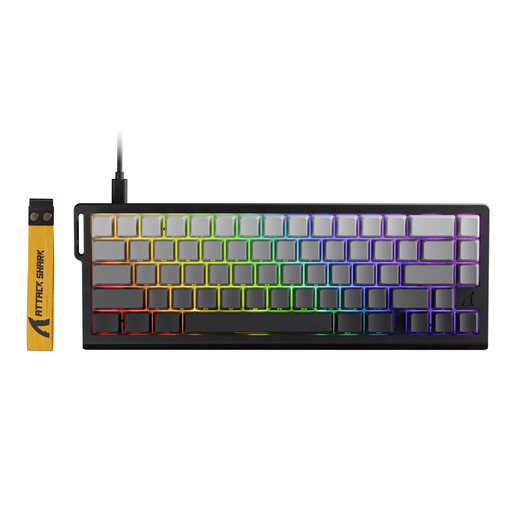 No image available
A good fit if you want to fine-tune repeated inputs and are looking for a compact keyboard.
66 keys; magnetic Hall Effect switches and Rapid Trigger.
Adjustable actuation range: 0.1 to 3.4 mm; wired USB-C connection.
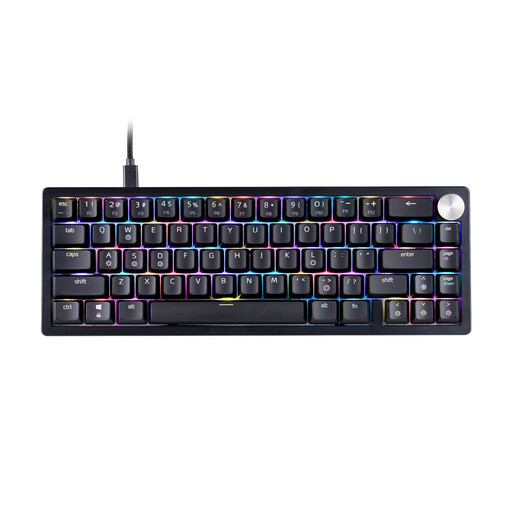 No image available
Worth considering if you want a compact mechanical model without the adjustment features described here and a US layout suits you.
Layout: 65%; XPG Red mechanical switches.
RGB lighting and detachable USB-C cable.
This product is listed with a US layout; check that it meets your needs before buying.
 No image available
A good fit if you’re looking for a compact layout with adjustable movement inputs and a US layout suits you.
65% and 68 keys; linear Hall Effect switches with Rapid Trigger.
Adjustable actuation range; polling rate: 8000 Hz.
US layout; detachable Type-C cable.
No. Rapid Trigger relates to actuation or reset based on key movement; Snap Tap and Rapid Tap, by contrast, prioritise inputs from a pair of keys. Valve cited hardware-assisted movement automation as a reason for kicking players from official Counter-Strike 2 servers (19 August 2024). Check the rules for the specific game and tournament you play.
Set the actuation point and, if available, Rapid Trigger in the profile for the specific model, then test whether the movement keys respond as you want them to. Wooting explains that lower actuation values are more sensitive and that there’s no single setting that works for everyone.
If a product is faulty, statutory consumer rights should be distinguished from a voluntary guarantee, as explained by the Verbraucherzentrale (28 September 2026). For ordinary online consumer purchases, there is generally a 14-day right to cancel; the conditions and exceptions for the specific purchase should be checked (Verbraucherzentrale, 13 August 2026).
When monitoring the market for electronic products, the Bundesnetzagentur checks, among other things, for CE marking, manufacturer details and required information. This is not a performance or quality mark for fast inputs. According to the Umweltbundesamt, old keyboards should not be put in household waste.