Gamers with very little mouse space
If you want to keep as much clear space as possible next to your keyboard, a particularly compact layout could help. Check whether you’re comfortable using secondary key functions to access extra keys.


For fantasy adventures at a small desk, a 75% layout is a good starting point if you want arrow and function keys within easy reach. A 60% model takes up less space, but relies more on secondary key functions. TKL is worth considering if you can do without the number pad and prefer a less condensed key layout. Measure the available space, including room for your mouse and cable, and check that the commands you need in your game are easy to reach on the specific layout.
If you want to keep as much clear space as possible next to your keyboard, a particularly compact layout could help. Check whether you’re comfortable using secondary key functions to access extra keys.
If you often use the arrow or function keys in fantasy adventures, make sure they’re easy to reach on the layout you choose.
If you share your desk with others, typing noise and cables could affect your day-to-day setup. Assess these features for the specific model and configuration you’re considering.
A good fit if: Every centimetre of mouse space counts and you’re happy to access extra functions using secondary key functions.
The trade-off: Check whether arrow and function keys are practical to reach in your games without dedicated key rows.
A good fit if: You want to save space but keep arrow and function keys within easy reach.
The trade-off: It takes up more desk space than a 60% layout. If the switches are replaceable, compatibility with the model is key.
A good fit if: You can do without the number pad and prefer a less condensed key layout.
The trade-off: TKL isn’t automatically the smallest option. Compare the keyboard’s width with the space you have available.
When setting up a small gaming desk, your priorities depend on whether mouse space, direct access, typing noise or flexible connectivity matters most in your day-to-day use.
| What matters | What to look for when buying | Who it matters most to |
|---|---|---|
| Clear desk and mouse space | Measure the available width, including the cable connection, and compare it with the dimensions of the specific version. | If my mouse and keyboard need to fit comfortably side by side on a small desk, every bit of space counts. Around 36 % of consumers put available space first. |
| Game commands within easy reach | Compare the keys you use most with the layout, and check that you’re choosing the DE-ISO or QWERTZ version you want. | If I use the arrow or function keys often, I want to reach them without awkward secondary key functions. Around 29 % of consumers prioritise direct access to game commands. |
| Typing noise and feel | Manufacturer descriptions such as “Whisper Quiet” aren’t comparable noise measurements, so check the specific switch type. | At a shared desk, I care more about a typing sound that suits me than extra gaming features. Around 21 % of consumers put noise and feel first. |
| Connectivity and customisation | Check the connection types and switch compatibility for the exact model. “Hot Swap” doesn’t mean that any switch will fit. | If I want to connect the keyboard in different ways or customise it later, I check the connections and supported switch type. Around 14 % of consumers prioritise connectivity and customisation options. |
According to Razer, the barebones version of the Razer BlackWidow V4 75% doesn’t include switches, keycaps or a wrist rest. Check the exact version and what’s included before you buy.
Razer specifies mechanical 3- or 5-pin switches for the BlackWidow V4 75%. According to Keychron, the Q1 HE is compatible only with Gateron Double-Rail Magnetic Switches. Check which switches are approved for your exact keyboard model before buying any.
A 60% layout relies more heavily on secondary functions, while the BlackWidow V4 75% keeps arrow and function keys. Note down the game commands you use most, measure your available space, and check the dimensions and layout of the specific version.
The BlackWidow V4 75% is an option if you’re looking for a compact layout with arrow and function keys, plus replaceable mechanical switches.
The Q1 HE is a wireless 75% layout in a DE-ISO version, with adjustable magnetic switches.
The Apex 3 TKL is a German-layout TKL option if you want to do without the number pad and take typing noise into account.
The Alloy Origins 60 is a 60% option if you want to leave as much space as possible for your mouse.
The PRO X TKL is a wireless TKL option if you want to do without the number pad.
These models range from particularly compact 60% layouts to 75% keyboards. When choosing, check whether the German or US key layout suits the game commands you use.
 No image available
The 65% format with a German QWERTZ layout is a good fit if you want to game in a small space and choose between several connection types.
65 %; German QWERTZ; Tri-Mode: 2,4 GHz, Bluetooth and USB-C; Low Profile MX Speed Switches.
 No image available
The 75% layout in ISO-DE is worth considering if you want a compact format with a German layout and a choice of connection types.
75 %, ISO-DE; Tri-Mode: Bluetooth, 2,4 GHz and USB-C; Hot-Swappable; V3 Pro Cream Yellow Switch.
 No image available
This 75% version keeps a compact layout. Bear in mind that, according to the product name, it has a US QWERTY layout.
75 %; US-QWERTY; Tri-Mode: wired, Bluetooth and 2,4 GHz; Reaper Switch.
 No image available
The 75% layout is a compact option with arrow and function keys within easy reach. Check that the US QWERTY layout works for you.
75 %; US-QWERTY; Tri-Mode connectivity; Hot-Swappable; volume control.
 No image available
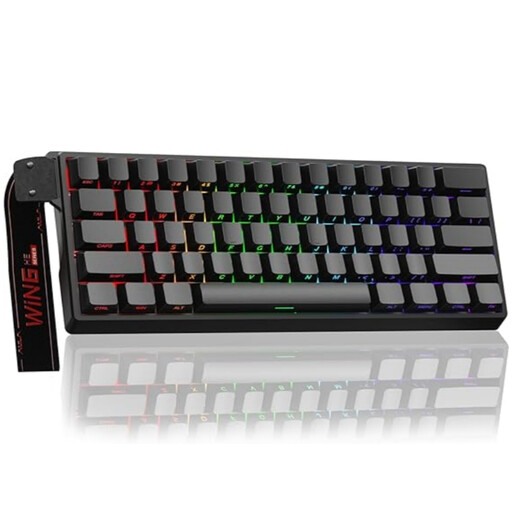
The 60% format is a good choice if you want to save desk space. Check whether you can comfortably reach your game commands without dedicated arrow or function key rows.
60 %; wired; magnetic switches; Hot-Swappable; adjustable actuation and Rapid-Trigger mode; 8000 Hz polling rate.
No, not just because of the genre. Start by comparing the keys you need with the typing feel you prefer. SteelSeries describes the Apex 3 TKL’s switches as quiet, while the BlackWidow V4 75% uses mechanical switches that are replaceable in certain versions.
Switch off the keyboard before cleaning it, and unplug a wired model. Logitech recommends carefully removing loose debris. If you’re taking the keyboard apart or removing the keycaps, also follow the instructions for the specific model.
For a qualifying online distance purchase in the EU, you generally have a 14-day right to cancel from the date of delivery; exceptions and the rules on return costs apply. You also have a statutory legal guarantee of at least two years from receiving the goods when buying from a business seller. A voluntary manufacturer’s warranty doesn’t replace this right.
Take it to a local collection point for electrical waste rather than putting it in your regular household rubbish. The German Environment Agency explains that local collection points generally accept electrical waste free of charge; retailers have take-back obligations in certain circumstances.