Card players short on mouse space
If you need to fit your keyboard and mouse side by side, compare their actual dimensions rather than relying on the layout percentage alone.


Start by considering which keys you need for your card games and everyday typing, then measure the space available for your keyboard and mouse. A 75% layout combines a compact design with a dedicated function row; a 65% layout gives you more room but does away with a separate function row, while a TKL layout omits the number pad but keeps the key groups separate. Also check the exact layout, switch noise and connection type rather than assuming that gaming features offer a general advantage for card games.
If you need to fit your keyboard and mouse side by side, compare their actual dimensions rather than relying on the layout percentage alone.
If you regularly use arrow keys, function keys or other easy-to-reach keys, check that your games’ commands are available on the keyboard before you buy.
If you also use the keyboard for everyday typing, consider its noise level, German key layout and connection type.
First, note which keys you need and measure the space available for your keyboard and mouse. Then compare the layout, noise level and connection type of the specific model.
| What matters | What to look for | Who is this important for? |
|---|---|---|
| Desk space and room for your mouse | Check the dimensions of the specific model; allow for mouse movement and cables when measuring. | If I need to use my keyboard and mouse in a small space, the actual footprint matters. Around 36% of consumers prioritise the space a keyboard takes up. |
| Easy-to-reach keys | Note your game commands and frequently used keys, then compare them with the layout of the specific keyboard. | If I often need particular keys while gaming or typing, I want to access them without using a secondary function. Around 29% of consumers prioritise readily available keys. |
| Switch feel and noise | Check the switch variant; don’t treat manufacturer claims about noise dampening as an independent comparison of volume. | If I share my desk with others, I want to take typing noise into account. Around 21% of consumers prioritise switch feel and noise. |
| Connection and key layout | Check whether it’s DE-ISO or US-QWERTY, and confirm the wired and wireless connections listed for the specific variant. | If I use my keyboard in German or need a particular connection, the selected variant must suit my needs. Around 14% of consumers prioritise connection and layout. |
A 65% layout may include arrow keys but no dedicated function row; a 75% layout may retain extra keys. Dimensions vary by model.
Measure your desk and compare the game commands you actually use with the layout of the specific model.
Missing easy-to-reach keys may mean getting used to secondary functions, while a case that’s too wide could leave you with less room for your mouse.
The Razer BlackWidow V3 Mini HyperSpeed considered here has a US-QWERTY layout; for the Keychron K2 HE, you need to select the DE-ISO variant.
Check the layout variant in the product details, not just the model name.
Adjustable switches or other gaming features do not, in themselves, prove any particular benefit for an unspecified card game.
Prioritise the keys you need, the desk space available, noise level and connection type. Consider specialist features only if you know how you plan to use them.
The BlackWidow V3 Mini HyperSpeed is a 65% option with arrow keys for desks with limited space.
The K65 PLUS WIRELESS (DE) is a 75% option with arrow keys and a programmable multi-function dial.
The K2 HE ISO collection is aimed at buyers looking for a 75% layout, a selectable DE-ISO version and magnetic switches.
The G515 TKL is a low-profile keyboard without a number pad, available in wired and LIGHTSPEED versions.
The Apex Pro TKL DE is a wired TKL option with a German-labelled layout.
Here you’ll find Joybuy models in compact 60%, 65% and 75% layouts. Pay particular attention to the dimensions and whether the key layout suits your everyday typing.
 No image available
The 75% layout is an option if you want to save space and use a German ISO layout.
Tri-Mode; Bluetooth, 2.4G and USB-C; V3 Pro Cream Blue Switch; hot-swappable and RGB; black and gold.
 No image available
The 75% format could suit you if you’re looking for a compact layout with a German ISO layout.
Tri-Mode; Bluetooth, 2.4G and USB-C; Creamy Rye Switches; hot-swappable and RGB.
 No image available
The 65% format is a compact option if you can manage without a separate function row.
Bluetooth, 2.4G and wired operation; detachable wrist rest; hot-swappable.
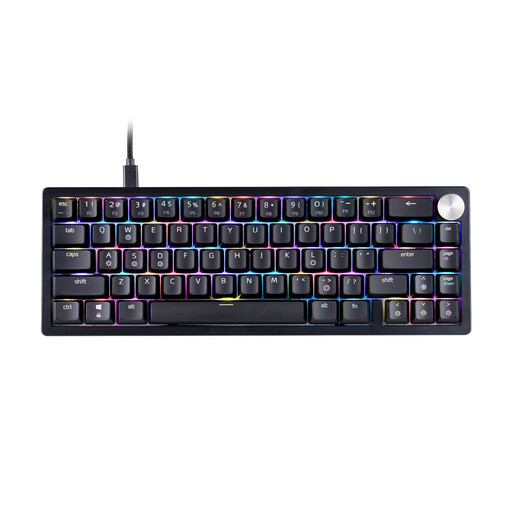 No image available
The 65% layout is designed for a compact setup; before buying, check that the US layout suits your everyday typing.
US layout; RGB; black.
 No image available
The 60% format with 61 keys is a space-saving option if you can access the commands you need without a dedicated function row.
Wired; US-QWERTY; 61 keys; RGB.
It could work if you can access your game commands without a dedicated function row. Check the key layout in the game and on the keyboard you’ve selected; this type of layout can also free up space for your mouse while providing arrow keys.
SteelSeries recommends unplugging a wired keyboard before cleaning, removing crumbs and keeping moisture away from the switches. Also follow the care instructions for your specific model.
For a standard online distance purchase, you generally have 14 days to cancel, starting from the day you receive the goods; statutory exceptions and rules on return costs also apply. Your Europe, the European Union’s consumer portal, also explains the legal guarantee of at least two years for faulty goods; an additional manufacturer’s warranty does not replace it.
CE marking is required for products covered by harmonised EU rules that expressly require it; it is not a general, independent mark of quality. For radio equipment, the European Commission sets out the framework under the EU Radio Equipment Directive. Check the documentation for the specific keyboard to see which information applies to it.
The German Environment Agency advises against putting waste electrical and electronic equipment in household rubbish. Find out about suitable return and recycling options, and remove any removable batteries before disposal where possible.