Which buying criteria matter on a small desk?
60%
A good fit if: You want to keep as much desk space free as possible and can easily reach the replay commands you need.
Trade-off: Pay particular attention to how you access the arrow, function and media commands.
65%
A good fit if: You want a small footprint but still want the arrow keys within easy reach.
Trade-off: Depending on the model, you may need a secondary key assignment for other frequently used commands.
75%
A good fit if: You want more keys within easy reach alongside the arrow keys, or a configurable dial.
Trade-off: This format tends to take up more room than smaller layouts. Also check how to configure a dial for your workflow.
TKL
A good fit if: You can do without a number pad but prefer a more familiar key layout.
Trade-off: TKL leaves out the number pad, but it isn’t the smallest option. Measure the specific keyboard.
| Buying criterion |
What to check before buying |
Who it matters most to |
| Desk space and room for your mouse |
Measure the available width, including space for your mouse and the cable route, then compare it with the dimensions of the specific keyboard. |
If I need room to move my mouse alongside my keyboard, the actual width matters more to me than the format name. That’s why around 36% of consumers put space requirements first. |
| Direct access to replay commands |
Make a note of the hotkeys in your replay application and check whether you can access them directly on your chosen layout or need a secondary key assignment. |
If I often want to pause or navigate through a recording, I want to reach the commands I need without awkward key combinations. Around 29% of consumers prioritise direct access to replay commands. |
| Typing noise and switch feel |
Check the switch type and any sound dampening on the specific variant. Manufacturer claims about dampening aren’t a measure of the noise at your own desk. |
If I share my desk with others, I want to choose a typing feel that suits my surroundings. Around 21% of consumers focus mainly on noise and switch feel. |
| Cable management and connectivity |
Check whether the specific variant is wired or wireless and whether its connection suits your desk setup. |
If a cable cuts across the limited space I have for my mouse, tidy cable management matters to me. Around 14% of consumers prioritise a neat connection setup. |
VideoLAN documents the hotkeys available in VLC and how to change them. If you use a different replay application, check its own keyboard settings. What matters is whether you can easily reach the commands you need on the specific layout.
Joybuy products for compact replay setups
This selection includes compact gaming keyboards with 65% and 75% layouts. Before buying, check that the layout and key assignments suit your replay hotkeys.
 No image available
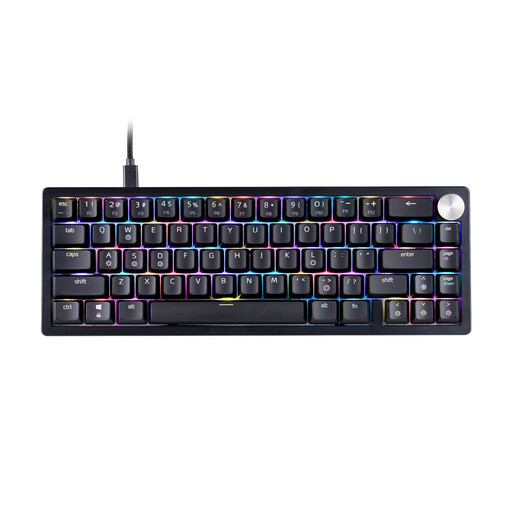
XPG SORCERER MINI 65%, US layout, RGB, black
The 65% layout may suit a small desk. Check whether you can easily access the replay commands you need on this US layout.
Mechanical gaming keyboard; 65% format; US layout; RGB; black.
View at Joybuy
 No image available
CHERRY MX-LP 2.1 Wireless, 65%, German QWERTZ layout, white
The compact 65% layout can leave more room for mouse movement. Compare the key assignments with your replay hotkeys.
Tri-mode connectivity: 2.4 GHz, Bluetooth and USB-C; low-profile MX Speed switches; RGB.
View at Joybuy
 No image available
Redragon RS68, 65%, 68 keys, space grey
The 65% layout is a compact option. Check whether the 68-key arrangement makes the commands you need for your replay software easy to access.
Mechanical keyboard with three connection modes: Bluetooth, 2.4 GHz and wired; hot-swappable switches; detachable wrist rest.
View at Joybuy
 No image available
AJAZZ AK820 MAX, 75%, US QWERTY layout
The 75% layout may suit you if you want a compact keyboard with more keys within easy reach. Check that the US QWERTY layout works for the characters you need to type.
Tri-mode connectivity; Flying Fish switches; volume dial; RGB; 8000 mAh battery; hot-swappable switches.
View at Joybuy
 No image available
CHERRY XTRFY K5V2 Compact, 65%, German QWERTZ layout, black
The 65% layout may be a good option when desk space is limited. Check whether the specific variant gives you access to the replay commands you need.
Wired mechanical gaming keyboard; hot-swappable MX2A-RED switches; RGB.
View at Joybuy
Frequently asked questions
Do I need a keyboard with macro keys for replay analysis?
Not necessarily. First check which keyboard shortcuts your replay application offers and whether you can change them. For example, VideoLAN documents the VLC hotkeys, which you can view and change in the settings. Other applications may use different key assignments.
How do I set up keys for reviewing replays?
Start by listing the playback commands you use most, then check the key assignments in your application. According to VideoLAN, you can view and change VLC hotkeys in the settings. Setting up additional keyboard features may require the relevant manufacturer’s software.
Can I change the switches in a hot-swappable keyboard later?
CHERRY describes the switches in the CHERRY XTRFY K5V2 Compact as replaceable. For other models and replacement switches, check compatibility with the specific variant and follow the manufacturer’s care instructions.
What rights do I have when buying a keyboard online in Germany?
For a standard online purchase from a business seller, you generally have a 14-day right to cancel from the date you receive the goods; exceptions and any return postage costs should be taken into account. If the goods are faulty, you have statutory rights against the seller; EU information specifies a minimum period of two years from receipt. A voluntary manufacturer’s guarantee does not replace these rights.
What should I know about labelling and disposal?
Electronic keyboards are subject to the applicable EU product rules. CE marking is required where the relevant harmonisation rules specify it, and RoHS restricts certain substances in electrical and electronic equipment. A keyboard you no longer need should not go in household waste; take it to a separate collection point for waste electrical and electronic equipment.


