Players short on mouse space
If you want to keep space beside your small desk free for mouse movement, a keyboard with a smaller footprint could help. You may be able to access less frequently used keys through function layers.


If space for mouse movement is limited on your small desk, a 60% keyboard could be the right choice. If you need more keys within easy reach, consider a 75% or TKL model. Adjustable actuation may be useful if you change direction frequently, but it doesn’t replace checking the exact layout or the rules of the game you play.
If you want to keep space beside your small desk free for mouse movement, a keyboard with a smaller footprint could help. You may be able to access less frequently used keys through function layers.
If you often use arrow, function or navigation keys outside gaming, it’s worth checking which ones you can access without switching layers. A 75% or TKL format could suit you.
If you want to adjust actuation or key assignments, check the features of the specific model and make sure they’re permitted under the rules of the game you play.
A good fit if: mouse space is your priority on a small desk.
The trade-off: fewer keys are within easy reach; check your game key bindings and the physical layout.
A good fit if: you want extra keys within easy reach, such as arrow keys and a function row, without taking up too much space.
The trade-off: compare the width of the specific model with the space you need for your mouse.
A good fit if: you can do without a number pad but prefer a less condensed key layout.
The trade-off: check that the keyboard will fit alongside the mouse movement space you need.
| What matters to you | What to look for | Who is it important to? |
|---|---|---|
| Mouse space | Measure the available desk width and the space you need for mouse movement, then compare both with the dimensions of the specific keyboard. | If I need as much room as possible for my mouse in a small space, I’m more willing to use function layers for less frequently used keys. Around 36% of consumers put mouse space first. |
| Keys within easy reach | Compare your game key bindings and frequently used everyday commands with the keys on the specific version. | If I often use arrow, function or navigation keys directly, I don’t want to keep switching layers. Around 29% of consumers prioritise keys that are immediately accessible. |
| Adjustable actuation | Check the features of the exact model and follow the rules of the game you play. | If I want to adjust how my keys actuate, the specific settings available matter more to me than a general performance claim. Around 21% of consumers prioritise configurable inputs. |
| Layout and connection | Check the version name, physical key layout and connection details, including whether it’s wired or wireless. | If I need a German key layout or a specific connection type, I want to choose the exact version that suits me. Around 14% of consumers prioritise layout and connection type. |
A smaller footprint can free up room for your mouse, but it may make it harder to access keys directly if they’re important to your key bindings.
Compare your gaming and everyday key bindings with the key map for the specific 60%, 75% or TKL version.
Changing the language settings in your operating system doesn’t change the physical ANSI or ISO layout. Wooting describes these layouts as physically different.
Check the key layout and legends separately for the version you’ve chosen.
Valve has said that certain hardware-based movement or shooting automation can be detected on official Counter-Strike 2 servers and may result in removal from a match. This rule applies to those game servers; it isn’t blanket permission to use other features.
Check the rules of the game you actually play and disable any features that aren’t allowed.
The wired PRO X TKL RAPID, with magnetic analogue switches, is different from the wireless PRO X TKL, which has mechanical switches.
Compare the full model name, connection type and switches of the version on offer.
The Wooting 60HE v2 is a 60% option with a small footprint and configurable inputs.
The Apex Pro Mini Gen 3 is available in a documented German, wired 60% version.
The Q1 HE combines a 75% format with a choice of DE-ISO layout and magnetic switches.
The wired PRO X TKL RAPID is designed for players who want to combine a TKL layout with adjustable magnetic analogue inputs.
The following Joybuy models include compact gaming keyboards for desks with limited space. For each version, check the layout and the keys you need within easy reach.
 No image available
The 60% format could suit you if you want to make more room for mouse movement on your desk.
Wired; magnetic, hot-swappable switches; adjustable actuation with Rapid Trigger mode; 8000 Hz polling rate.
Before buying, check that the layout version meets your needs.
 No image available
The compact 65% format with a German QWERTZ layout could be a good choice if you’re looking for a smaller keyboard with German key legends.
Low-profile MX Speed switches; connects via 2.4 GHz, Bluetooth or USB-C.
 No image available
The compact 68-key format could suit a small desk if the US layout works for you.
Magnetic Hall Effect switches, Rapid Trigger and adjustable actuation; 8000 Hz polling rate.
The version described has a US layout.
 No image available
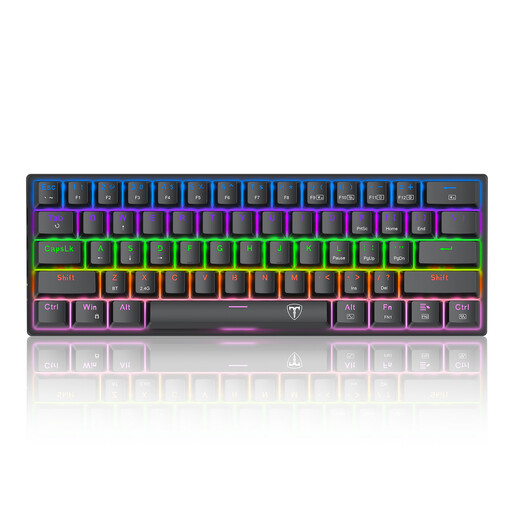
The 60% format could suit you if you prefer a small keyboard and are happy using function layers.
Wired; blue mechanical switches; US QWERTY layout. According to the product description, the arrow keys can be toggled using Fn+Spacebar.
Check that the US layout meets your needs.
 No image available
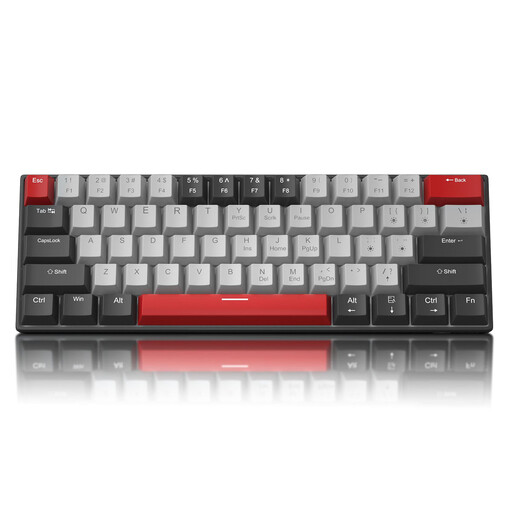
The compact 60% format could suit you if you want to free up mouse space on a small desk and the US QWERTY layout works for you.
Blue switches; detachable USB-C cable; N-key rollover.
The version described has a US QWERTY layout; arrow keys are accessed through a function layer.
No. Your operating system settings determine which characters you type, not the physical key layout or legends. Wooting points out that ANSI and ISO keyboards are physically different. If you need an ISO layout, check the specific version.
Not without checking the specific model. Keychron states that the Q1 HE is compatible only with Gateron Double-Rail Magnetic Switches.
No. Valve has said that certain hardware-based movement or shooting automation on official Counter-Strike 2 servers, including assisted counter-strafing, can be detected and penalised with removal from the match. This is a rule for those game servers, not a general ban on keyboards in Germany; check the rules of the game you play.
If a product is faulty, your statutory rights are against the seller and are separate from any voluntary guarantee. Online purchases generally come with a 14-day right to cancel, starting from the day you receive the goods. The Verbraucherzentrale explains that the terms and exceptions applying to your specific purchase should be checked.
Radio equipment is covered by the EU Radio Equipment Directive, which includes requirements for safety and electromagnetic compatibility. The CE mark is the manufacturer’s declaration that relevant requirements have been met; it isn’t an independent EU quality seal. Check the information for the specific wireless version.