If every centimetre of desk space matters for mouse movement and you rarely need extra keys within easy reach, a 60% layout could be a good fit. If you need arrow keys or other keys without using an Fn layer, compare 65%, 75% or TKL layouts. Adjustable actuation and wireless connectivity are extra features, not requirements for playing together.
Who are these layouts suited to?
Gamers with limited mouse space
If your desk is cramped, measure the space needed for your keyboard and mouse together. Compare the actual width of 60% and 65% layouts; HyperX positions the Alloy Origins 65 as a more compact alternative to TKL, while retaining arrow keys.
Gamers who need plenty of direct access
If you want arrow, navigation or other keys within easy reach, check the exact layout of a 65%, 75% or TKL model. Keychron describes the K2 Max as having a 75% layout; the key arrangement and language variant you choose are still important.
Gamers who want custom settings
If you want to adjust actuation or key assignments yourself, check the features of the specific model. Logitech G lists customisable key layers for the PRO X 60, while Razer lists an adjustable actuation range for the Huntsman V3 Pro Mini.
What should you look for when buying?
At a small desk, start by weighing up the space you need for your mouse against the keys you want to access directly. Connectivity and actuation settings come next.
| Buying priority |
What to look for |
Who is this especially important to? |
| Mouse space |
Measure the keyboard width and the mouse space left on your desk. |
If I need room to move my mouse on a cramped desk, the space at the side matters most to me. Around 36% of consumers put mouse space first. |
| Keys within easy reach |
Check the exact layout to see which gaming and everyday keys require an Fn layer. |
If I want arrow keys or other frequently used keys within easy reach, that matters more to me than choosing the smallest possible layout. Around 29% of consumers prioritise direct access. |
| Actuation |
Check the exact model to see which keys are adjustable and which settings you want to use. |
If I want to fine-tune the actuation of my movement keys, I check the specific feature rather than relying on a general performance claim. Around 21% of consumers put adjustable actuation first. |
| Connectivity and layout |
Check that the version you choose has the DE-ISO/QWERTZ layout and the type of connection you want. |
If I need a specific German layout or connection, the exact version must meet those requirements. Around 14% of consumers prioritise connectivity and layout. |
Avoid common buying mistakes
-
Choosing solely by footprint
A smaller layout won’t solve your space problem if it makes frequently used commands awkward to reach.
Make a note of the keys you use most and check their position on the specific 60% layout, then compare it with a 65% model that has arrow keys.
-
Confusing a layout family with the version you choose
A model range may include several ISO layouts; what matters is the specific version you select.
Before ordering, check the version name and confirm that the specific keyboard has a DE-ISO/QWERTZ layout.
-
Assuming Rapid Trigger guarantees an in-game advantage
Adjustable actuation is a keyboard feature, not a guaranteed result in a particular game.
Choose this feature if you want to configure it yourself, and check that you like how it feels in the games you play.
A guide to key brands
HyperX
The Alloy Origins 60 and 65 cater to different priorities, from saving desk space to keeping keys within easy reach.
- HyperX lists labelled secondary functions for the Origins 60; according to HyperX, the Origins 65 retains its arrow keys.
- The listed layout options for the Origins 65 include US and NO. Check the specific version if you need a German layout.
Keychron
The K2 Max is a 75% option for anyone looking for a compact layout with several connectivity options.
- Keychron lists wired, Bluetooth and 2.4 GHz connectivity, as well as a DE-ISO layout option for this model.
- Before buying, check the language and connectivity version you’re actually selecting.
Logitech G
The PRO X 60 is a wireless 60% option with configurable key layers.
- Logitech G lists LIGHTSPEED and customisable key layers for this model.
- The manufacturer’s specifications don’t prove that it will give you an individual advantage in a co-op shooter.
Razer
The Huntsman V3 Pro Mini is aimed at gamers who want to adjust actuation points in a 60% layout.
- Razer lists an adjustable actuation range of 0.1 to 4.0 mm and Rapid Trigger for this model.
- These manufacturer specifications don’t prove it will be an advantage in every game or for every person.
SteelSeries
The Apex Pro Mini Gen 3 is a wired 60% option with a choice of German layout.
- SteelSeries lists a German layout and features powered by OmniPoint 3.0 technology for the Mini Gen 3.
- Before buying, check the size and connection offered by the specific version.
Joybuy product options
These product options include compact 60%, 65% and 75% keyboards for setups where mouse space, keys within easy reach or adjustable actuation are important.
 No image available
AULA WIN60HE, 60%, magnetic switches
The 60% layout is worth considering if you want more room for your mouse and adjustable actuation.
The product title lists wired connectivity, adjustable actuation, Rapid Trigger and an 8000 Hz polling rate. According to the safety information, hot-swap is compatible only with Hall Effect magnetic switches; standard mechanical 3-/5-pin switches won’t work.
Joybuy
 No image available
Redragon M68, magnetic switches, US layout
The compact 65% layout could be a good fit if you want a smaller keyboard with adjustable features.
The product title lists magnetic switches, Rapid Trigger and an 8000 Hz polling rate; the description specifies 68 keys and compatibility with Windows and macOS. Bear in mind that the stated layout is US QWERTY before making your choice.
Joybuy
 No image available
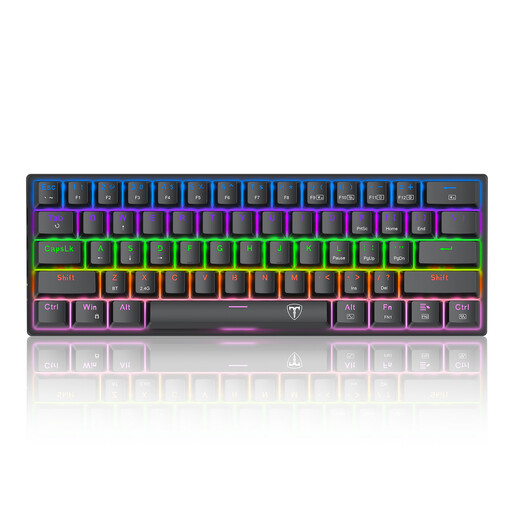
ET 60, 60%, US QWERTY layout
The 60% layout is worth considering if you prioritise a compact keyboard and more space for your mouse.
The title lists 61 keys, blue switches and a detachable USB-C cable. According to the description, you can access the arrow keys with Fn+Space; the product title specifies a US QWERTY layout.
Joybuy
 No image available
Akko 3084B Plus, 75%, ISO-DE, Black & Gold
The 75% ISO-DE layout could be a good fit if you want a German keyboard layout and several connectivity options.
The product title lists V3 Pro Cream Blue switches and hot-swap; the description lists Bluetooth, 2.4 GHz and USB-C.
Joybuy
 No image available
Ticktype EVO75, 75%, ISO-DE
The 75% layout is worth considering if you want a German layout and a choice of connectivity options.
The title lists Bluetooth, 2.4 GHz, USB-C, VIA compatibility, hot-swap and 8000 mAh. Capacity alone doesn’t tell you how long the battery will last.
Joybuy
Frequently asked questions
Is a 60% keyboard automatically the right choice for co-op shooters?
No. A 60% layout could work if having more space at the side for your mouse matters more than keeping extra keys within easy reach. If you need arrow keys without using a function layer, compare 65% layouts too.
How should I set up my keyboard on a small desk?
Measure the space taken up by your mouse and keyboard together, then check which key assignments you need in your game. On a 60% keyboard, labelled secondary functions or customisable key layers may help; exactly how they work depends on the model.
What should I check before buying a hot-swap keyboard?
Check which switches the specific version supports. Keychron lists hot-swap for the hot-swap version of the K2 Max; according to the safety information, the AULA WIN60HE is compatible only with Hall Effect magnetic switches, not standard mechanical 3-/5-pin switches.
What rights do I have when buying online from a business seller?
For a relevant distance-selling contract, you generally have 14 days from delivery to cancel; exceptions and return costs may apply. If you buy faulty goods from a business seller in the EU, you’re entitled to a legal guarantee of at least two years. This is separate from any voluntary manufacturer’s warranty. This information is based on guidance from Your Europe, the European Union.


