A compact keyboard reduces the footprint on your desk and can improve ergonomics by shortening hand travel. Selecting the right model depends on specific technical requirements and the primary use case. This guide breaks down the crucial criteria and presents a selection of models with varying specifications.
Buyer's Guide: Technical Criteria for Selection
The decision to choose a compact keyboard is based on a range of technical parameters. Balancing these factors is crucial for functionality in your specific application, whether it's gaming, programming, or office work.
Form Factors in Detail: TKL, 75%, and Other Layouts
The term "compact" covers several standardised layouts that differ in the number and arrangement of their keys:
- TKL (Tenkeyless) or 80%: This layout is equivalent to a full-size keyboard but without the numeric keypad (numpad). All other key clusters, including the function keys (F-row), the navigation block (Ins, Del, Home, End, PgUp, PgDn), and the arrow keys, are retained.
- 75% Layout: This layout compresses the keys even further. The navigation cluster is often arranged vertically next to the main keys, and the space between key blocks is minimised. The result is a keyboard that is barely wider than the main alphanumeric block but still offers dedicated arrow and function keys.
- 65% / 60% Layouts: These even smaller form factors also omit the F-key row. Functions are accessed via a key combination (usually with the FN key). These layouts maximise portability and the available space for your mouse.
Switch Technology: Mechanical vs. Membrane
The technology built beneath the keycaps determines the typing feel, acoustics, and durability.
- Mechanical Keyboard: Each key has its own individual, physical switch (mechanical switch). These switches come in various types (linear, tactile, clicky), delivering precise and consistent feedback. They are characterised by a long lifespan, often measured in millions of keystrokes.
- Low-Profile Keyboard (Membrane/Scissor): Here, contact is made by pressing a rubber dome membrane. Models with a scissor-switch mechanism stabilise the keycap and allow for a very short travel distance, resulting in an extremely slim design. The typing feel is softer and quieter than most mechanical switches.
Connectivity: Wireless, Multi-Device, and Wired
The connection method is a key factor for flexibility and performance.
- Wireless Keyboard: Wireless connections are typically established via 2.4 GHz radio (with a USB dongle) or Bluetooth. 2.4 GHz generally offers lower latency, which is crucial for gaming keyboards.
- Multi-Device Keyboard: Keyboards with this feature can be paired with multiple devices simultaneously (e.g., PC, tablet, smartphone) and allow for quick switching between them at the touch of a button.
- Wired: A direct USB connection provides the most stable connection with the lowest latency and eliminates the need for a battery. Many modern keyboards use a detachable USB-C port.
Additional Features: RGB, Hot-Swap, and Compatibility
For power users and enthusiasts, other features are also important:
- RGB Keyboard: Customisable RGB backlighting allows you to personalise the keyboard's appearance and can be used to highlight specific keys or display system information.
- Hot-Swap: This feature allows you to swap out mechanical switches without soldering. This lets users customise the typing feel of their keyboard by installing different switch types.
- Keyboard for Mac: While most keyboards are compatible with macOS, some models offer special key layouts and functions tailored to the Apple operating system (e.g., Command and Option keys).
Our Highlights for 2026
Based on the technical criteria above, we have compiled a selection of compact keyboards that cater to different user profiles.
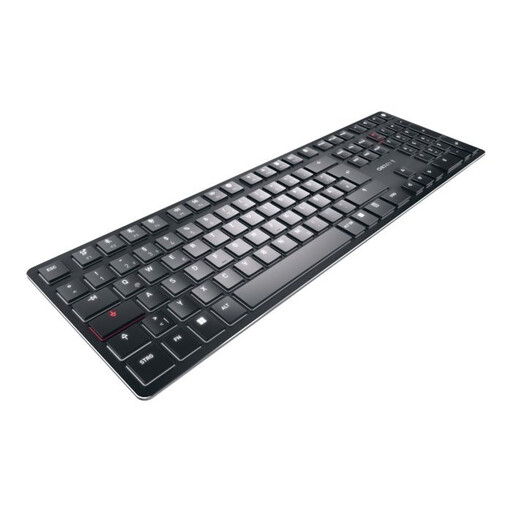
1. CHERRY KW X ULP Mechanical Keyboard

CHERRY KW X ULP Mechanical Keyboard, Ultra-Thin, Tactile MX Switches, Multi-Device, White Backlight, US Layout (English), Black
-
Why We Recommend This Product: The CHERRY KW X ULP combines two worlds that are usually separate: an ultra-slim design with a height of just 16 mm and the tactile feedback of genuine mechanical switches. The exclusive CHERRY MX Ultra Low Profile switches enable a precise, short key travel. Its versatility as a Multi-Device Keyboard for up to four devices makes it a powerful tool for complex work environments.
-
Pros:
- Ultra-slim profile (16 mm) with mechanical switches (CHERRY MX Ultra Low Profile Tactile).
- Quad-mode connectivity: 2x Bluetooth 5.2, 2.4 GHz wireless, and USB-C cable.
- High-quality construction with an anodised aluminium top plate.
- Features like Full N-Key Rollover and AES-128 encryption in wireless mode.
-
Who It's For: Users seeking the precise feel of a mechanical keyboard in a very slim, wireless, and premium chassis. Ideal for programmers, prolific writers, and users who need to switch seamlessly between multiple devices.
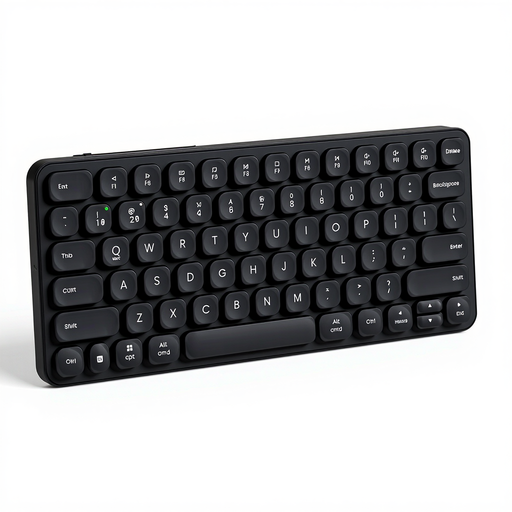
2. RAPOO E9050L 75% Wireless Membrane Keyboard

RAPOO E9050L 75% Wireless Membrane Keyboard, QWERTY US layout, Multi-mode, Ultra-slim, 78 Key Multi-Device Wireless Keyboard
-
Why We Recommend This Product: The RAPOO E9050L is designed for maximum portability and quiet operation. With its 78-key layout in a 75% keyboard format and a thickness of just 13 mm, it is extremely compact. The scissor-switch mechanism of the keys ensures quiet and comfortable typing, similar to high-end laptops. Its multi-mode connectivity for up to four devices underscores its flexibility for mobile use.
-
Pros:
- Very slim and lightweight design with an aluminium alloy frame.
- Quiet scissor-switch keys for comfortable typing.
- Multi-device connectivity for up to 4 devices (Bluetooth 4.0, 5.0, 2.4G).
- Long battery life; up to 90 days on a full charge, according to the manufacturer.
-
Who It's For: Mobile professionals, office workers in open-plan offices, and users who need an extremely quiet, slim, and portable wireless keyboard for Windows and Mac.
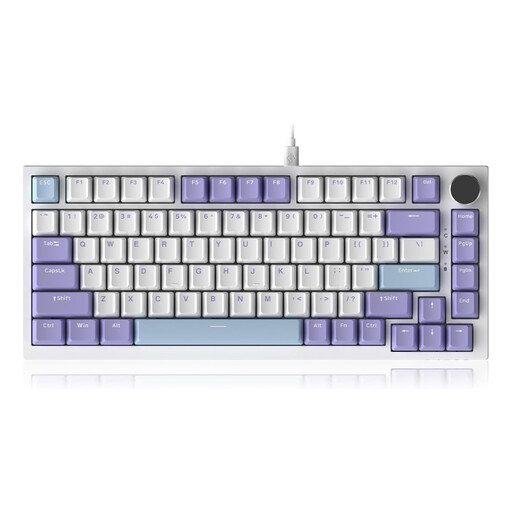
3. AJAZZ AK820 75% TKL Wired Mechanical Keyboard

AJAZZ AK820 75% TKL Wired Mechanical Keyboard, QWERTY US layout, Gasket Mount, Hot Swap Joint Mount Gaming Keyboard, RGB Lighting
-
Why We Recommend This Product: The AJAZZ AK820 is aimed at enthusiasts and gamers who value customisability and a specific typing experience. Its gasket-mount structure, where the circuit board is suspended between gaskets, works with multiple dampening layers to create a soft and acoustically pleasing typing sound. The hot-swap capability allows for easy switch replacement, while the RGB keyboard lighting and a CNC-machined volume knob complete the feature set.
-
Pros:
- Gasket-mount structure for a dampened and flexible typing feel.
- Hot-swap sockets for 3/5-pin switches for easy customisation.
- Extensive sound dampening through five layers of material.
- Dedicated volume knob and customisable RGB lighting.
-
Who It's For: Gamers, keyboard modders, and power users looking for a wired gaming keyboard with maximum customisability, a premium typing feel, and useful extra features like a volume knob.
Complementary Peripherals: Finding the Right Mouse
A compact keyboard frees up additional desk space, which is ideal for generous mouse movement. To complete the setup, choosing a matching input device like a black and white computer mouse is a sensible addition that fits the workspace both functionally and aesthetically.
Frequently Asked Questions (FAQ)
1. What is a TKL keyboard? A TKL keyboard (Tenkeyless) is a keyboard without the right-hand numeric keypad. It retains the standard layout of the main keys, function keys, and navigation cluster, making it narrower than a full-size keyboard and creating more space for the mouse.
2. What are the advantages of a mechanical keyboard? Mechanical keyboards offer precise, tactile feedback that can improve typing speed and accuracy. They are generally more durable than membrane keyboards and, thanks to the variety of switch types (linear, tactile, clicky), offer the ability to tailor the typing feel to personal preferences.
3. Can I use a gaming keyboard for work? Yes, many features of gaming keyboards are also useful in a professional setting. Low latency, programmable keys for macros, robust build quality, and good ergonomics can be advantageous for programming or writing tasks. The often flashy RGB lighting can usually be dimmed or disabled entirely.
Written by: Joybuy Product Recommendation Officer