Developers with limited desk space
If you need room on your desk for a computer, mouse and test phone, check whether a model without a number pad will free up enough space.


For a small debugging desk, choose a compact keyboard that keeps the navigation and function keys you need within easy reach. Start by checking its footprint and key layout, then consider how it connects to your computer. Switching between devices makes it easier to change where you type, but it doesn’t set up remote debugging: Chrome for Developers explains how to inspect Android devices using Chrome DevTools on a computer, while Apple requires a connected Mac running Safari Web Inspector to inspect web content on an iPhone.
If you need room on your desk for a computer, mouse and test phone, check whether a model without a number pad will free up enough space.
If you often switch between code, the browser and the inspector, pay attention to the layout of the arrow, function and special keys.
If you use a smartphone or tablet as well as your work computer, remember that switching the keyboard connection is separate from setting up remote debugging.
First, check the dimensions and key layout against your workspace. Then consider the connection type and power supply.
| What matters | What to look for | Who should pay particular attention? |
|---|---|---|
| Desk space and key layout | Compare the keyboard’s width and depth with the space available, and allow room for your mouse and test phone. | If I need room for a test phone as well as my keyboard and mouse, width matters most, along with whether I can do without a number pad. Around 36% of consumers would make desk space their top purchasing priority. |
| Direct access to keys and shortcuts | Check that the specific layout has the arrow, function and special keys you need. If the key mapping can be customised, check software and operating system compatibility. | If I often switch between code and DevTools, I want to reach the navigation and function keys I use most without taking extra steps. Around 29% of consumers would prioritise direct access to keys and shortcuts. |
| Connectivity in your test setup | Check Bluetooth support and the USB port you need. Set up Android and iPhone debugging separately. | If I use a smartphone or tablet alongside my computer, I need a suitable keyboard connection without confusing it with the debugging connection to the test device. Around 21% of consumers would prioritise the right connection. |
| Power and ongoing effort | Check the battery type and whether a cable supports charging and data transfer. Distinguish the terms of the specific offer’s warranty from your statutory rights. | If I want to work wirelessly and minimise interruptions for charging, I check the power supply and what the cable can actually do. Around 14% of consumers would prioritise power and the effort involved after purchase. |
Switching keyboard input between devices doesn’t establish a connection between browser developer tools and your test phone.
Set up each process separately: Chrome for Developers explains how to use Chrome DevTools on a computer for Android, while Apple describes using Safari Web Inspector on a Mac to inspect iOS web content.
On the manufacturer’s website, a DE-ISO version could be selected for the Keychron K3 Max ISO collection, while the configuration shown was ES-ISO.
Check the selected variant, key legends and switches in the specific offer.
Charging and wired keyboard use are different functions.
Look for an explicitly stated data or wired mode. CHERRY specifies a wired data-transfer mode for the KW 9200 MINI.
The KW 9200 MINI is a low-profile compact keyboard with several connection options.
The K3 Max ISO collection is aimed at anyone looking for a compact 75% mechanical layout with customisable key mapping.
The Pebble Keys 2 K380s is a slim Bluetooth keyboard with device switching; the MX Keys Mini is another compact range, with backlighting.
The German Magic Keyboard (USB–C) is a slim option for a compatible Mac workspace.
This selection features compact keyboards with different layouts and connection options, suited to workspaces with limited desk space.
 Image unavailable
For a small workspace when you want a 75% layout with ISO-DE.
Bluetooth, 2.4 GHz and USB-C; hot-swappable; V3 Pro Cream Blue switch.
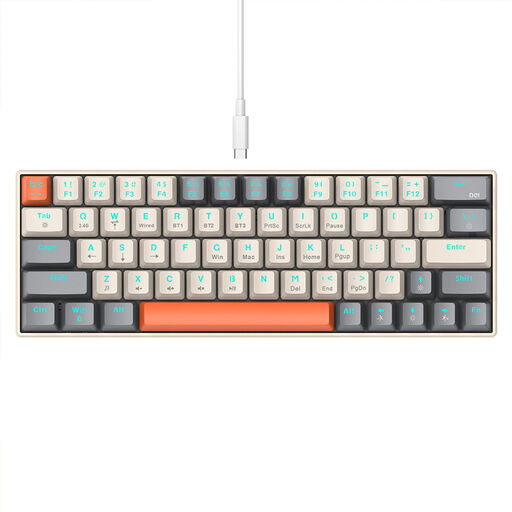 Image unavailable
For very limited desk space, if a 63-key mechanical layout has all the inputs you need.
Bluetooth and 2.4 GHz; RGB lighting.
 Image unavailable
For a small desk if you’re looking for a 65% layout with German QWERTZ.
Bluetooth, 2.4 GHz and USB-C; low-profile MX Speed switches.
 Image unavailable
For a small workspace when you want a 75% ISO-DE layout with customisable key mapping.
VIA compatible; hot-swappable; Bluetooth, 2.4 GHz and USB-C.
 Image unavailable
For a limited workspace when you want a 75% layout and extra controls.
Bluetooth, 2.4 GHz and USB-C; TFT display, rotary knob and hot-swappable switches.
No, not for the Chrome remote debugging process described by Chrome for Developers. This involves enabling USB debugging on the Android device, connecting it to your development computer and using Chrome DevTools on that computer. A keyboard connection to the phone is separate.
For the Safari Web Inspector process described by Apple, you need a connected Mac. Enable Web Inspector on the iPhone and connect the device to the Mac; your choice of keyboard doesn’t change this requirement.
Compare the actual layout of the arrow, function and special keys with the shortcuts you use most. Keychron describes the K3 Max as supporting QMK/VIA; whether you want to set up custom key mapping depends on how you work.
Statutory rights when a product is faulty are separate from any additional voluntary guarantee, as explained by the Verbraucherzentrale. As part of its market surveillance, the Bundesnetzagentur lists the CE mark and declaration of conformity among the points to check; this doesn’t mean that any individual model mentioned here has been officially approved.